MegaPoints servo controller Revision 24 April 2016
www.loolee.org Page: 9
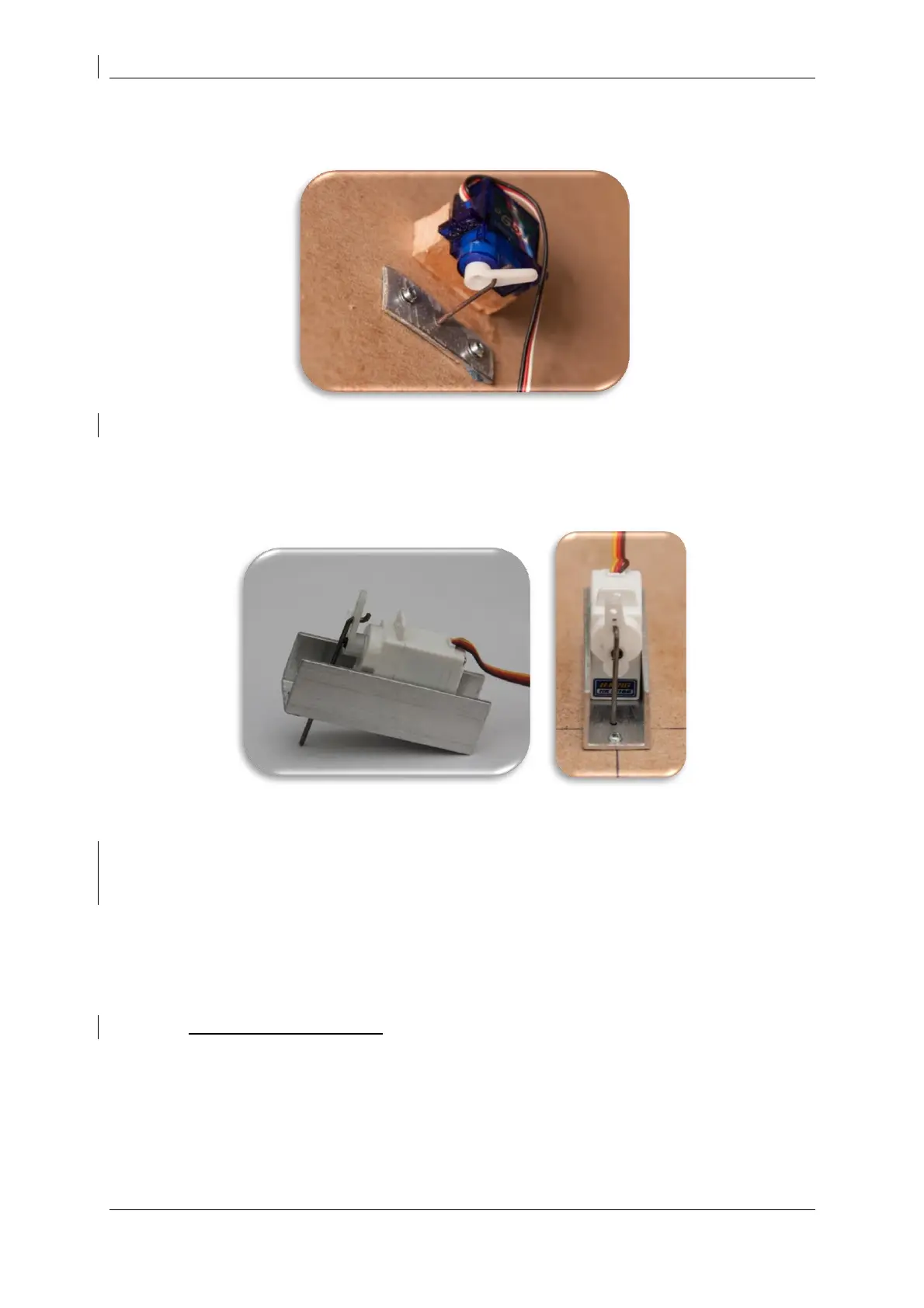
Servo installation images
In the above image thin aluminium plate was used as a pivot for 1.2mm diameter piano wire
connecting the servo to the points.
Below, aluminium channel provides the most flexible and easiest under baseboard mounting
method. See web site for videos and channel specifications.
Initial set-up
The MegaPoints Servo Controller is ready for use out of the box. Just hook it up to a regulated DC
power source (12 - 13.8 volts) observing the correct polarity and begin to use it.
WARNING: This device uses a linear voltage regulator that will get hot during usage. The greater the
input voltage the greater amount of heat will be dissipated by the regulator. Do not touch the
voltage regulator while the board is in use.
Power connection
Connect a regulated DC power source of at least 2 amps capacity to the GND and +VE connectors
(located on the lower right side of the board).
Servo connection
Plug in servos to the connectors on the right side of the board (numbered 1 – 12). The signal (white
or yellow wire) should be towards the inside of the board. Black or negative is to the outer edge.


 To Next Page