27
Test Result Storage, Deletion and Retrieval
Saving Results
After a test, the result is displayed on the screen and this may be
saved with additional information. A circuit number (1 - 99) may
be assigned, and when moving site or building, circuits may be
grouped using the distribution board feature. In this way, when
downloading to
AVO PowerSuite, the results can be easily split
into different test schedules. When the results are displayed or
printed, a change in the distribution board is indicated.
Changing Distribution Boards (DB)
Before a test the distribution board number may be changed as
follows:-
1. Move the rotary selector switch to the
RCL position. The
code rcl is displayed.
2. Press the
SAVE key. The currently selected DB code is
displayed, e.g.
d01.
3. This number may be changed using the
× RCL keys to
display the required number.
4. The number can be accepted by pressing the
SAVE key,
or the procedure aborted by pressing the
EXIT key,.
5. When the number is saved the code
Std is displayed
(accompanied by a long bleep) to confirm that the data has
been saved.
Testing may now continue with all subsequent results associated
with the new distribution board number.
Saving a result
On completion and display of the measurement:-
1. Press and hold the
SAVE key. After about 1 second, a
bleep will be heard. For a
Continuity, (MΩ) L-N or (Loop)
L-N
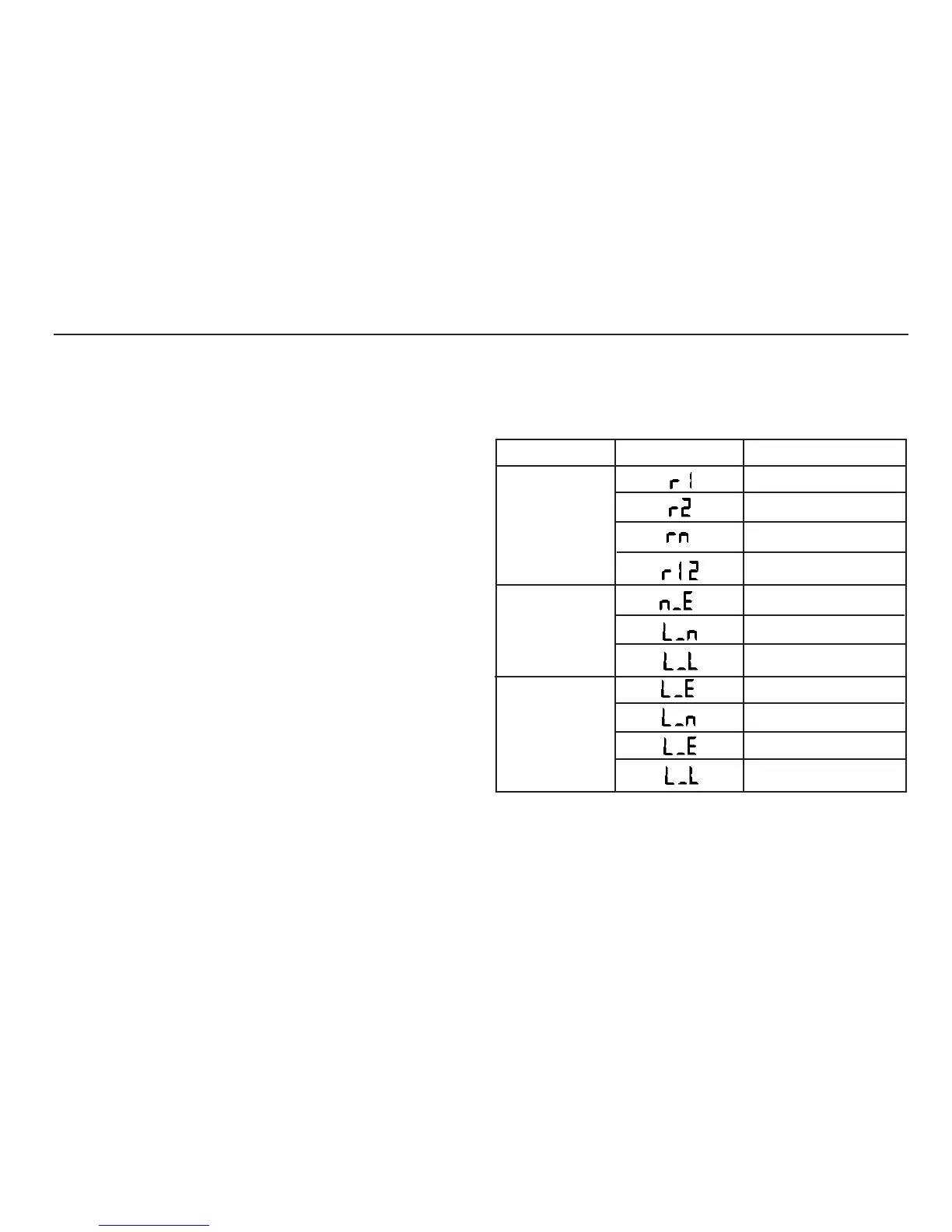
test, a code, as given in the following table is
displayed. This code is used to describe the circuit tested
and can accordingly be modified by the user. For all other
tests, a circuit number code is displayed, and you should
proceed directly to step 4.
2. The code may be changed by pressing the
× RCL keys.
3. The code may be accepted by pressing the
SAVE key, or
aborted by pressing the
EXIT key.
4. The circuit number is displayed as 2 digits e.g.
c01.
Test to be saved
Display code
Meaning
Continuity
Insulation
Loop
Single circuit
Single circuit
R1 + R2 Return circuit
N - PE
L - N
L- L
L - PE
L - N
L - PE
L- L
Single circuit


 To Next Page