26
Condition and Warning Indication
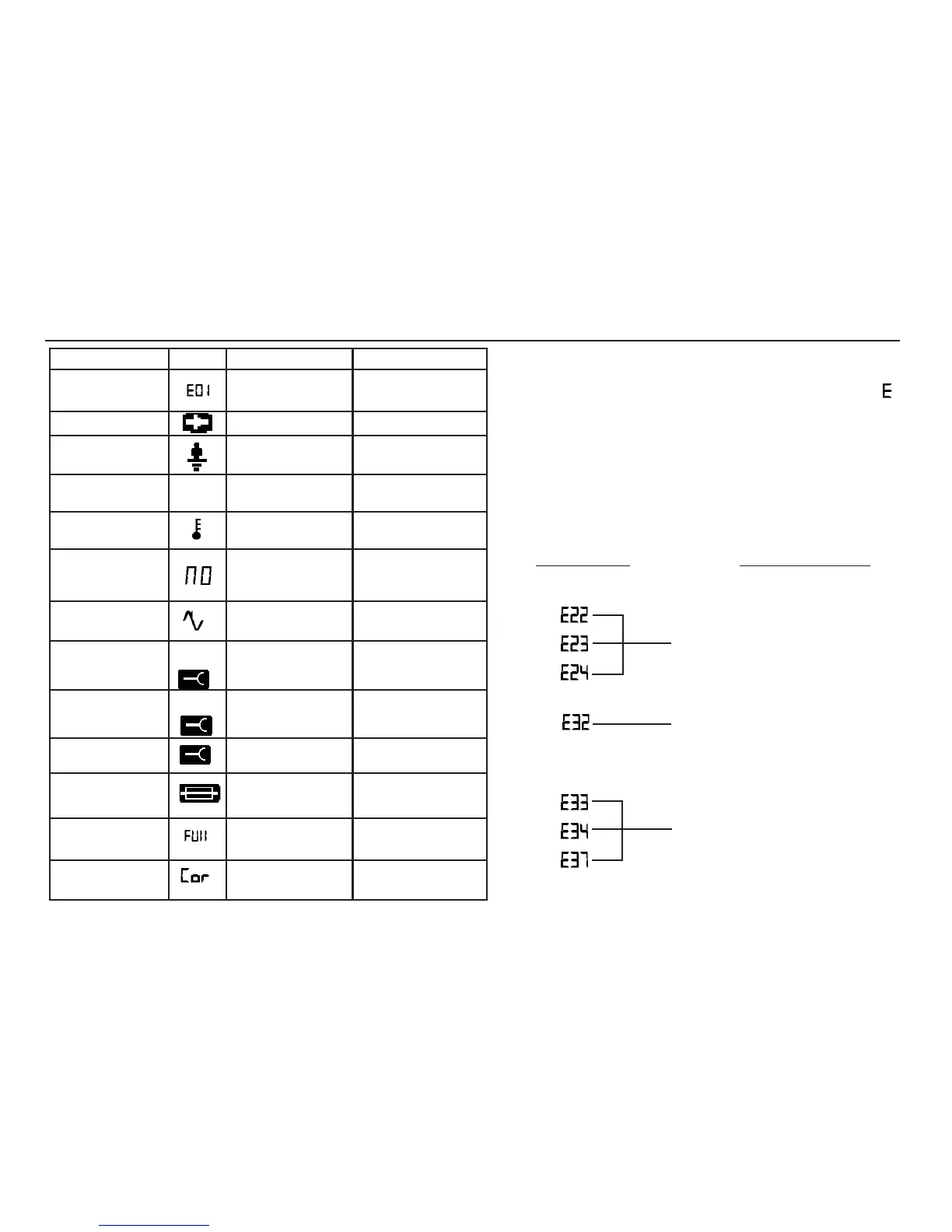
Error Numbers
Any hardware or software faults and errors will cause the
display to show an error number in the form of a digital ‘ ‘
together with an identifying 2 digit number.
If such an error number is displayed, switch the instrument ‘
Off’
and back ‘
On’ again. Then repeat the test that was originally
being carried out, or as given in the following table.
If the error number is again displayed, switch the instrument to
‘Off’, and return the instrument to the manufacturer for service,
together with a description of the events leading to the
message display. See ‘
Returning an instrument for Repair’
on page 39.
Error Number Appropriate Action
EEPROM failure. Stored data is
lost. Attempt to delete the stored
test results and then store
another result. If Error Number
persists, return the instrument for
service.
(
Loop LE, LN or LL) Secondary
internal thermal cut-out is open
circuit. Return the instrument for
service.
(
Re) May be due to incorrectly
positioned spike.
(
Earth, Loop, or RCD) Possibly
due to excessive ‘noise’ on the
supply, or the RCD unexpectedly
trips together with an internal
fault. If Error number persists,
return the instrument for service.
Condition
System Error
Low Battery
Touch Pad
>100 V
Supply voltage and
Freq. out of range.
Thermal Trip
Operated.
Supply interrupted
during test.
Noise.
Auxiliary spike
R. too high.
Earth test Spike
Voltage too high.
Auxiliary Spike
Fuse Ruptured.
Memory full
Memory
Corrupted
Cause
Hardware or software
fault.
Battery voltage too low.
Earth voltage too high.
Supply voltage or freq.
too high or low for test.
Too rapid testing with
no pauses for
heat dissipation
RCD Tripped.
or
Supply Failure
Excessive external
supply noise during
earth loop or RCD test.
Incorrect connection.
Standing V. on probe
too high prior to test.
Spike connected.
No external d.c. V. and
I during insulation test.
Results memory full.
Results memory
unintelligible
Display
Action
Switch ‘Off’, then ‘On’
and attempt re-test.
Replace battery
Check installation or
wiring to
CM500
_
Pause between tests to
allow cooling.
Confirm RCD rating
and check for excess
earth leakage current
Identify and rectify,
or wait and re-test.
Rectify or re-position
auxiliary spike
Rectify or re-position
auxiliary spike
As required
Replace fuse.
(see page 7)
Download results and
clear memory
Press Test to
attempt recovery
> or <
and limit
value
>50kΩ
and
>20V
and


 To Next Page