8
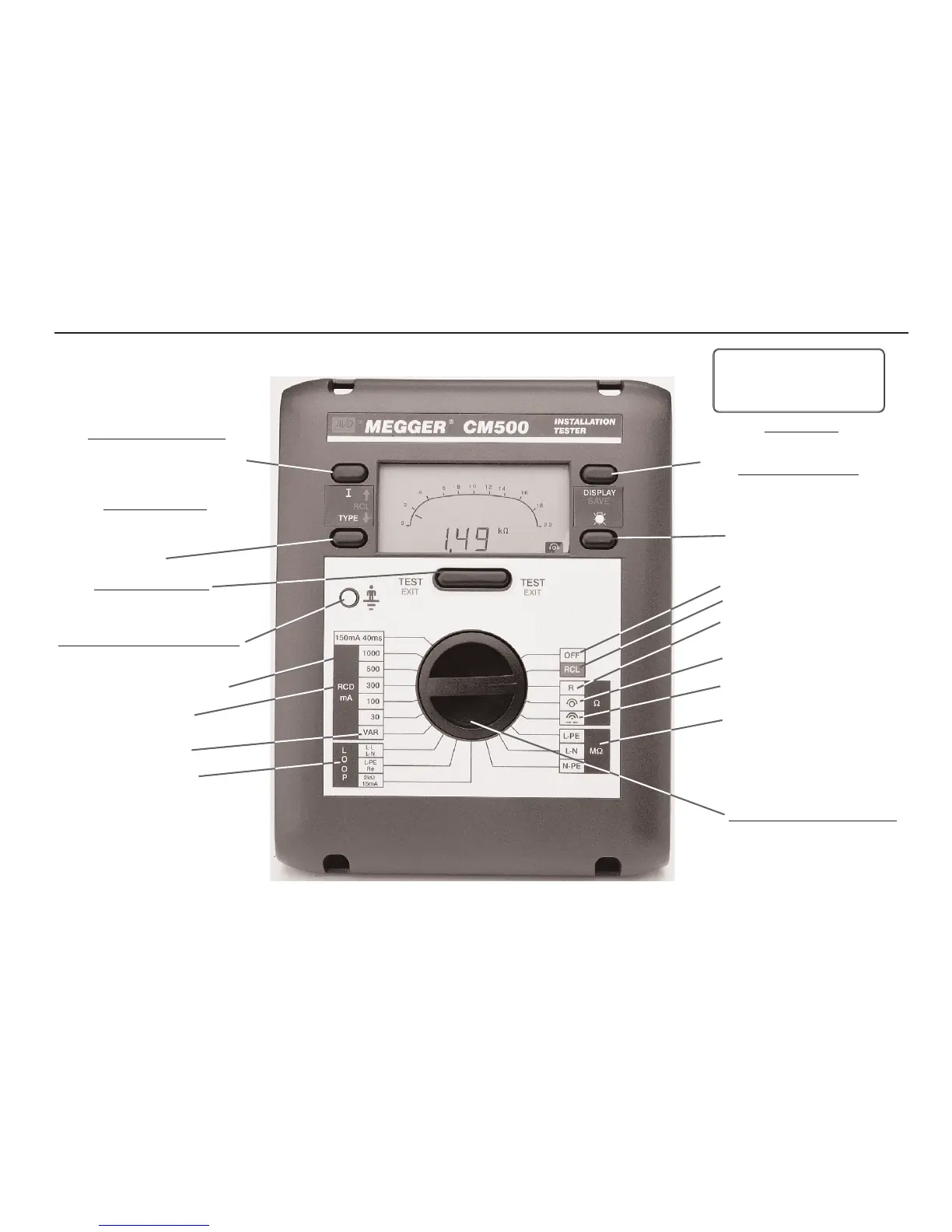
Features, Controls and Connections
Press I and TYPE key to:
• Select test parameters
• Enter test result identification
Auto Shut-off
Operates after 5 minutes of
inactivity by the instrument
(30 seconds in Bleeper mode)
Turn Rotary Selector Switch to:
• Select test position
• Select Download (RCL)
• Select ‘OFF’
Press TYPE key to:
• Select test voltage (MΩ)
• Select type of RCD
• Delete data (in combination
with
I key)
Insulation test positions
Continuity test position
VAR test selection
Push TEST
button to:
• Initiate the selected test
• Repeat selected test
Touch finger to Earth Test Pad to:
• Check potential between the Earth
connection and your finger
Press key to:
• Display other test results
Press and hold key to:
• Save test results
RCD test selection
Backlight key
Continuity Bleeper position
Lead resistance null
position
Recall / Download position
‘OFF’ position
150mA 40ms test selection
Loop test selection


 To Next Page