Read this page before using the CM500.
Your
CM500 has been set up as shown on the label on the
front of this User Guide:-
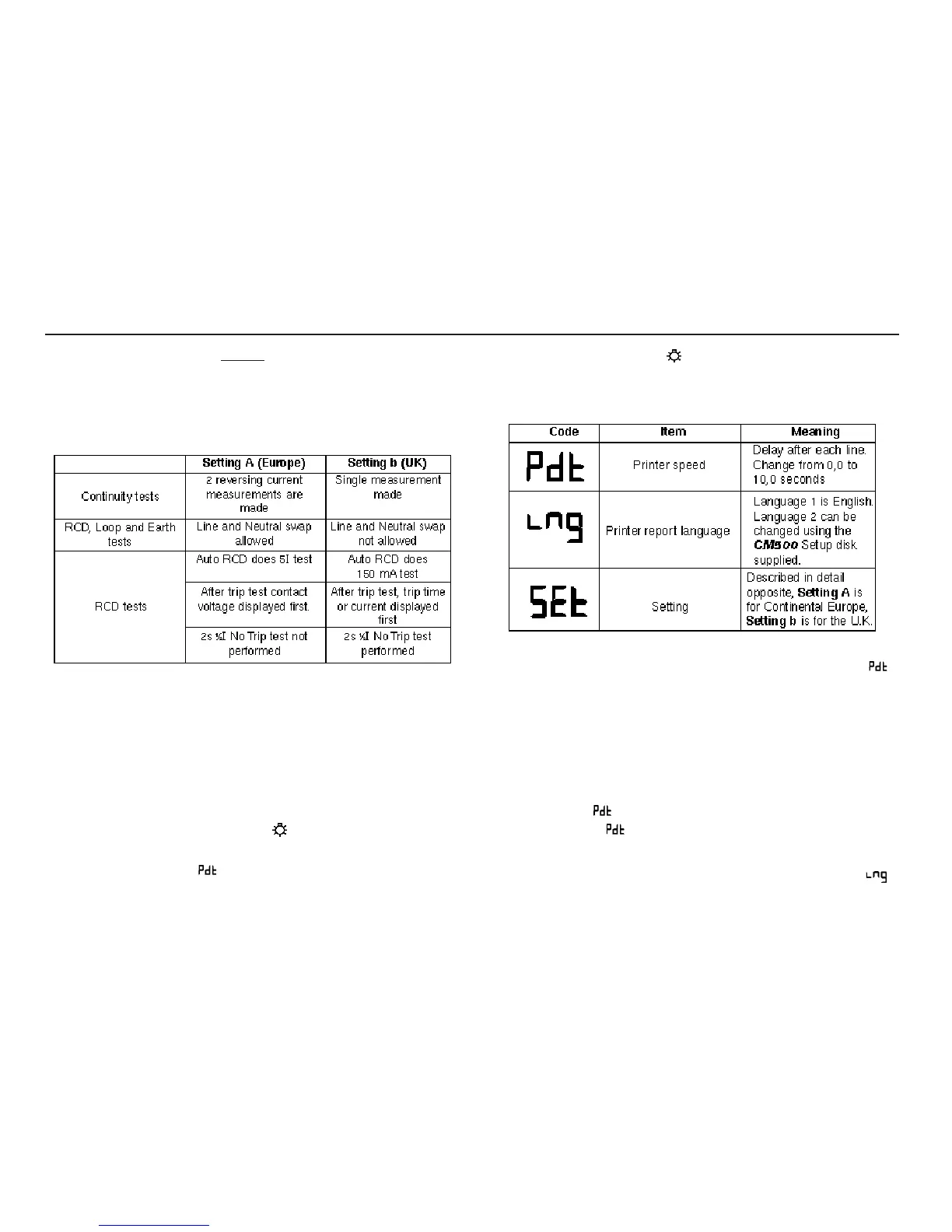
The
first line gives the setting, which modifies the way the
instrument behaves.
The second line gives the printer report language. This may be
Language 1, which is English, or Language 2 which is the
language noted on the third line of the label.
Instrument Setup
The instrument setup mode allows you to change the setting, the
printer speed and the printer report language.
To display the current setup modes:-
1. Press and hold the
backlight key, then turn the rotary
selector switch from the from ‘OFF’ position to the ‘RCL’
position. The code (printer speed) is displayed.
2. Release the
backlight key.
3. Toggle the
I key to scroll through and display the current
setup modes. as follows:-
To change the Printer speed
1. Toggle the I key to scroll through and display the
code.
2. Press the
SAVE key. The current speed setting is
displayed.
3. Toggle the
RCL keys until the required speed setting is
displayed.
4. To save the new setting, press the
SAVE key. The bleeper
sounds and is displayed. To abort the new setting, press
the
EXIT key. is displayed.
To select the Printer language
1. Toggle the I key to scroll through and display the
code.
Initial Setup
4


 To Next Page