EasyManua.ls Logo

Megger DLRO10HD - Memory Features (DLRO10 HDX); Date and Time Setup

Megger DLRO10HD
40 pages
Print Icon
To Next Page IconTo Next Page
To Previous Page IconTo Previous Page
Loading...
www.megger.com
DLRO10HD and DLRO10HDX
21
Memory Features (DLRO10HDX)
The DLRO10HDX can record, saved and download test results, complete with a date and time stamp.
Up to 200 memory slots are available.
Date and Time Setup
AUTO
3s
2.5
Ω
250
mΩ
µA
100
2.5
1mA
10mA
100
mA
1A
1A
10A
10A
250
Ω
25
Ω
2.5
Ω
250
25
2.5
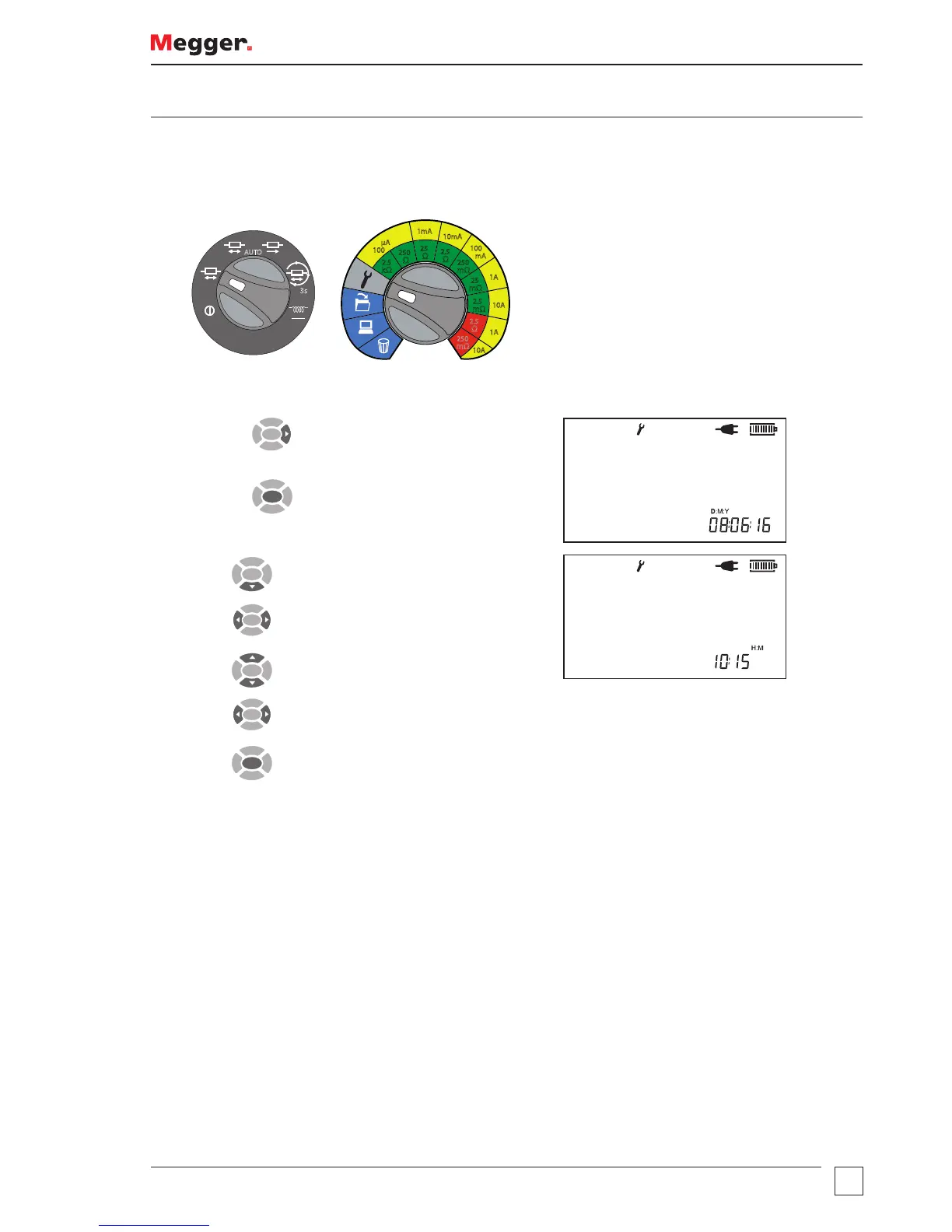
To Set Date and Time
Press
to toggle between D:M:Y or M:D:Y
format (Default: DMY).
Press
OK
to toggle between Date and Time.
1. Press to start adjustment.
2. Press
to toggle between D/M/Y and HM.
3. Press
to adjust.
4. Press
to scroll.
5. Press
OK
to set.

Other manuals for Megger DLRO10HD

Related product manuals