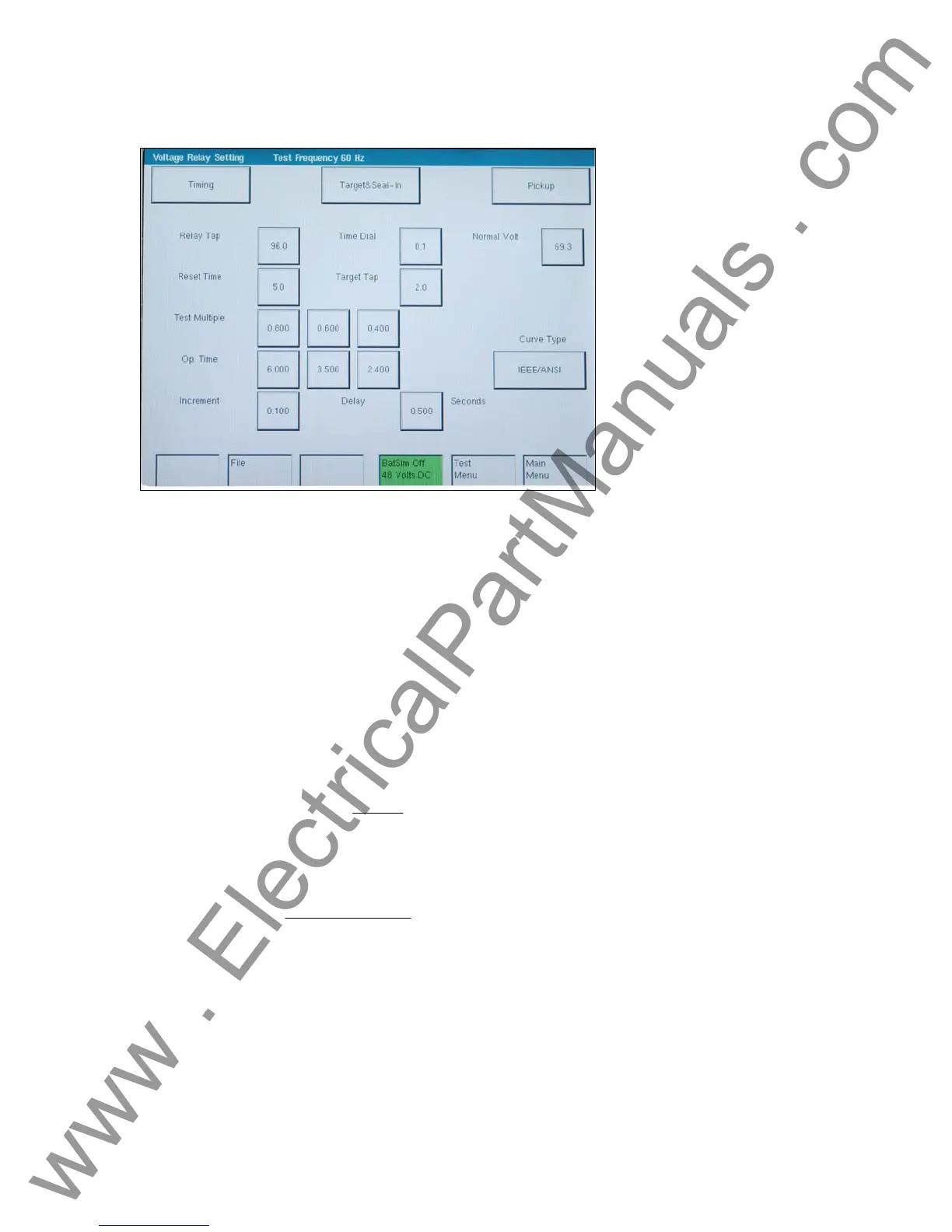
3.8.5.1 Voltage Relay Setting Screen
Figure 60 Voltage Relay Setting Screen
• The Timing Settings button will change screens and will allow changes to meet the
manufacturer specifications.
• The Target & Seal-In Settings button will change screens and will allow changes to meet the
manufacturer’s specifications.
• The Pickup Settings button will change screens and will allow changes to meet the
manufacturer’s specifications.
• Relay Tap, Time Dial, Normal Voltage, Reset Time, Target Tap, IEEE curve type, % Error,
test multiple(s), and Operation Time(s) need to be set unless factory defaults are used.
• The Timer Setup screen allows the user to define how the time will be used.
• The IEC curves are algorithms and must be selected by the operator using the Time Curve
pull-down button.
• For inverse time curves, the IDMT characteristic available on each stage is defined by the
following formula:
Where: K = Time multiplier setting (e.g. Vo(rms), etc)
()
1-M
K
t
=
T = Operating time in seconds
voltageSetting
voltageResidual
M =
NOTE: The Residual and Setting voltages will need to be furnished if performing a definite time
test.
• For under voltage inverse time delay, the under voltage elements may be programmed to
have an inverse time delay characteristic. The under voltage delay set point defines a family
of curves as illustrated by the following equation:
T = D / (1 – V / V
pu
)
-
83
www . ElectricalPartManuals . com


 To Next Page