SERVICE - UIS page 10
8. Replacing the power unit
Pull out the mains supply plug!
Remove the housing cover
Pull off all cables from power unit
(if nec. apply markers to unmarked cables)
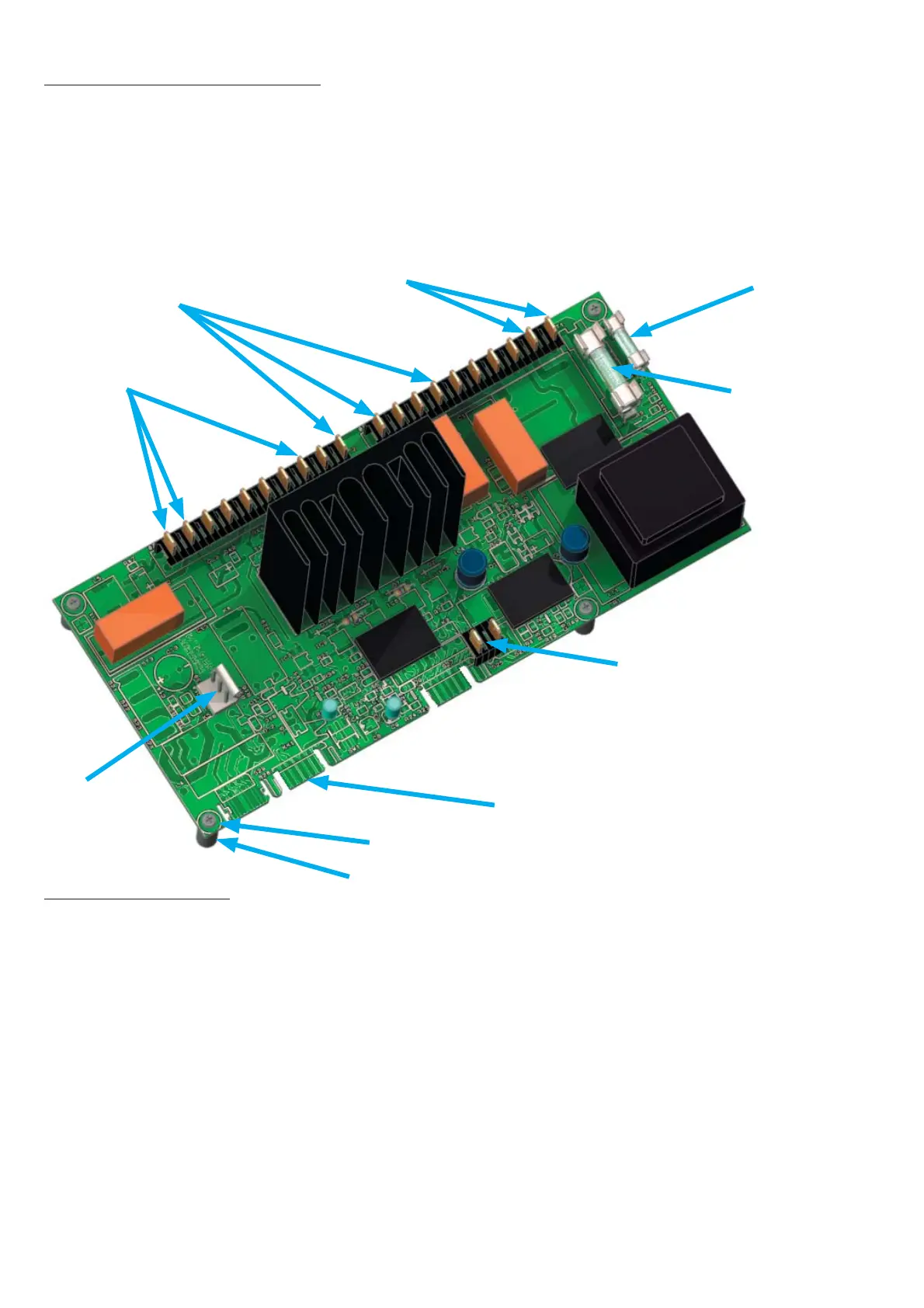
Release 4 screws from power unit (ensure that spacers are not lost)
•
•
•
•
•
9. Changing fuses
Pull out the mains supply plug !
Remove the housing cover
The two fuses are located on the power unit (see above)
Check the fuse resistance with a continuity tester.
If the fuse is OK the resistance is only a few Ohm.
To change the fuse, place an insulated screwdriver from the side underneath the fuse and twist it to
lift out the fuse from its holder. Push the new fuse from above into the holder.
Main oven fuse: 15 A fast 32 x 6.3 mm (American)
Fuse controller/display: EXCELLENT / PERFECT 100 mA slow 20 x 5 mm
BASIC 80 mA slow 20 x 5 mm
•
•
•
•
•
•
Screw
Spacer
Main oven fuse
Fuse
controller/display
S25/26
Temperature limiter
Circulating fan
S30
Fan
Heating
S 28 Controller/display
Main terminal
supply
black=S20
N=S1
L=S2
blue=
S13
brown=
S19



 To Next Page