SERVICE - UIS page 16
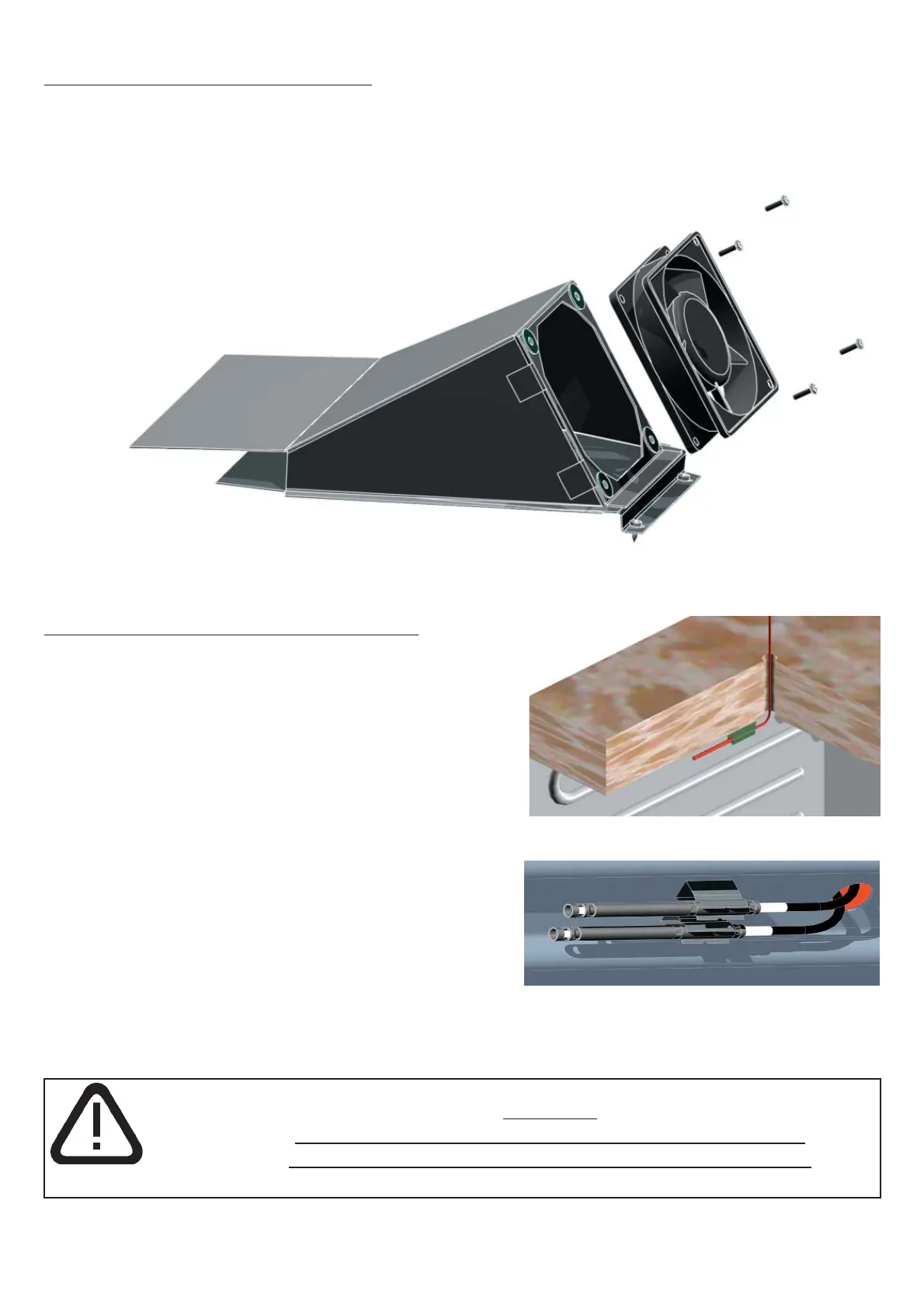
15. Replacing control chamber fan
Pull out the mains supply plug!
Remove the housing cover
Pull off the chamber cabinet fan from the power unit location S30 (see Section 8)
Remove screws on control chamber fan
•
•
•
•
16. Replacing Pt100 temperature probe
Pull out the mains supply plug!
Remove the housing cover
The temperature probe can be carefully slid out
of the clamp towards the back and threaded
upwards through the working chamber ceiling
Probe for working controller:
pull off Pt100 probe from 4-pin controller location
J4 (see Section 11-13)
Probe for monitor controller:
Pull of Pt 100 probe from 4-pin controller location
J3 (see Section 11-13)
Cut the cable binder with the side cutters and
replace the Pt100 probe
•
•
•
•
•
•
•
•
Warning!!
Ensure that the Pt100 probe is fitted correctly in its clip!
Pt100 probe must be secured level at the back in the clip.



 To Next Page