SERVICE - UIS
2
4
5
1
3
7
8
6
10
9
page 17
17. Changing the circulating fan motor
Pull out the mains supply plug!
Remove the housing cover
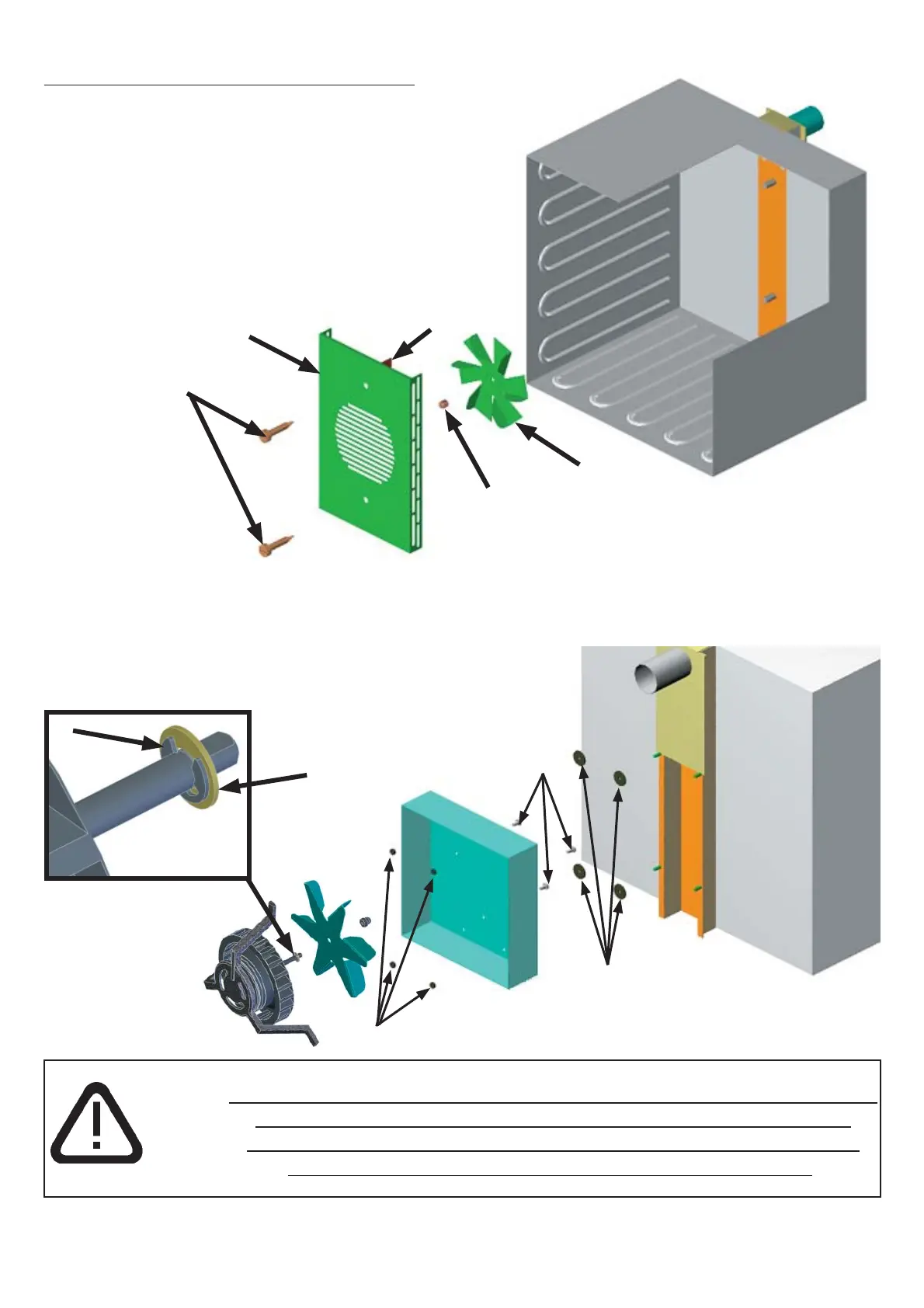
To replace the circulating fan motor it is first
necessary to take off the fan duct cover (2) in
the working chamber after releasing the two
screws (1).
The fan disc (5) can be pulled off after
removing the cap nut (4)
(Note! left-hand thread)
•
•
•
•
Disconnect the earth connections on the back panel and pull out the back panel upwards
Disconnect the earth connection and cable connection from the motor at the power unit
(see Section 8)
After releasing the hexagon nuts (6) the motor baseplate has to be removed together with the
•
•
•
fan motor.
On the back of the motor baseplate the screws (7)
can now be unscrewed and the motor pulled out.
•
•
During assembly it is necessary to ensure that the spacers (8) are again
positioned between motor baseplate and working chamber back
wall. Ensure that the air guide (3) is directed upwards and that the
lockwasher (9) and brass washer (10) are fitted as shown.



 To Next Page