SERVICE - UIS
J
1
J
13
J
4
J
2
J
3
J
9
J
8
J
11
page 14
13. Replacing controller (PERFECT)
Pull out the mains supply plug!
Remove the housing cover
Pull off the turn control knob towards the front
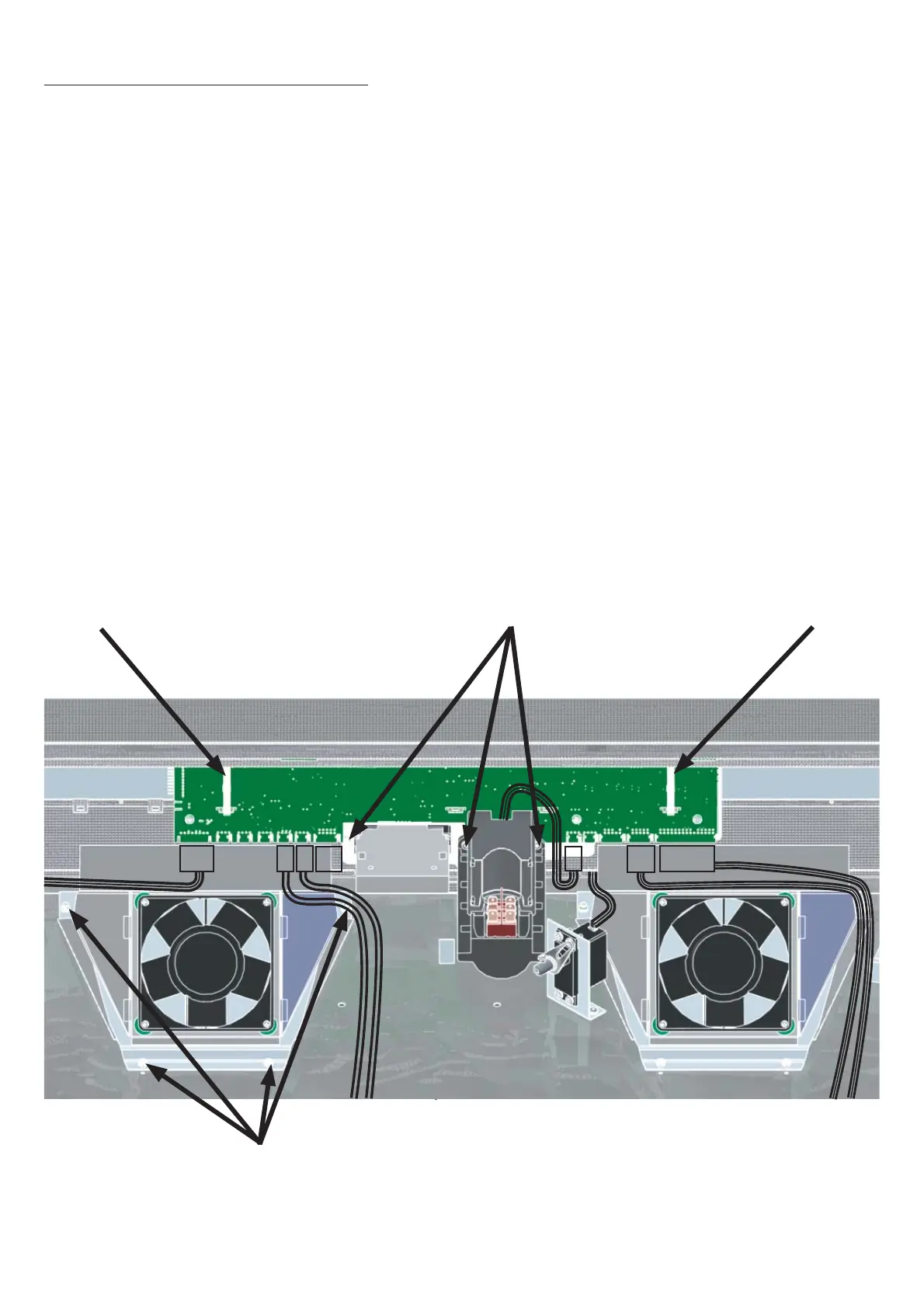
On 250°C/300°C ovens (UNP, UFP, SNP, SFP) unscrew the control chamber fan
Cut the cable binder with the side cutters and remove it
Disconnect the cable (8-way) for power supply from controller location J13
Remove connector (4-pin) for Pt100 monitor controller from controller location J3
Remove connector (4-pin) for Pt100 working controller from controller location J4
Remove connector (10-pin) for RS232 interface from controller location J9
Remove connector (30/22-pin) for printer interface from controller location J8
Remove connector (4-pin) chip card reader from controller position J11 and disengage it
Remove connector (4-pin) air flap servoce from controller position J1
Remove connector (4-pin) for main switch from controller location J2
Release three fixing screws (see ill.)
Remove the controller towards the back
•
•
•
•
•
•
•
•
•
•
•
•
•
•
•
Cable binder
Screws for control chamber fan
Cable binderFixing screws
Example UFP 800



 To Next Page