27
TV PARENTAL CONTROL
MUTE
Q
.VIEW INFO
INPUT
SAP P.MODE
-
MENU
C
H-
CH+
VOL
-
VOL
+
CC SLEEP
GUIDE
FAV.L IST
ARC
CH.LIST
E
XIT
0
2
1
ENTER
MUTE
Q
.VIEW INFO
INPUT
S
AP P.MODE
-
MENU
CH-
CH+
VOL
-
VOL
+
CC SLEEP
GUIDE
FAV.L IST
ARC
CH.LIST
EXIT
0
ENTER
V
-Chip enables parents to prevent their children from watching inappropriate material on TV. V-Chip reads the ratings for
programming (except for news, sports, unedited movies on premium cable and Emergency System signals), then denies
a
ccess to programming if the program’s rating meets the limitations you select. In this case, the program will be blocked.
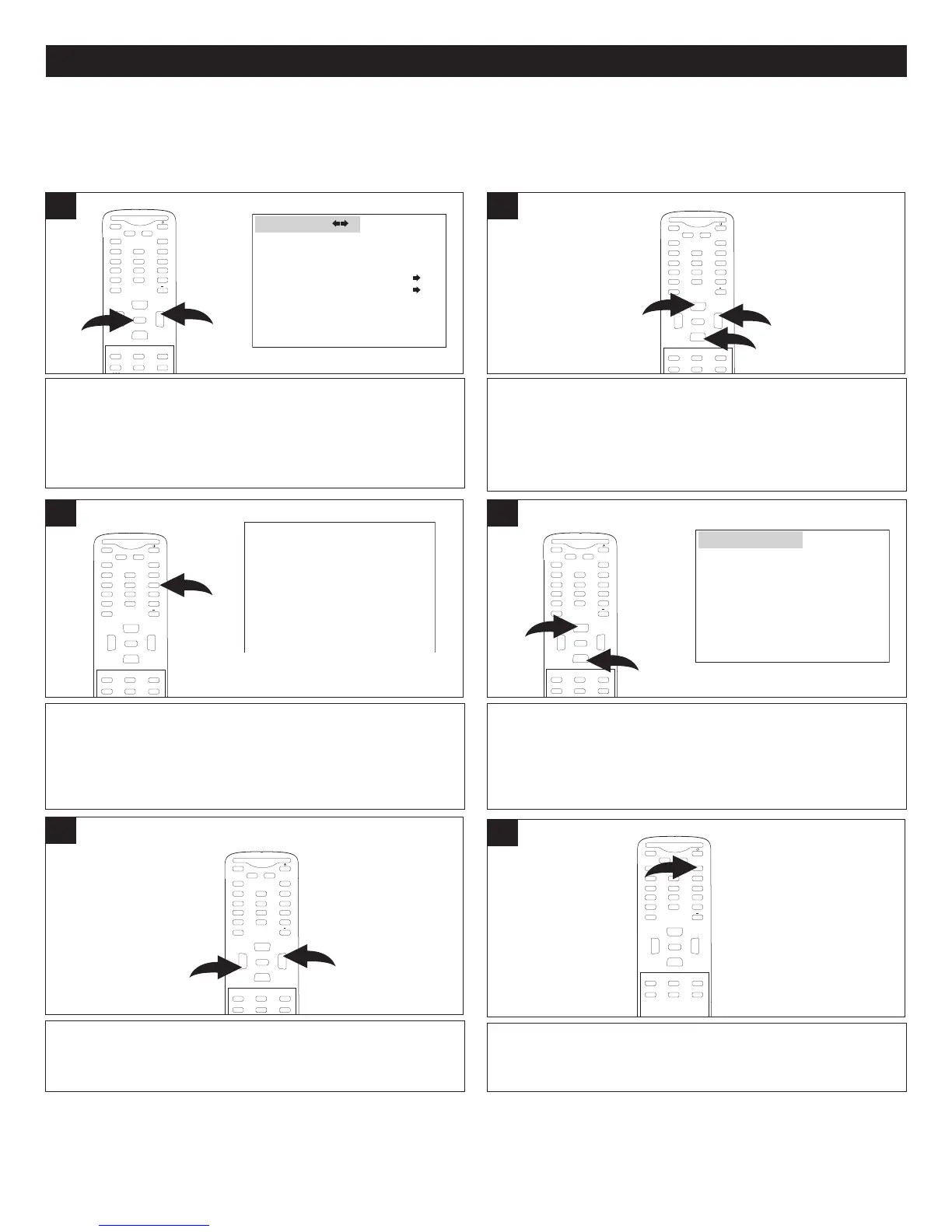
With the TV on, press the MENU button 1; the Video menu
will appear. Press the VOLUME Up button 2 to select the
Function menu.
1
Press the CHANNEL Up 1 or Down 2 button until
PARENTAL LOCK is selected, then press the VOLUME Up
button 3 to enter the submenu.
MUTE
Q.VIEW INFO
I
NPUT TV/DTV
SAP P.MODE
-
MENU
CH-
CH+
VOL
-
VOL
+
CC SLEEP
GUIDE
FAV.LIST
ARC
CH.LIST
E
0
3
1
2
ENTER
2
Enter the 4-digit password using the Number (0-9) buttons.
After inputting the password correctly, the Parental Lock
submenu appears.
NOTE: The default password is “1234”.
3
To turn the Parental Lock on or off, after inputting the
password, press the CHANNEL Up 1 or Down 2 button
until PARENTAL LOCK is selected.
MUTE
Q.VIEW INFO
INPUT
SAP P.MODE
-
MENU
CH-
C
H+
VOL
-
VOL
+
C
CSLEEP
GUIDE
FAV.L IST
ARC
CH.LIST
EXIT
0
1
2
ENTER
4
PARENTAL CONTROL SET-UP
Press the VOLUME Up 1 or Down 2 button to select
between ON or OFF.
MUTE
Q.VIEW INFO
INPUT TV/DTV
SAP P.MODE
-
MENU
CH-
CH+
VOL
-
VOL
+
CC SLEEP
GUIDE
FAV.LIST
ARC
CH.LIST
0
1
2
ENTER
5
When done, press the EXIT button to exit the menus.
MUTE
Q.VIEW INFO
INPUT
SAP P.MODE
-
MENU
CH-
CH+
VOL
-
VOL
+
CC SLEEP
GUIDE
FAV.L IST
ARC
CH.LIST
EXIT
0
ENTER
6
LANGUAGE ENGLISH
BLUE SCREEN ON
NTSC CAPTION OFF
DTV CAPTION
PARENTAL LOCK
F
UNCTION
PLEASE ENTER PASSWORD
####
MPAA RATING
PARENTAL GUIDE
CA ENG RATING
CA FREN RATING
DIGITAL RATING
PARENTAL LOCK OFF
CHANGE PASSWORD
PARENTAL LOCK
NOTES:
• See page 32 to change the password.



 To Next Page