29
TV PARENTAL CONTROL (CONTINUED)
Enter the Parental Lock submenu and turn on the V-chip
option as described on the previous page (Steps 1-3).
L
ANGUAGE ENGLISH
B
LUE SCREEN ON
N
TSC CAPTION OFF
D
TV CAPTION
P
ARENTAL LOCK
FUNCTION
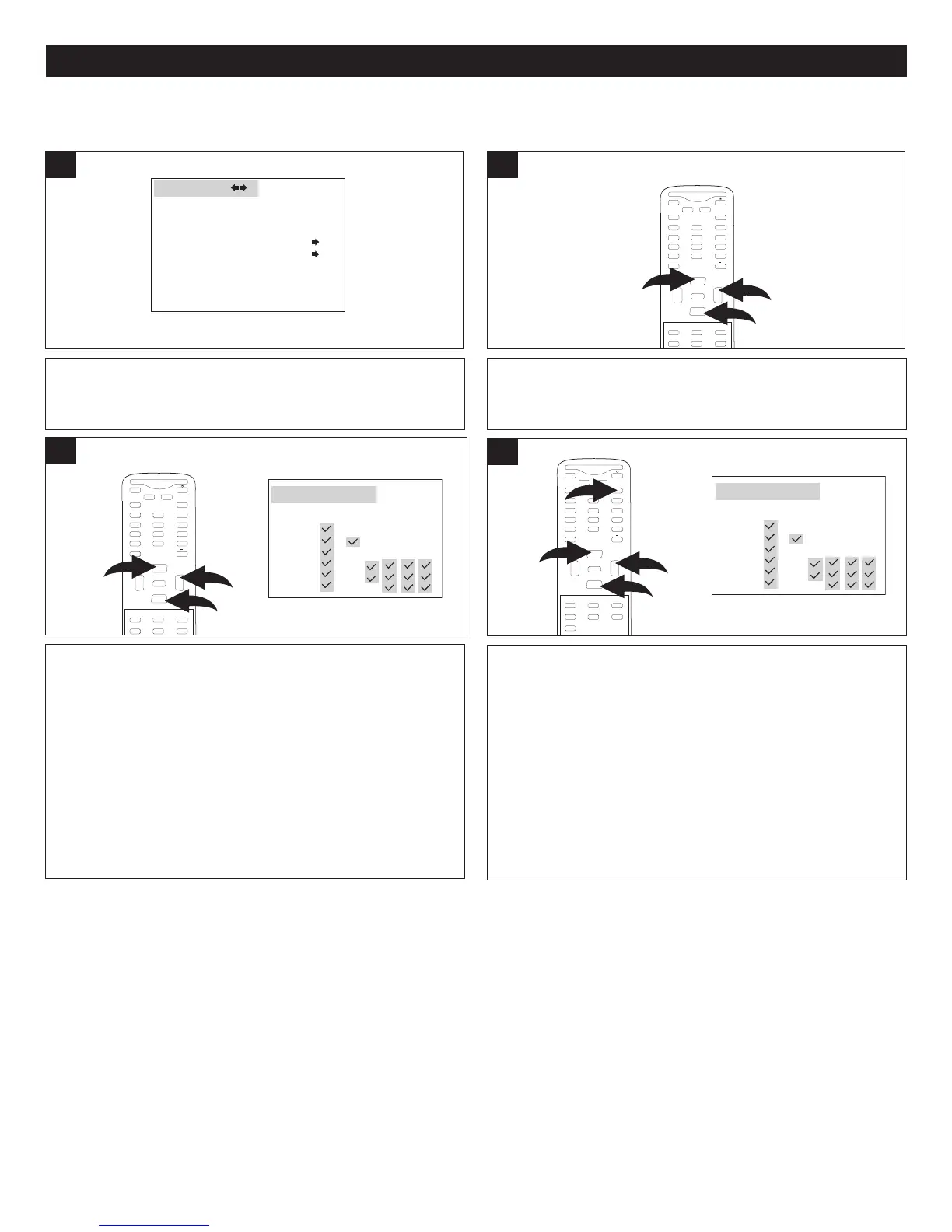
1
Press the CHANNEL Up 1 or Down 2 button until
PARENTAL GUIDE is selected, then press the VOLUME
Up button 3 to enter the submenu.
MUTE
Q.VIEW INFO
INPUT TV/DTV
SAP P.MODE
-
M
ENU
CH-
CH+
VOL
-
VOL
+
CC SLEEP
GUIDE
F
AV.LIST
ARC
CH.LIST
E
0
3
1
2
ENTER
2
TV RATING SET-UP
You can also block some or all criteria for each level for
Fantasy Violence (FV), Sexual Dialogue (D), Language (L),
Sexual Situations (S) or Violence (V).
Using the CHANNEL Up 1 or Down 2 button, select the
desired criteria (to reach the criteria, cycle through the
columns using these buttons), then press the VOLUME Up
button 3 to turn the option On or Off.
When finished, press the Exit button 4 to exit the menus.
NOTE: A checkmark indicates that the criteria is blocked.
MUTE
Q
.VIEW INFO
INPUT
S
AP P.MODE
-
MENU
CH-
CH+
VOL
-
VOL
+
CC SLEEP
GUIDE
FAV.L IST
ARC
CH.LIST
EXIT
0
3
1
2
4
ENTER
4
Press the CHANNEL Up 1 or Down 2 button to select a
rating and then the VOLUME Up button 3 to BLOCK
(ratings at or above cannot be viewed) or UNBLOCK
(ratings at or under can be viewed).
NOTE: A checkmark indicates that the rating is blocked.
M
UTE
Q.VIEW INFO
I
NPUT TV/DTV
SAP P.MODE
-
M
ENU
CH-
CH+
VOL
-
VOL
+
CC SLEEP
GUIDE
FAV.LIST
ARC
CH.LIST
E
0
3
1
2
ENTER
3
Y: All ages
Y7: Ages 7 and up
G: General Audience
PG: Parental Guidance
14: Parental Guidance
less than 14 years
old
MA: Mature Audiences
Only
None: None blocked
A
LL FV
D
L
S
V
TV-MA
NONE
TV-14
TV-PG
TV-G
TV-Y7
TV-Y
PARENTAL GUIDE
ALL FV
D
L
S
V
TV-MA
N
ONE
TV-14
TV-PG
TV-G
TV-Y7
TV-Y
P
ARENTAL GUIDE



 To Next Page