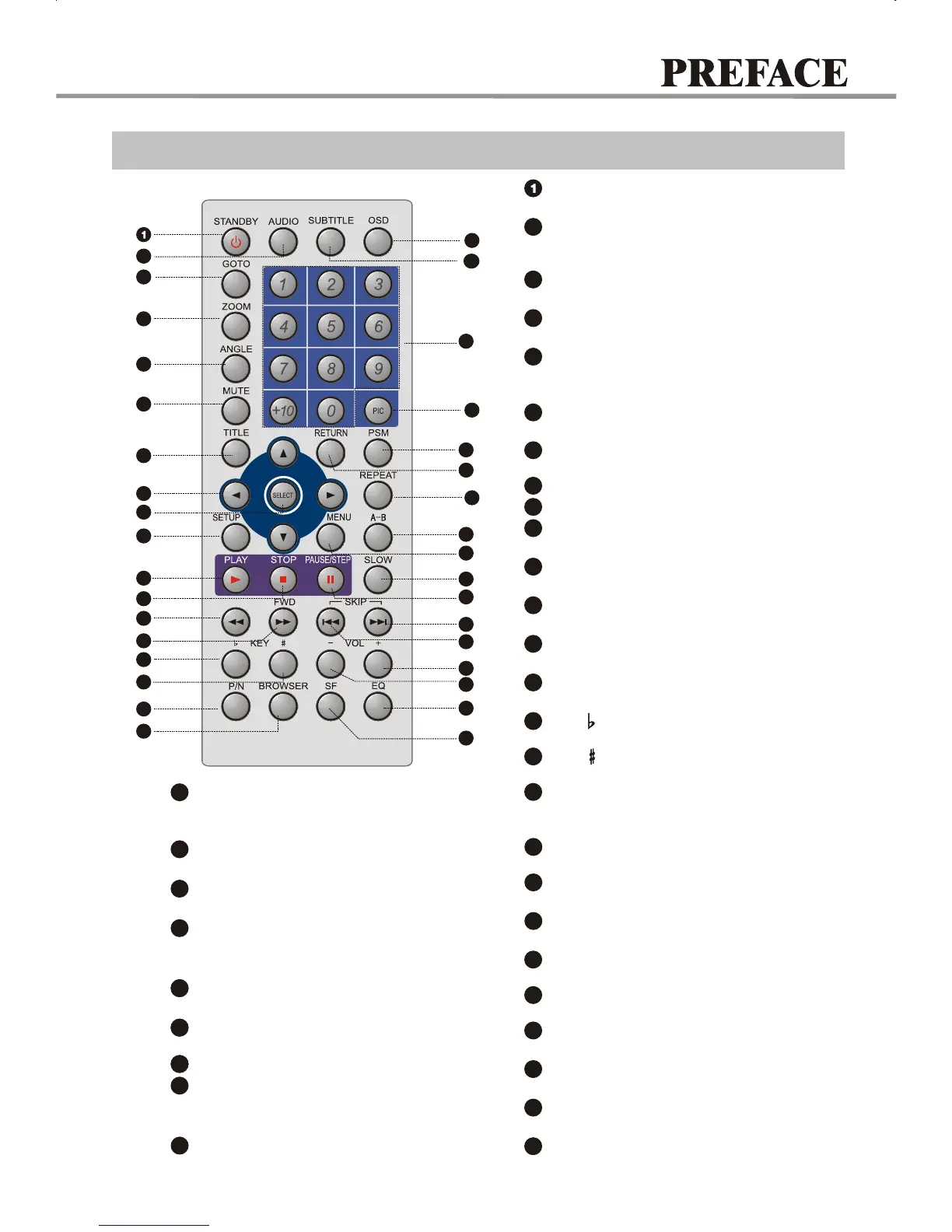
Remote Control Illustration
6
3
2
5
7
8
9
12
11
13
14
16
33
22
20
18
21
19
23
24
28
27
25
26
15
17
4
31
32
30
29
10
35
34
Switch new user interface.
BROWSER
18
Press to turn On/Off the unit.
STANDBY Button
Change the audio language or
audio channel.
AUDIO Button
2
Play from the desired location.
GOTO button
3
Zoom In/Out the display frame.
ZOOM Button
4
Fast forward play.
FWD Button
14
Change camera angles, MP3/JPEG
playback modes switch.
ANGLE Button
5
Press once to mute, twice to unmute.
6
MUTE button
DVD titles.
TITLE button
7
Fast backward play.
REV Button
13
Function setup.
10
SETUP Button
Normal playback.
PLAY Button
11
Stop playback.
STOP Button
12
8
CURSOR Buttons
SELECT Button
9
Fall tone.
KEY Button
15
Switch the TV system between
PAL, NTSC and AUTO.
P/N Button
17
Rise tone.
KEY Button
16
Adjusting sound field effects.
SF Button
19
Adjusting equalization effects.
EQ Button
20
Decrease volume.
VOLUME-
21
Increase volume.
VOLUME+
22
Slow motion Forward/Reverse playback.
SLOW Button
26
Skip forward.
NEXT Button
24
25
PAUSE/STEP Button
Pause or play frame by frame.
Skip backward.
PREV Button
23
A-B Button
28
Repeat the select.
Display DVD menu or open/close
PBC.
27
MENU/PBC Button
Display or hide disc information.
OSD Button
35
REPEAT Button
29
Repeat play.
Power Spectrum Meter on/off.
PSM Button
27
31
NUMBER Buttons
27
33
Change subtitle languages/
Switch JPEG display modes.
SUBTITLE Button
34
Back to the previous menu/
Clearing input numbers.
30
RETURN Button
Set video.
27
32
PIC Button
REV
7


 To Next Page