14
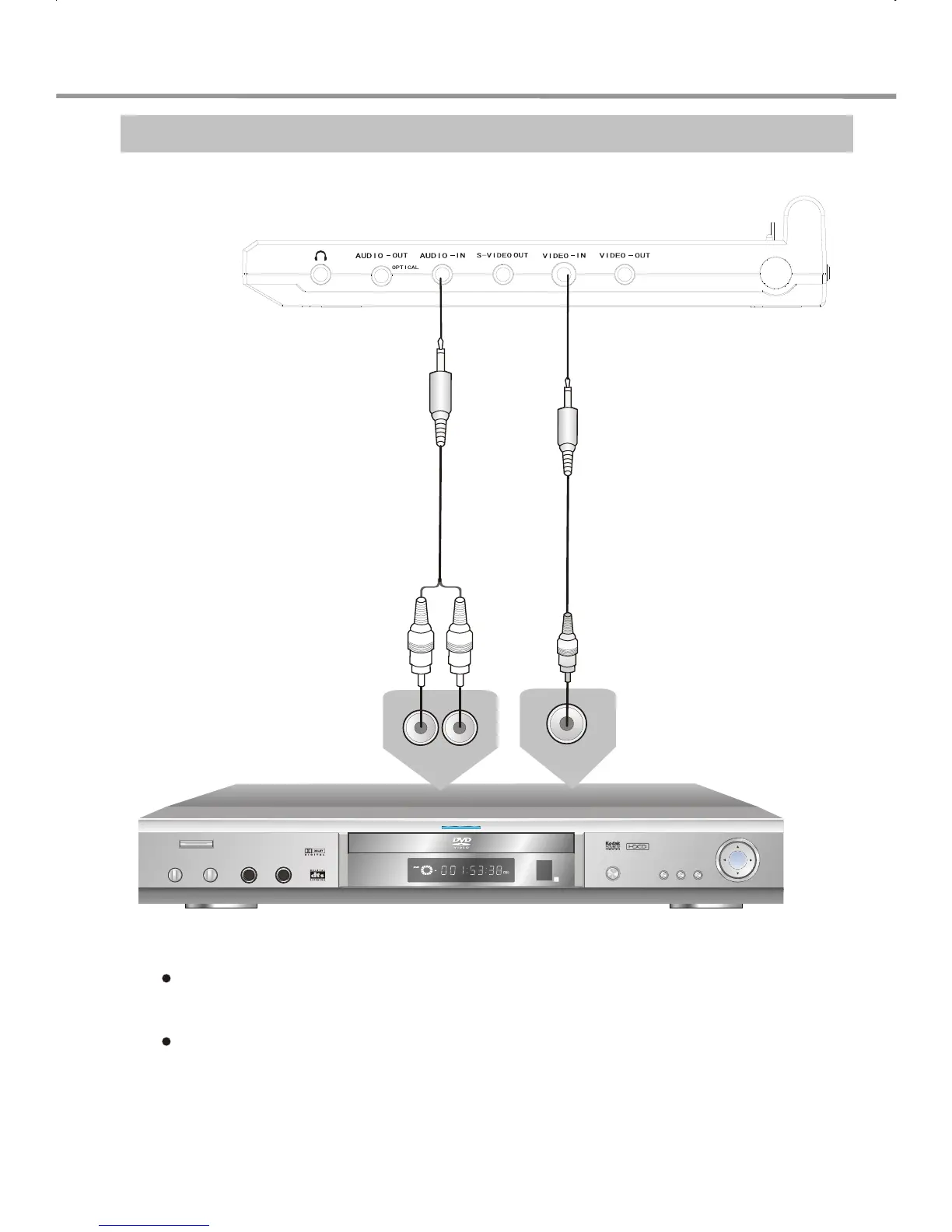
Audio/Video In (AUX IN)
Connect the video cords from the Video Out on the source to Video In on your DVD.
Connect the audio cords from the Audio Out on the source to Audio In on your DVD.
14
Audio/Video In (AUX IN)
Connect the video cords to the video out jacks of the video equipment.
Connect the audio cords to the video equipment's audio out jacks which
ought to be in the same group of the audio out jacks.
14
Audio/Video In (AUX IN)
Connect the video cords to the video out jacks of the video equipment.
Connect the audio cords to the video equipment's audio out jacks which
ought to be in the same group of the audio out jacks.
14
Audio/Video In (AUX IN)
Connect the video cords to the video out jacks of the video equipment.
Connect the audio cords to the video equipment's audio out jacks which
ought to be in the same group of the audio out jacks.
Video output
Video Cord
Audio Cord
Audio output
Video Equipment
SYSTEM CONNECTIONS


 To Next Page