23
MP3
CDVCDSVCDDVD
Repeat Playback
Repeat the Selected Section
The repeat function enables a title/chapter/track/disc to be repeated.
MP3
CD
VCDSVCD
DVD
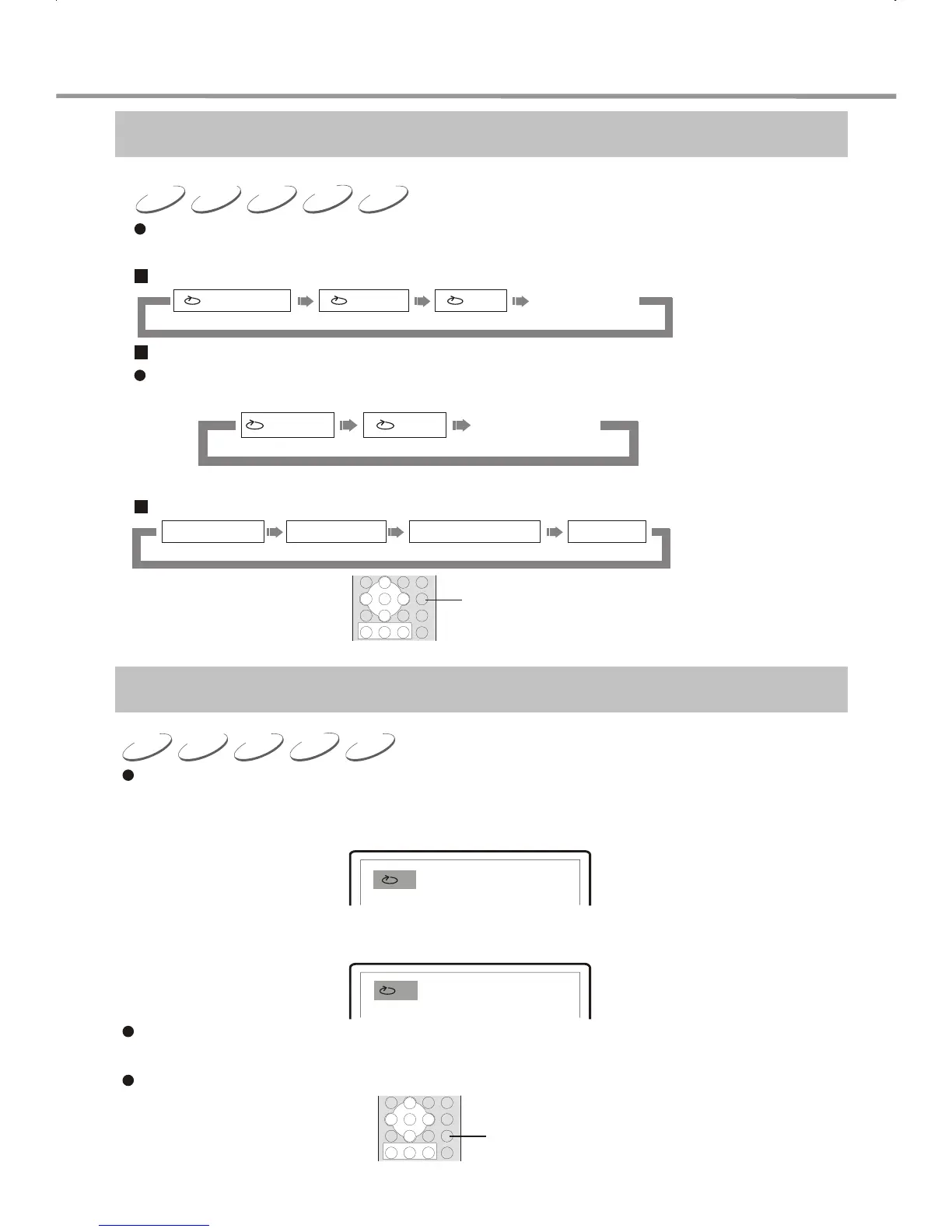
1. Press REPEAT to cycle through the repeat options shown below:
DVD disc:
SVCD,VCD,CD discs:
Repeat playback can be performed on SVCD or VCD2.0 only when the PBC is off.
Repeat will work on VCD1.1 or CDs when PBC is on or off.
MP3 disc:
REPEAT
When playing disc, Press A-B button to repeat playback of a certain section.
1. During normal playback, Press A-B button at the desired point (point A) to set the
beginning.
Display on TV screen:
A
2. During normal playback, Press A-B button at the desired point (point B) to set the
end.
Display on TV screen:
AB
The player returns to point A automatically to repeat the selected section (A-B).
3. Press A-B for the third time.
Normal playback resumes.
A-B
PLAY OPERATION
REPEAT OFF
CHAPTER ALLTITLE
REPEAT OFF
TRACK
ALL
SINGLE
REPEAT ONE
REPEAT FOLDER FOLDER


 To Next Page