28
Virtual Keyboard
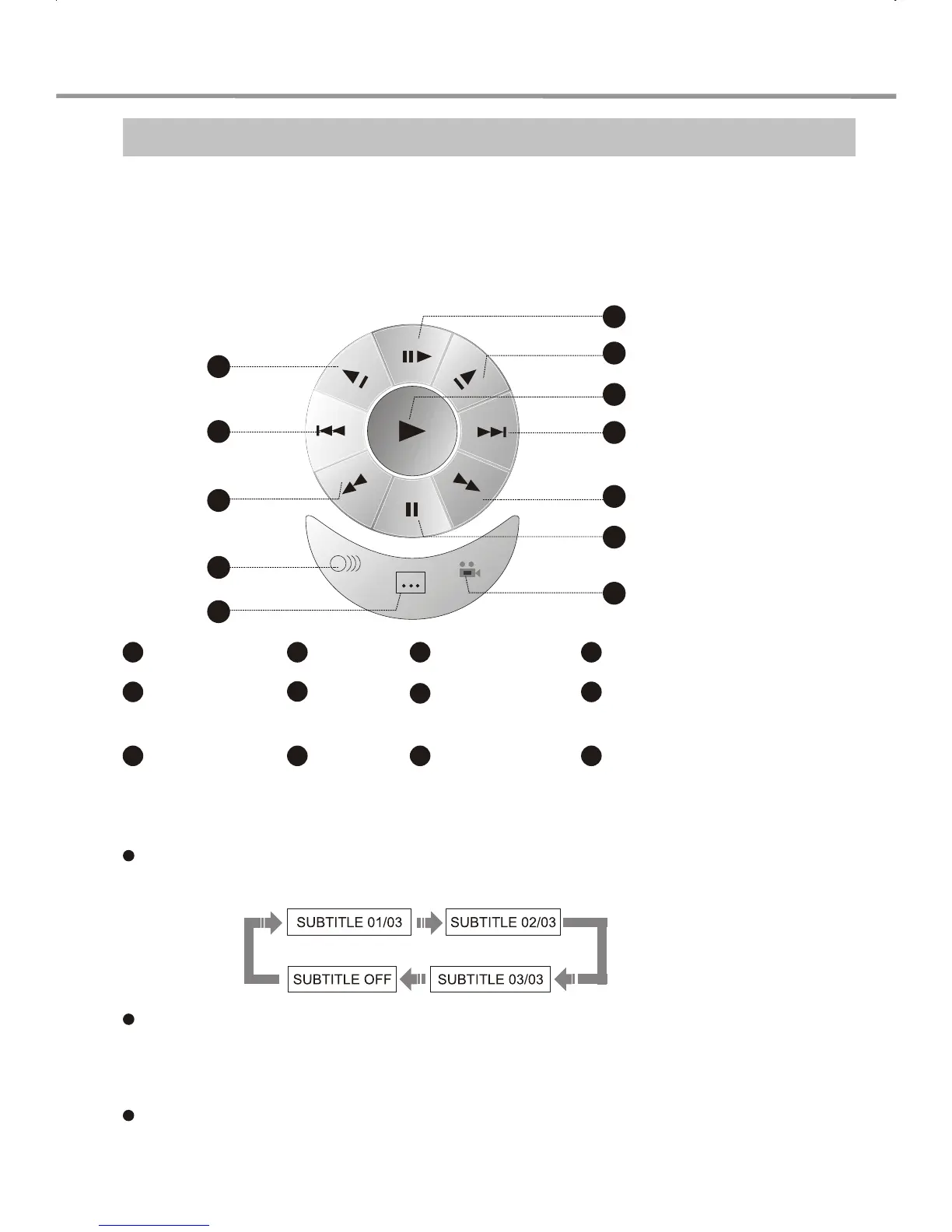
The brand-new VIRTUAL KEYBOARD function enables you to perform some easy operations
and configurations when enjoying a movie without using the remote control.
1
2
4
5
6
8
9
10
11
12
7
3
Step
1 4
Next
7
Angle
10
Fast Reverse
2
Forward Slow
Playback
5
Fast
Forward
8
Reverse Slow
Playback
11
Audio
3
Play
6
Pause
9
Prev
12
Subtitle
1. Press FUNCTION SELECT on the front panel twice. A virtual keyboard will
appear on the screen as shown in the figure below:
2. Use the four direction arrows to select the function you want to set. Press
SELECT for verification. For instance: To select SUBTITLE
Press the direction arrows to select the subtitle icon. Each time you press SELECT the
subtitle settings move to the next available option as follows:
This time the front panel NEXT/PREV/PAUSE/STOP buttons correspond to RIGHT/
LEFT/DOWN/UP respectively.
The virtual keyboard function is applicable to DVD, SVCD or VCD discs only.
3. To exit the virtual keyboard, press FUNCTION SELECT again.
PLAY OPERATION


 To Next Page