46
You can change the default settings
to customize performance to your
preference.
Setting setup language
1
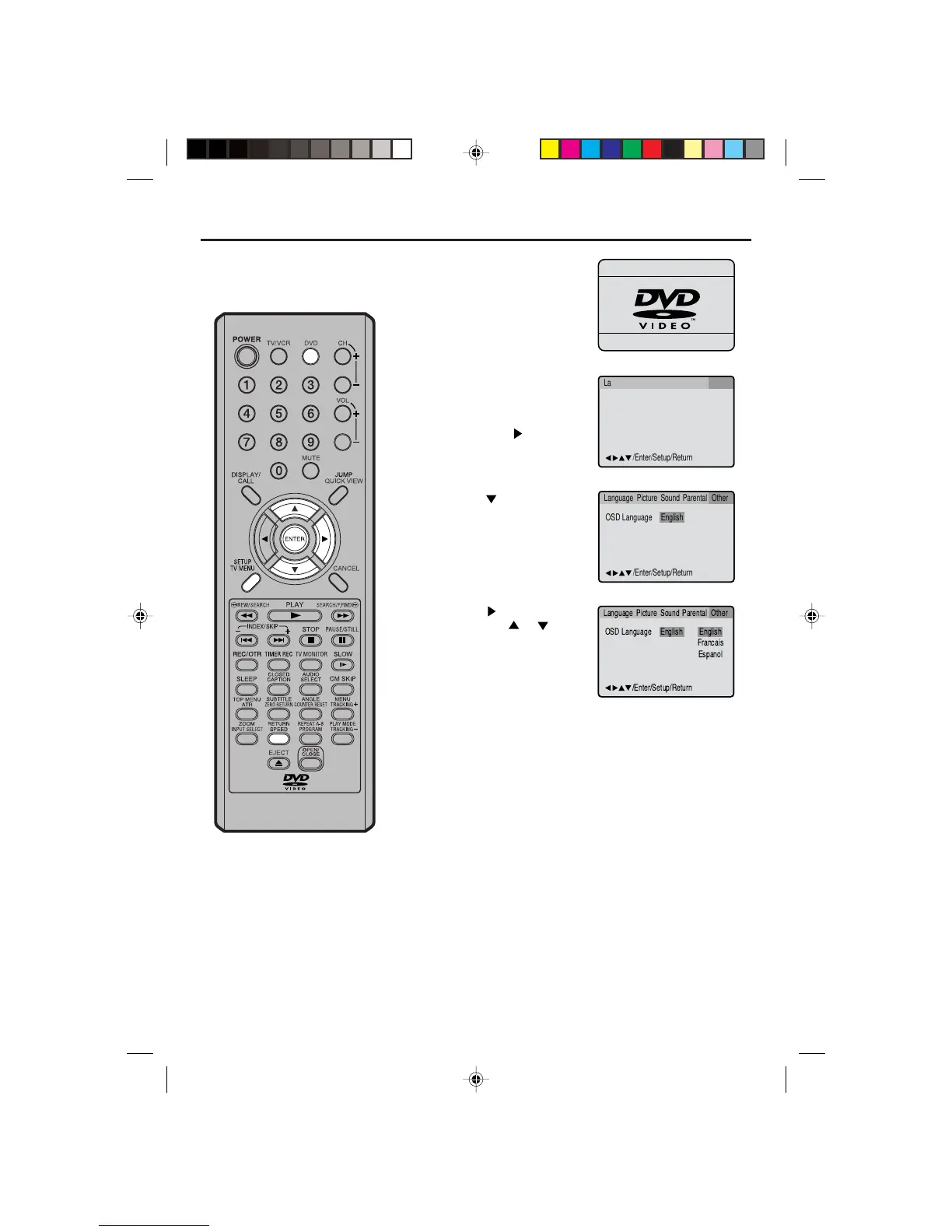
Press DVD to select the
DVD mode.
“No Disc” will appear on
the screen. (If a DVD disc
has already loaded, the
playback will start auto-
matically.)
2
Press SETUP in the stop
mode. The SETUP MENU
of DVD will appear on the
screen.
Then press
to select
Other.
3
Press or ENTER to
select OSD Language.
4
Press or ENTER and
then press
or to
select desired language
(e.g. English), then press
ENTER.
5
Press SETUP or RETURN to remove the MENU screen.
OSD Language English English
Francais
Espanol
/Enter/Setup/Return
Language Picture Parental OtherSound
OSD Language English
/Enter/Setup/Return
Language Picture Parental OtherSound
/Enter/Setup/Return
Language Picture Parental OtherSound
If the TV/VCR/DVD does not operate
properly:
Static electricity, etc., may affect the play-
er's operation. Disconnect the AC mains
lead once, then connect it again.
5Q00401AE(43-48) 26/5/04, 10:4746


 To Next Page