Engineer’s Menu 3 TS790+ & TS900+ Installation Manual
48
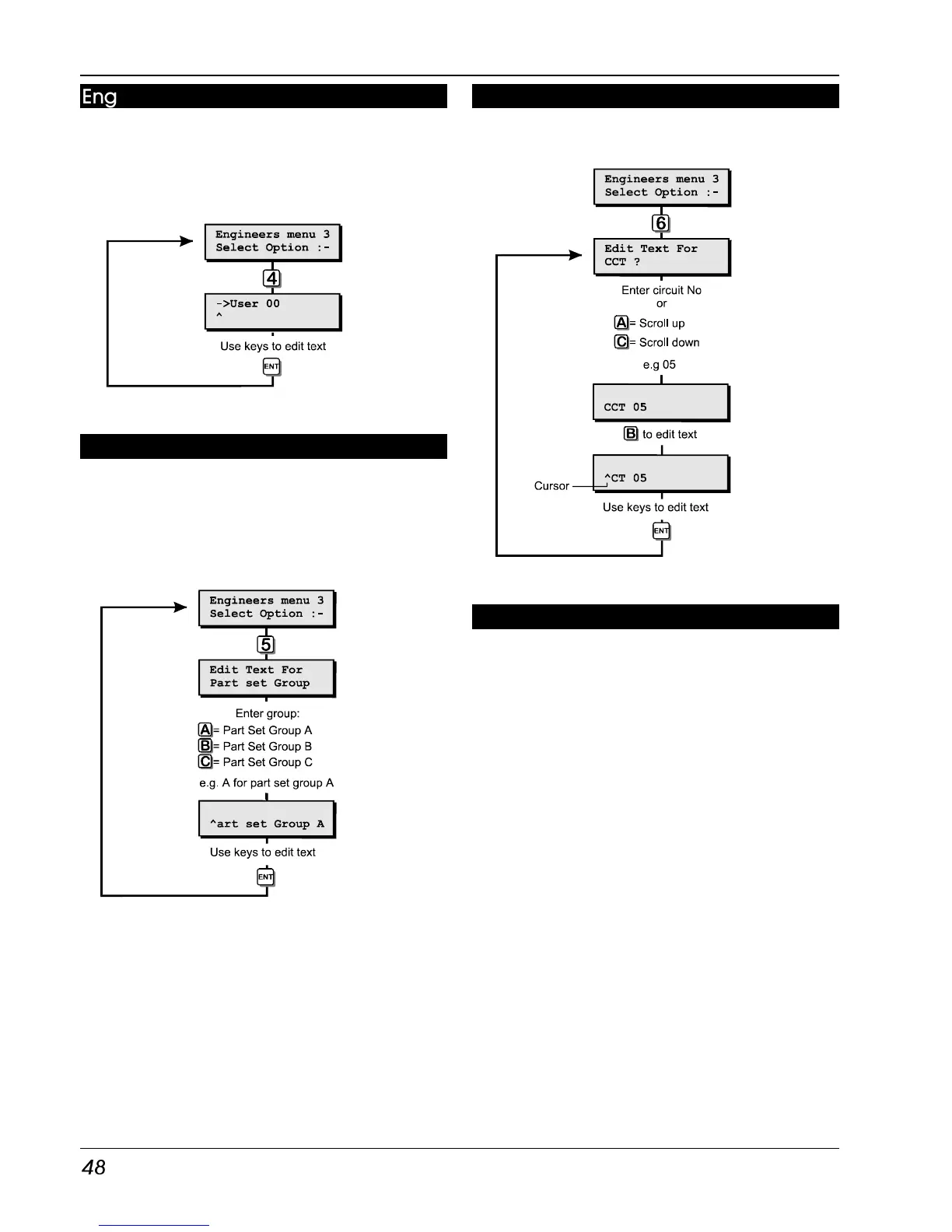
Engineers Name (LCD Only) [3.4]
This option allows the engineer to assign a
name (7 characters) to user 00. When using the
view log option you can press the [B] key to
alternate between displaying the user number
and user name.
Engineer’s Name Flowchart
Part Set Text (LCD Only) [3.5]
This option allows the engineer to assign 32
characters of text to each part set group. When
the user selects the part set options during
setting, the display will show the relevant part set
text.
Part Set Text Flowchart
Circuit Text (LCD Only) [3.6]
Each detection circuit can have up to 16
characters of text assigned to it.
Circuit Text Flowchart
Custom Text Menu (LCD Only) [3.7]
This menu option allows the installation engineer
to edit the following text messages:
Reset Message
The default reset message “CALL ENGINEER TO
RESET SYSTEM” can be personalised by the
engineer, e.g. the message may be
programmed to read “CALL XYZ ALARMS ON
0181-1234567".
Banner Message
Normally when the system is unset the bottom
line of the display shows the time and date,
and the top line is left blank. This menu option
allows the engineer to program or edit a 16
character “Banner” message which is displayed
on the top line. This may be used to display the
company’s name, e.g., “Blogg Alarms”, “ABC
Security” etc.



 To Next Page