1t
art.
ht
,t
rt.
ht
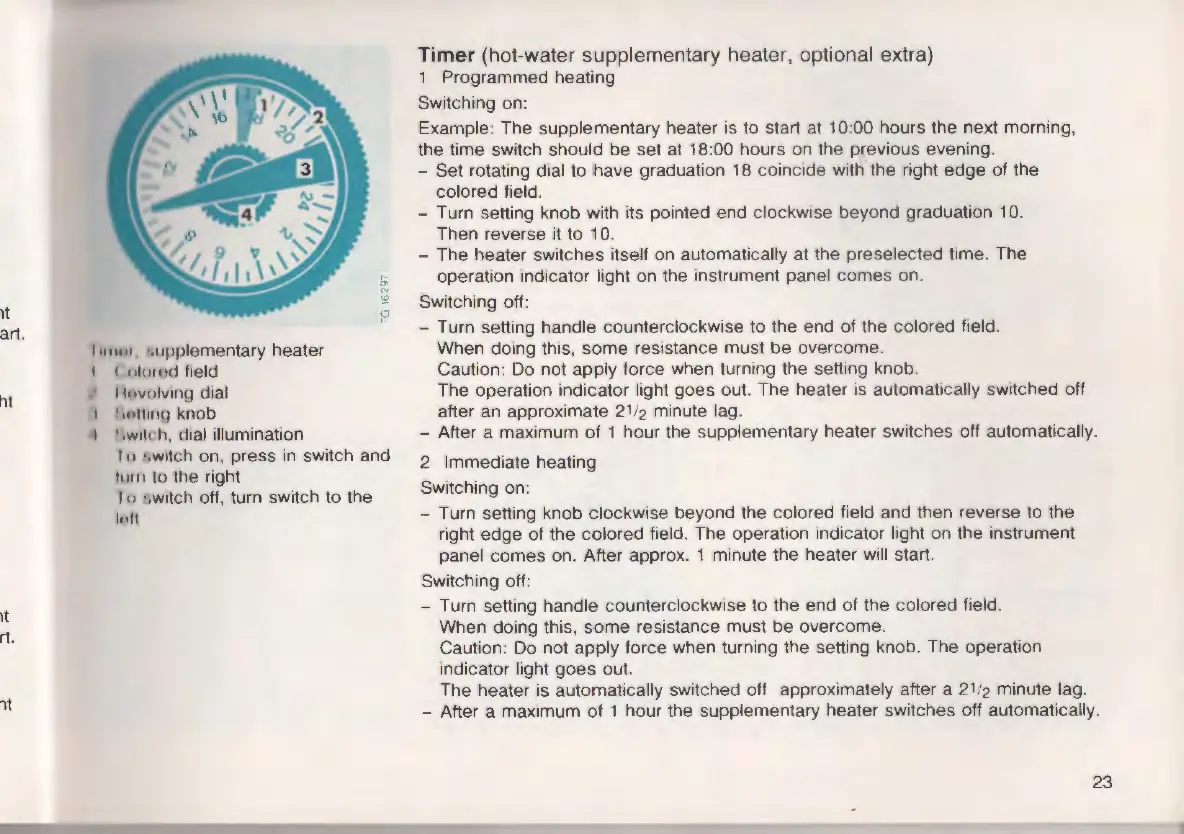
11111111 ·,upplementary heater
I (
11h11,,<1 freld
I t11volvrng dial
t ',111t111r, knob
II • ,w111 h, dral illumination
I 11 •,wrtch on, press in switch and
111111 to the right
Io •;wrtch off, turn switch to the
h•II
Timer (hot-water supplementary heater, optional extra)
1 Programmed heating
Switching on:
Example: The supplementary heater is to start at
10:00 hours the next morning,
the time switch should be set at
18:00 hours on the previous evening.
- Set rotating dial to have graduation
18 coincide with the right edge of the
colored field.
- Turn setting knob with its pointed end clockwise beyond graduation
10.
Then reverse it to 10.
- The heater switches itself on automatically at the preselected time. The
operation indicator light on the instrument panel comes on.
Switching off:
- Turn setting handle counterc lockwise to the end of the colored field.
When doing this, some resistance must be overcome .
Caution: Do not apply force when turning the setting knob.
The operation indicator light goes out. The heater is automatically switched off
after an approximate
2112 minute lag.
- After a maximum of
1 hour the supplementary heater switches off automatically.
2 Immediate heating
Switching on:
- Turn setting knob clockwise beyond the colored field and then reverse to the
right edge of the colored field. The operation indicator light on the instrument
panel comes on. After approx.
1 minute the heater will start.
Switching off:
- Turn setting handle counterclockwise to the end of the colored field.
When doing this, some resistance must be overcome.
Caution: Do not apply force when turning the setting knob. The operation
indicator light goes out.
The heater is automatically switched off approximately after a
21/2 minute lag.
- After a maximum of
1 hour the supplementary heater switches off automatically.
23











 To Next Page