1
5
6
7
2
3
4
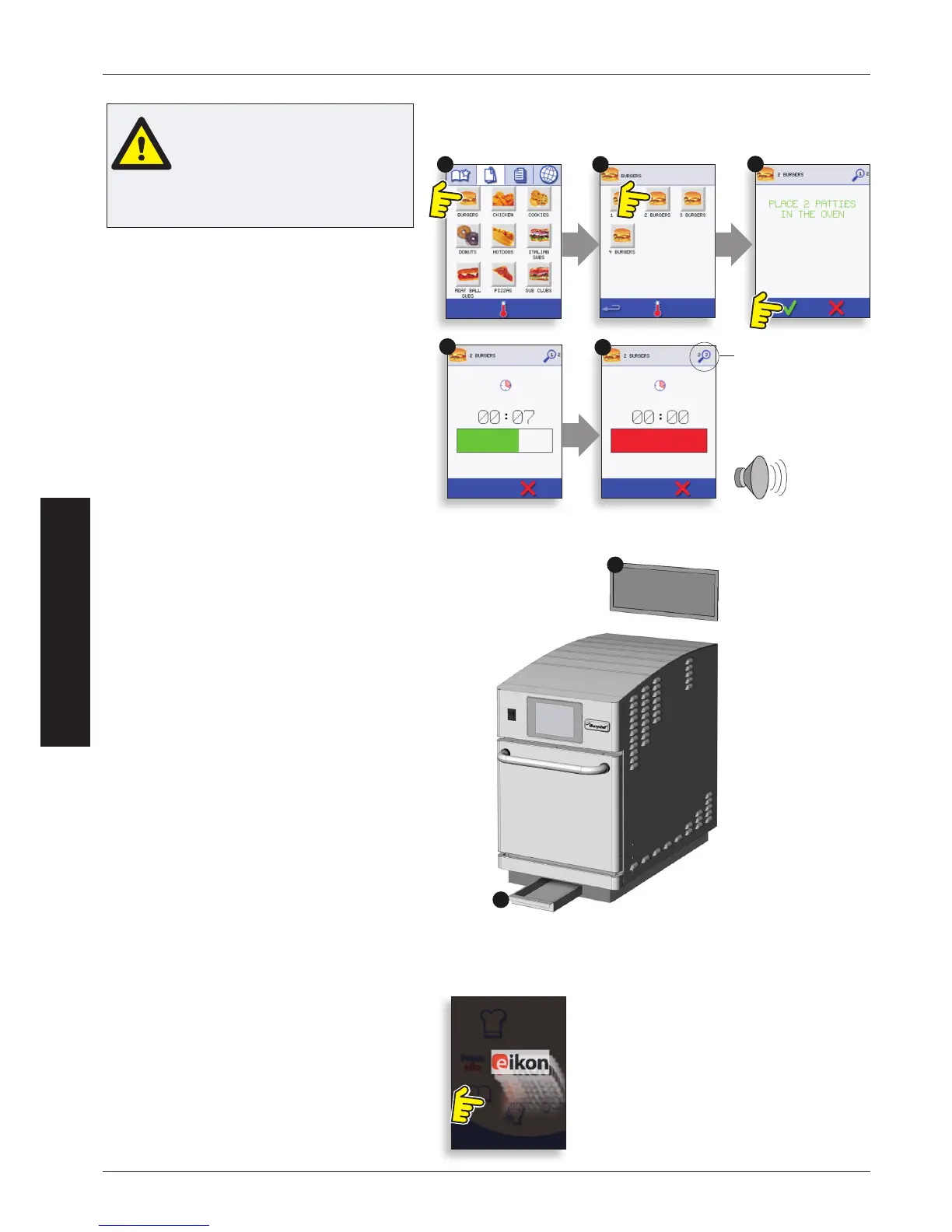
1. Select a program group, for example ‘BURGERS’,
to display the individual cooking programs.
2. Select a cook program to start, for example ‘2
BURGERS’.
3. Follow instructions if displayed on the screen.
4. Touch the green tick to cook.
The cooking time counts down for each program
stage.
5. When the program ends a red bar is displayed
usually with an audible sound -- open the door or
touch the red ‘X’ to return to the cook program.
NOTE: Opening the oven door during cooking stops
the cooking program and displays a warning. Closing
the door allows the user to continue or cancel the
cooking program.
CAUTION
Taking all the necessary
precautions to ensure you do not
burn yourself, open the oven door
to place the food into the hot oven
and close the door.
PROGRAM STAGE
USING A COOKING PROGRAM
AIR FILTER & GREASE TRAY
IMPORTANT:
Clean the AIR FILTER (6), located at the top rear of
the oven, and the GREASE TRAY (7), located at the
front underside of the oven, every day and ensure
the air lter and grease tray are in place prior to
operating the oven.
See ‘CLEANING & MAINTENANCE’.
SCREEN SAVER
An active screen saver will mask the screen
showing a moving image. To use the touchscreen,
tap the screen to deactivate the screen saver.


 To Next Page