E
F
G
H
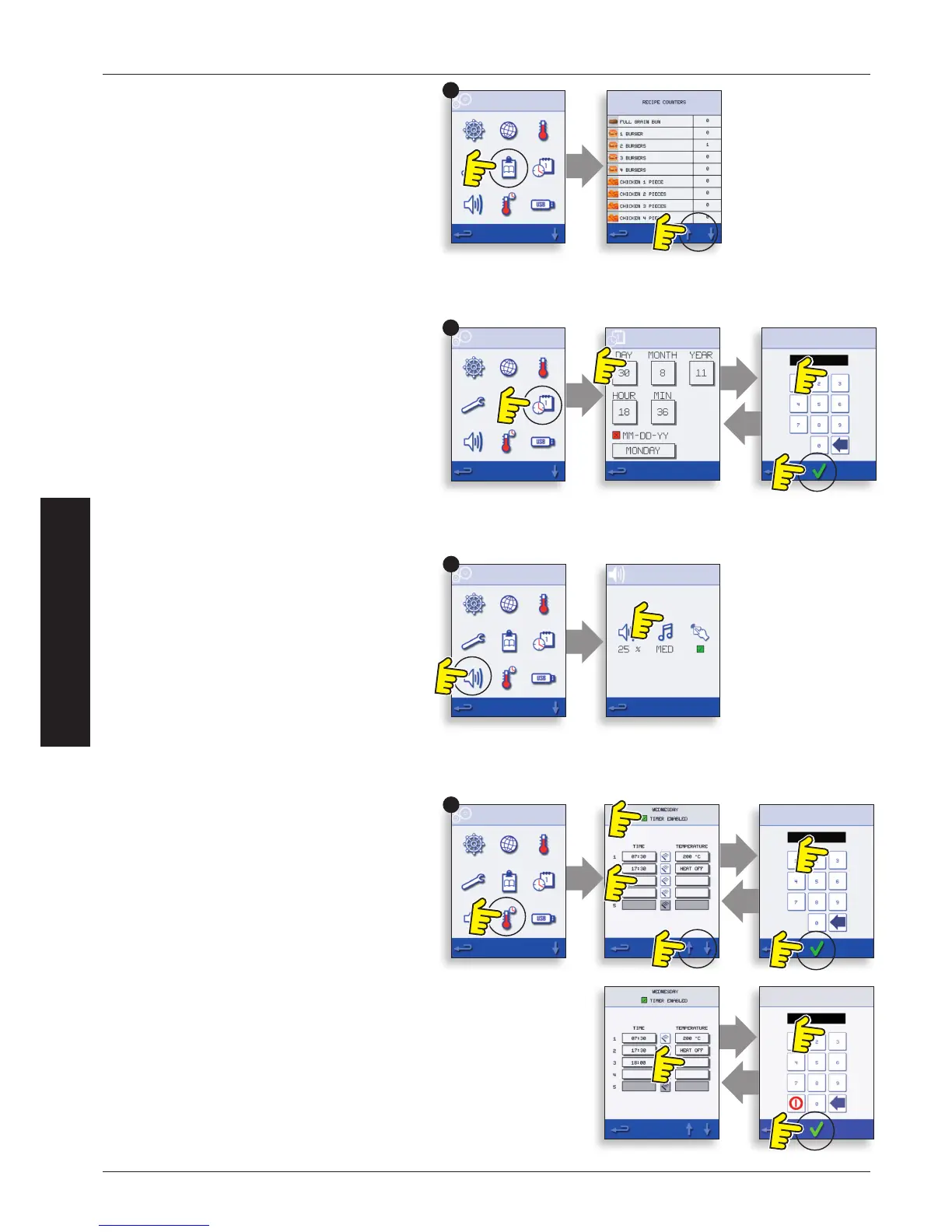
Recipe Counters (E)
Select the clipboard symbol to display a listing of
recipe counters.
If shown, use the arrows (bottom right) to scroll up
and down the list.
Date and Time Settings (F)
Select the time/date symbol to display the setting
options.
CHANGE THE DATE: Select ‘MONTH’, enter the
correct Month on the keypad and select OK.
Select ‘DAY’, enter the correct Day on the keypad
and select OK.
Select ‘YEAR’, enter the correct last two digits of the
Year on the keypad and select OK.
To display the Month rst, followed by the Day and
Year, select the ‘MM-DD-YY’ checkbox.
NOTE: The Error Logs are recorded using these
settings.
CHANGE THE TIME: Select ‘HOUR’, enter the correct
Hour on the keypad and select OK.
Select ‘MIN’, enter the correct Minutes on the
keypad and select OK.
Select the day name shown to cycle through to
display the correct weekday.
Sound Levels (G)
Select the speaker symbol to adjust the volume
level suitable for the environment from none (OFF)
to the loudest (100%).
Select music note symbol to set LOW, MED
(medium) or HIGH tone.
Select the keypad symbol to switch the sound ON
or OFF when the touchscreen is pressed.
Oven Timer (H)
Select the thermometer/timer symbol.
Select the ‘Timer Enabled’ checkbox (green tick).
Select a weekday using the up/down arrows.
Select an empty ‘Time’ box (maximum of 5 per day)
or clear the box using the wipe symbol.
Enter the start time on the keypad and select OK.
Select an empty ‘Temperature’ box opposite the
Time box displaying the time just entered, or clear
the box using the wipe symbol next to it.
Enter the cavity temperature required on the
keypad and select OK.
NOTE: You can also select zero to turn the heat o.
Selecting the red circle symbol will switch the oven
OFF.


 To Next Page