1
5
2
6
3
4
1
5
2
34
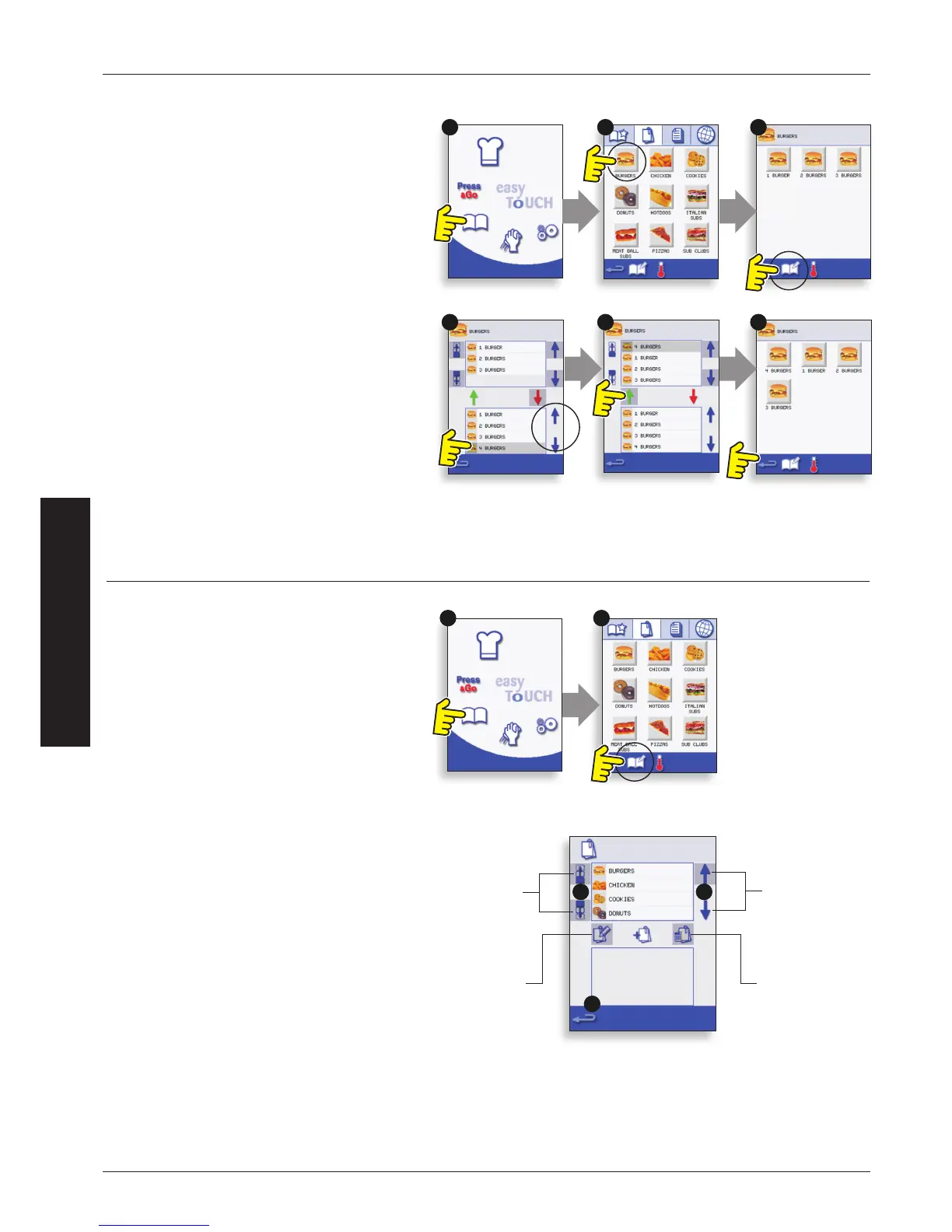
Example: Add program ‘4 BURGERS’ to the Program
Group ‘BURGERS’.
1. Select ‘COOKBOOK’ from the Main Menu Screen.
2. Select the ‘BURGERS’ Program Group.
3. Select ‘EDIT COOKBOOK’.
4. In the lower part of the screen use the up/down
scroll arrows on the right side to nd and select the
‘4 BURGERS’ Cooking Program.
5. Select the green UP arrow to add the ‘4 BURGERS’
Cooking Program to the Program Group in the
upper part of the screen, then select backspace to
return to the Cooking Programs.
6. Select backspace again to return to the
‘COOKBOOK’.
ADDING A COOKING PROGRAM TO A PROGRAM GROUP
Scroll to show
Program
Groups
Move the
selected
Program
Group
Edit the
selected
Program
Group name
Delete the
selected
Program Group
MANAGING PROGRAM GROUPS
To move a Program Group Position in a
Program Group List
1. Select ‘COOKBOOK’ from the Main Menu Screen.
2. Select ‘EDIT COOKBOOK’.
3. Use the scroll arrows, up and down on the right
side of the screen to locate all the Program Groups.
4. Select the Program Group to be moved and use
the up and down arrows on the left side of the
screen to move the selected Program Group.
5. Select backspace to go back to the ‘COOKBOOK’.
To change the Program Group Name
Select the Program Group.
Select ‘EDIT PROGRAM GROUP’.
Enter the new name and select OK.
To delete a Program Group
Select the Program Group.
Select the DELETE Program Group symbol.
Select OK to delete the Program Group.


 To Next Page