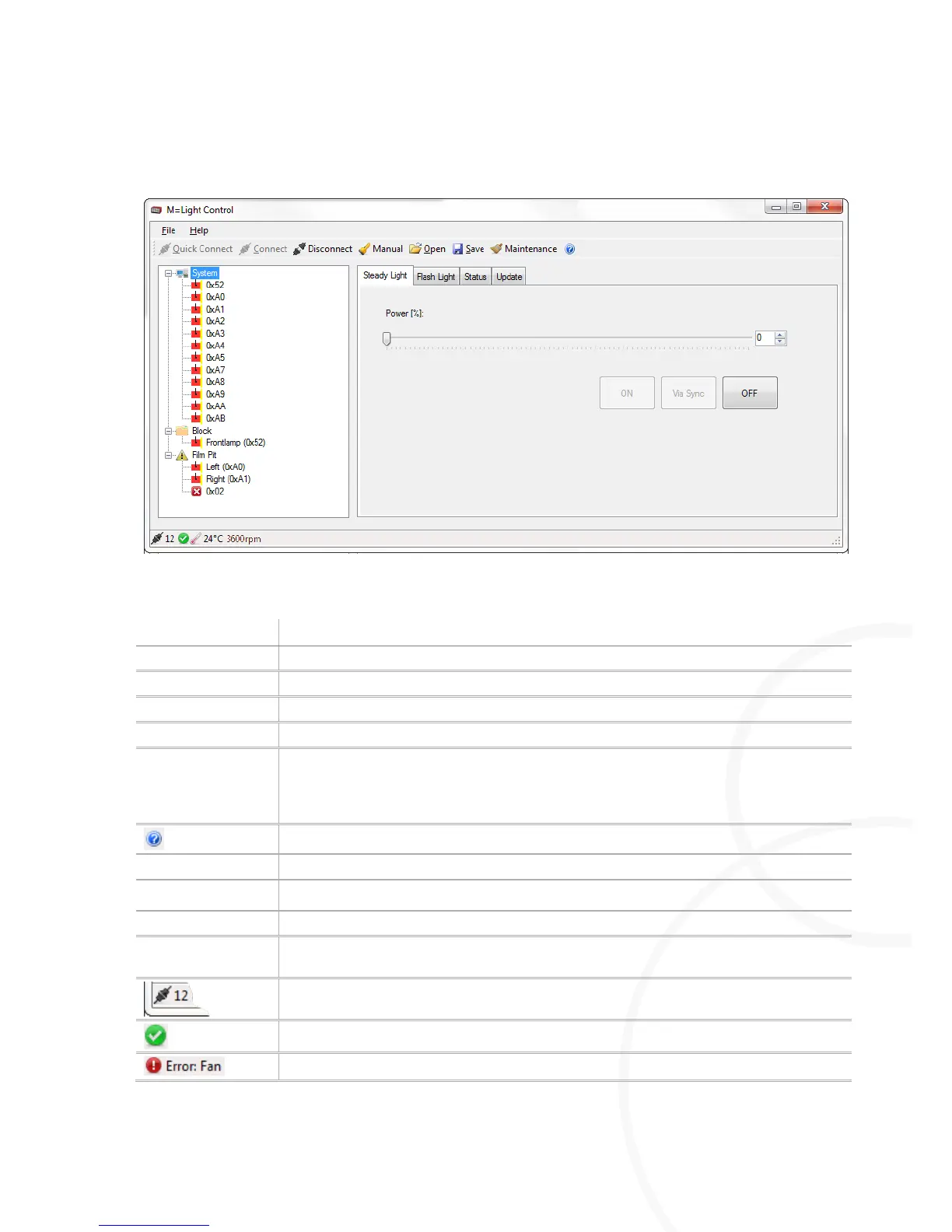
5.3.2. User Interface and Status Indicator with M=Light LED
Figure 12: User interface and status indicator with M=Light LED connected
Press Disconnect to disconnect all connected M=Light LEDs from the software
Manual operation of M=Light LEDs (section 8.3, page 54).
Open the file in which the parameterization data is saved (*.led).
Save the current parameterization data in a file (*.led).
Each M=Light LED is equipped with an integrated operating hours counter. The
Maintenance command queries the operating hour counter in all M=Light LEDs. If the
operating hour counter displays more than 150 hours, the status indicator of the
M=Light LED flashes blue (section 4.1, page 13).
Opens the operating instruction of the M=Light LED
Window for parameterization of steady light.
Window for parameterization of pulsed operation.
Displays the status of the M=Light LED highlighted in the M=Light Explorer.
Performs firmware or FPGA update. Only perform updates upon agreement with
MESSRING.
Indicates how many M=Light LEDs are connected via CAN-bus with the PC and thus
with the M=Light Control.
Status indication, M=light LED operational.
One or more fans have failed, M=Light LED was switched off.



 To Next Page