EN | Use
16
6. Use
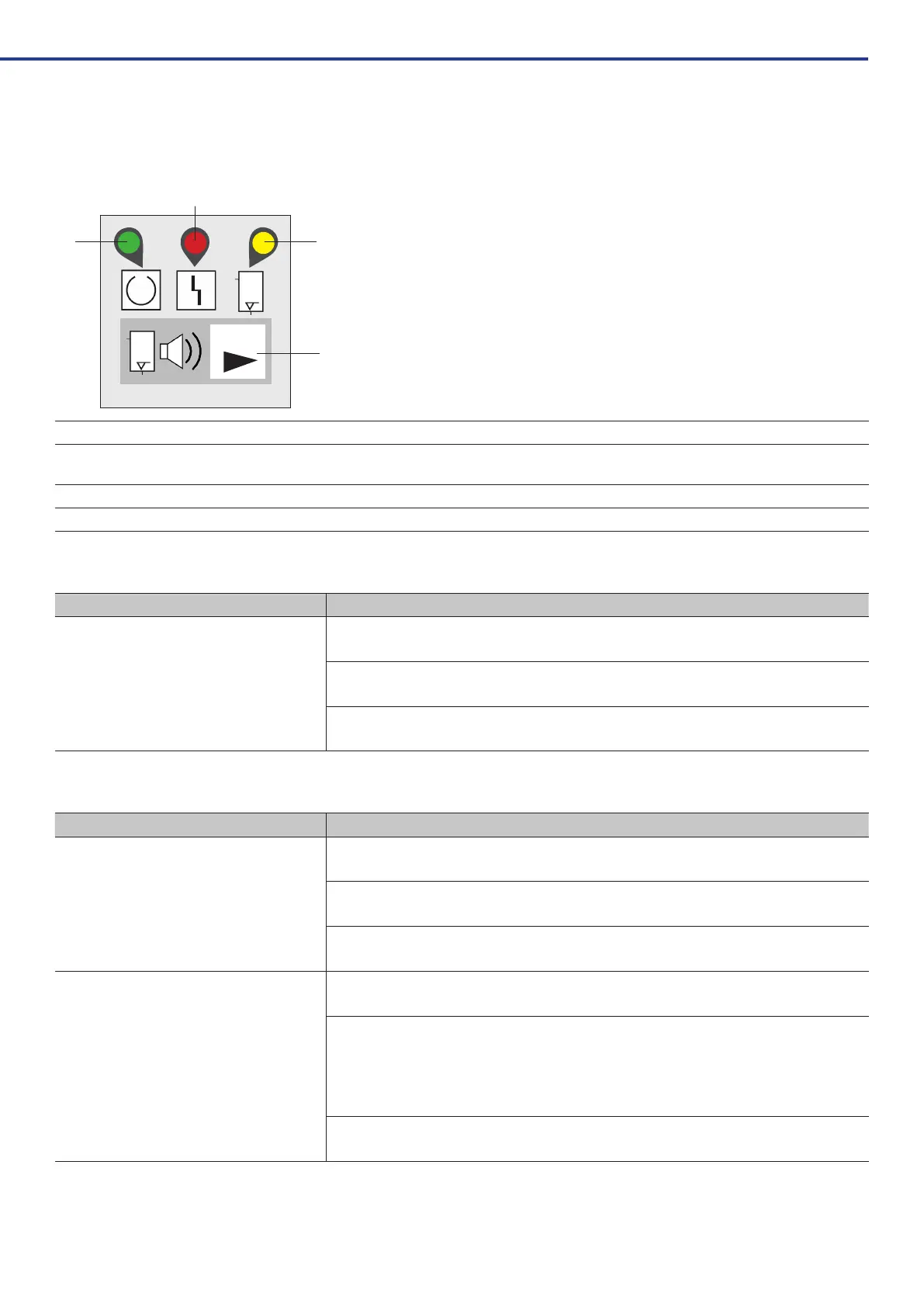
6.1. External display
RESET
1
3
4
2
1 LED 1 green ready for operation
2 LED 2 red Fault
see 6.4 Error messages
3 LED 3 yellow Disinfection display
4 RESET no color RESET button
6.2. Normal operation
Program Description
Switching on / test routine
Duringtheswitch-onprocess,theWEKcarriesoutanautomatictestroutineduringwhichLED1ashes
rapidly.
In the event of an error, the device does not go into operation; the error is displayed on the control panel
(see6.4).
Afterasuccessfultest,LED1lightsupconstantly,LED3lightsupbrieyandthedeviceisreadyfor
operation.
6.3. Additional programs
Program Description
Automatic emptying
Toemptythedeviceduringoperation,pressandholdtheRESETbuttonfor8seconds(LED1ashes)
until the second beep.
LED1thenashesslowly.Themixingandpressuretanksareemptywhennomorewatercomesoutof
theinstrumentorcupller.
TheWEKcantheneitherbeswitchedofforswitchedbacktonormaloperationbypressingtheRESET
button for 8 seconds.
Intensive decontamination
To increase the concentration of GREEN&CLEAN WK if necessary, intensive decontamination can be
activatedbypressingtheRESETbuttonfor4seconds(LED1ashes)untiltherstbeep.
Duringthisprocess,LED1lightsupconstantlyandLED3ashes.
Forthenextchemicaldosing,3cyclesofGREEN&CLEANWKareaddedrst,followedby2cyclesfor
each of the next 4 doses.
Nomorechemicalsareaddedduringthenaldosing,sothatthenormalconcentrationoftheworking
solution is restored once intensive decontamination is complete.
After decontamination, LED 3 goes out and a short buzzer signal sounds - the WEK is back in normal
operation.



 To Next Page