15
TEROS 54
To obtain detailed instructions, refer to the TEROS 54 Integrator Guide.
The SDI-12 protocol requires that all sensors have a unique address. The TEROS 54 sensor
factory default is an SDI-12 address of 0. To add more than one SDI-12 sensor to a bus, the
sensor address can be changed using a METER ZSC Bluetooth
®
sensor interface and the
ZENTRA Utility Mobile app as described below:
NOTE: The sensor SDI-12 address must be returned to 0 to work with ZENTRA loggers.
1. Using a mobile device, open the ZENTRA Utility Mobile app.
2. Connect the sensor to the ZSC.
3. Under Sensor Information, select the SDI Address dropdown.
4. Scroll through the options and select the desired SDI-12 address.
NOTE: Address options include 0–9, A–Z, and a–z.
Detailed information can also be found in the application note Setting SDI-12 addresses on
METER digital sensors using Campbell Scientific data loggers and LoggerNet.
When using the sensor as part of an SDI-12 bus, excite the sensors continuously to avoid
issues with initial sensor startup interfering with the SDI-12 communications.
2.4 REMOVAL
Do not shake the TEROS 54 to remove it from the soil. Do not try to pull the TEROS 54 from
the borehole with bare hands.
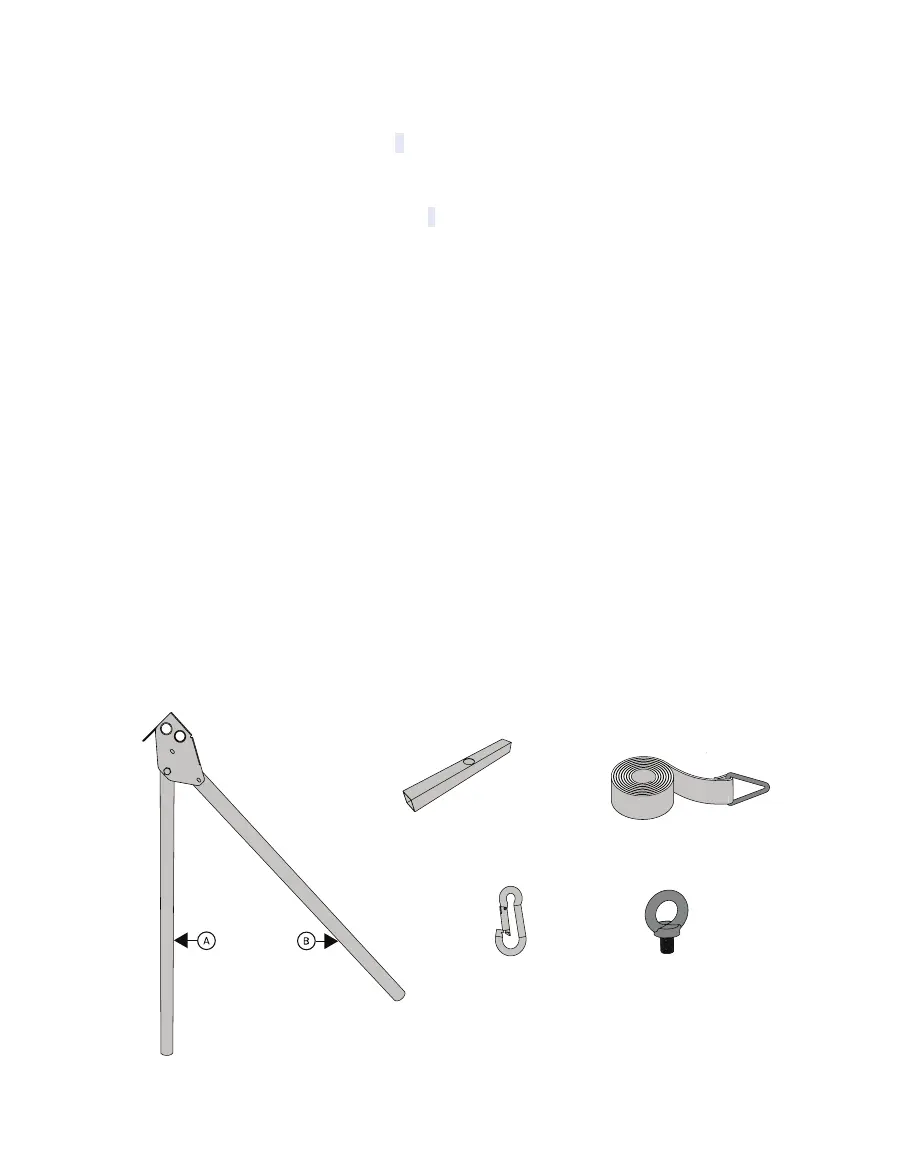
To remove the TEROS 54, only use the TEROS 54 Removal Tool (Figure11) available from
METER, consisting of an eyebolt, a carabiner, a tensioning strap, a lever tool (pile puller), and
a base (serves as a foundation by inserting the lever tool).
Lever
Base
Carabiner
Eyebolt
Tension strap
Figure11 Removal tool components



 To Next Page