MI 3125 / MI 3125E EurotestCOMBO Start-up guide
7
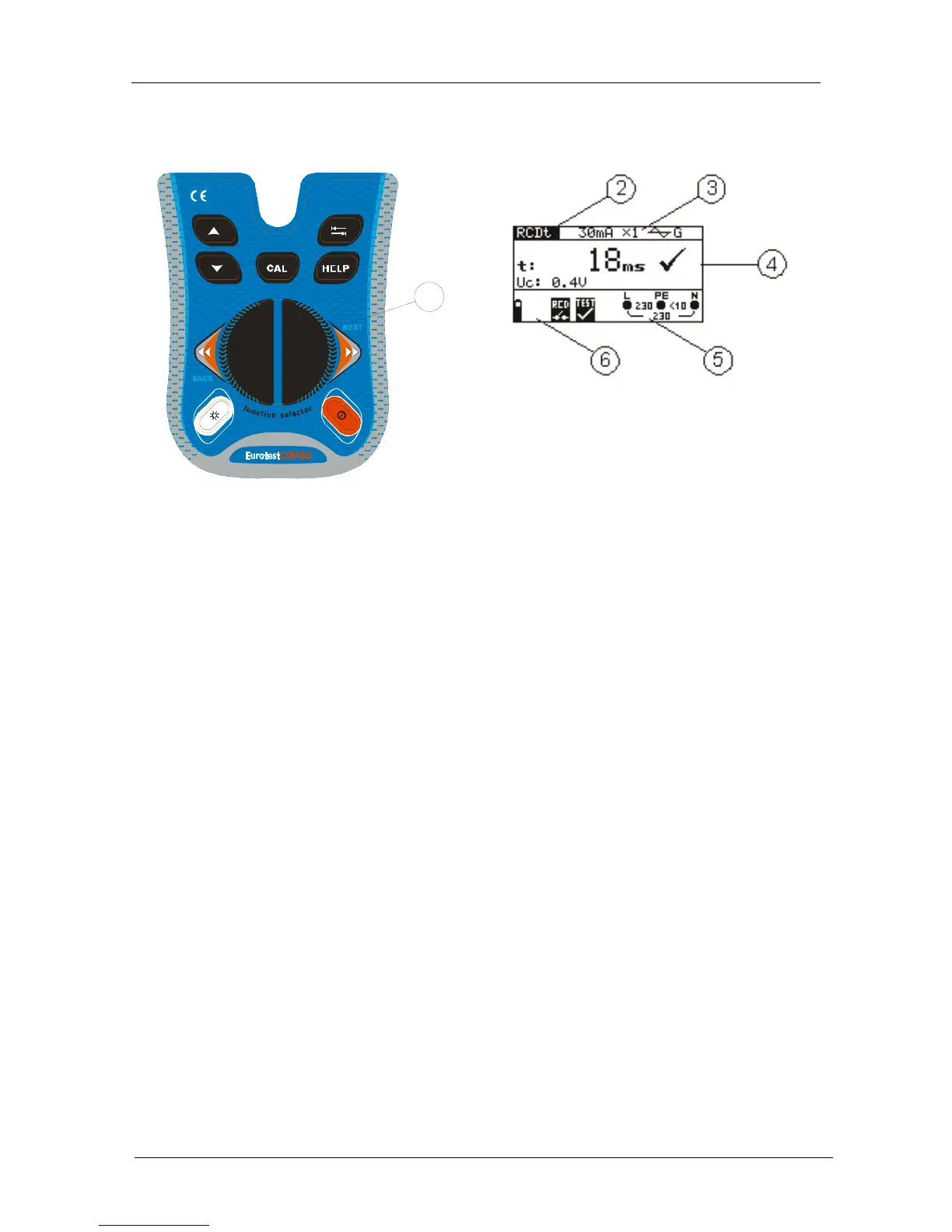
1.4 Function selector switch and instrument display
1
Legend:
1. Function switch.
2. Function or sub-function name.
3. Measuring parameters and limit values.
4. Result field.
In this field the main and sub-results together with the PASS/FAIL/ABORT status are
displayed.
5. Online voltage and output monitor.
6. Message field.
In this field battery status and warnings/messages related to the actual
measurement are displayed.
1.5 Battery handling
When replacing battery cells or before opening battery/fuse compartment cover,
disconnect any test leads/accessory connected to the instrument and switch off the
instrument. Hazardous voltage can exist inside the instrument!
Insert all cells correctly! If this is not performed correctly, the instrument will not
operate and the battery could be discharged.
If the instrument is not used for a long period of time, remove all of the battery from
the battery compartment to protect the instrument from leakage.
Alkaline or rechargeable Ni-MH battery cells (size AA) can be used. The operating
hours are given for cells with a nominal capacity of 2100 mAh.
Do not recharge alkaline battery cells.The battery will begin charging as soon as the
power supply adapter is connected to the instrument. The in-built protection circuits
control the charging procedure.



 To Next Page
 Loading...