6.0 Operating the Digital Top Box
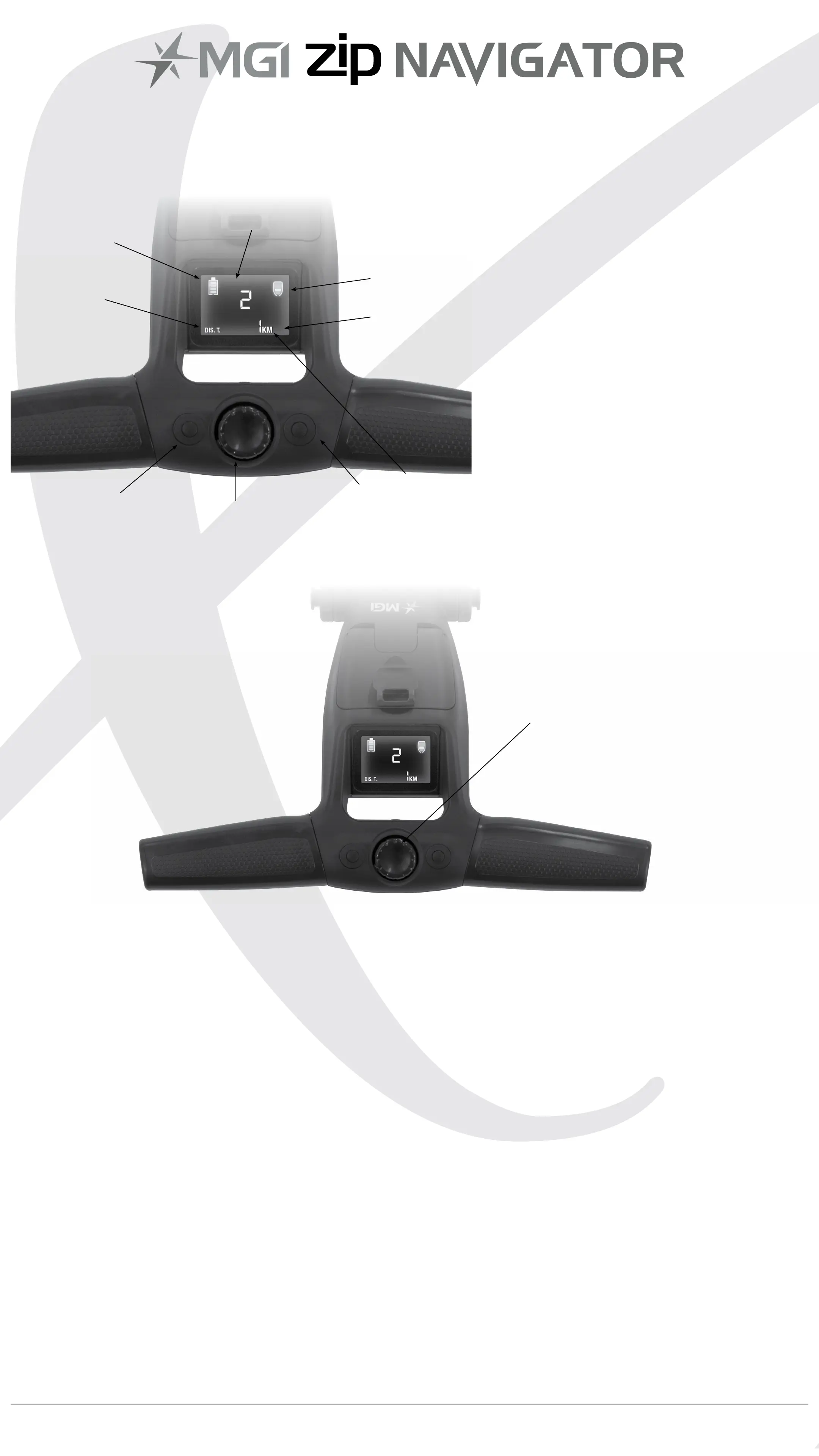
6.1 Top Box Display
6.2 Start / Stop the Zip Navigator
Zip Navigator Speed Control
Please note the following points regarding the Zip Navigator Speed
Control.
1. To select the desired speed, rotate the speed control button. Turning
the speed control button clockwise will increase the speed, whilst
anti-clockwise will decrease speed.
2. The speed setting chosen is displayed in the centre of the
screen.
Please note you will feel notches as you rotate the speed control. The notches
do not indicate a change in speed. The speed will only increase or decrease as
the number changes in the display.
3. To start the Zip Navigator at this desired speed, press the speed
control button.
4. Another tap will stop the Zip Navigator.
5. The desired speed can be altered up or down while the
Zip Navigator is moving.
Speed Control
1. Distance Mode Button
2. Unit Setting Button
3. ON / OFF Speed Control
Button
4. Speed Setting Indicator
5. Main Battery Level Indicator
6. Distance Mode
7. Distance
8. Unit Measurement
9. Remote Battery Level Indicator
1.
3.
2.
8.
9.
7.
6.
5.
4.
MGI Zip Navigator User Manual 12


 To Next Page