© Microhard Systems Inc. 17
2.3 Getting Started with WiFi
This Quick Start section walks users through setting up a basic WiFi AP (Access Point). For
additional settings and configuration considerations, refer to the appropriate sections in the
manual. This walkthrough assumes all setting are in the factory default state.
2.3.1 Setting up WiFi
Use Section 2.2 Getting Started with Cellular to connect, power up and log in and con-
figure the Carrier in a VIP4G.
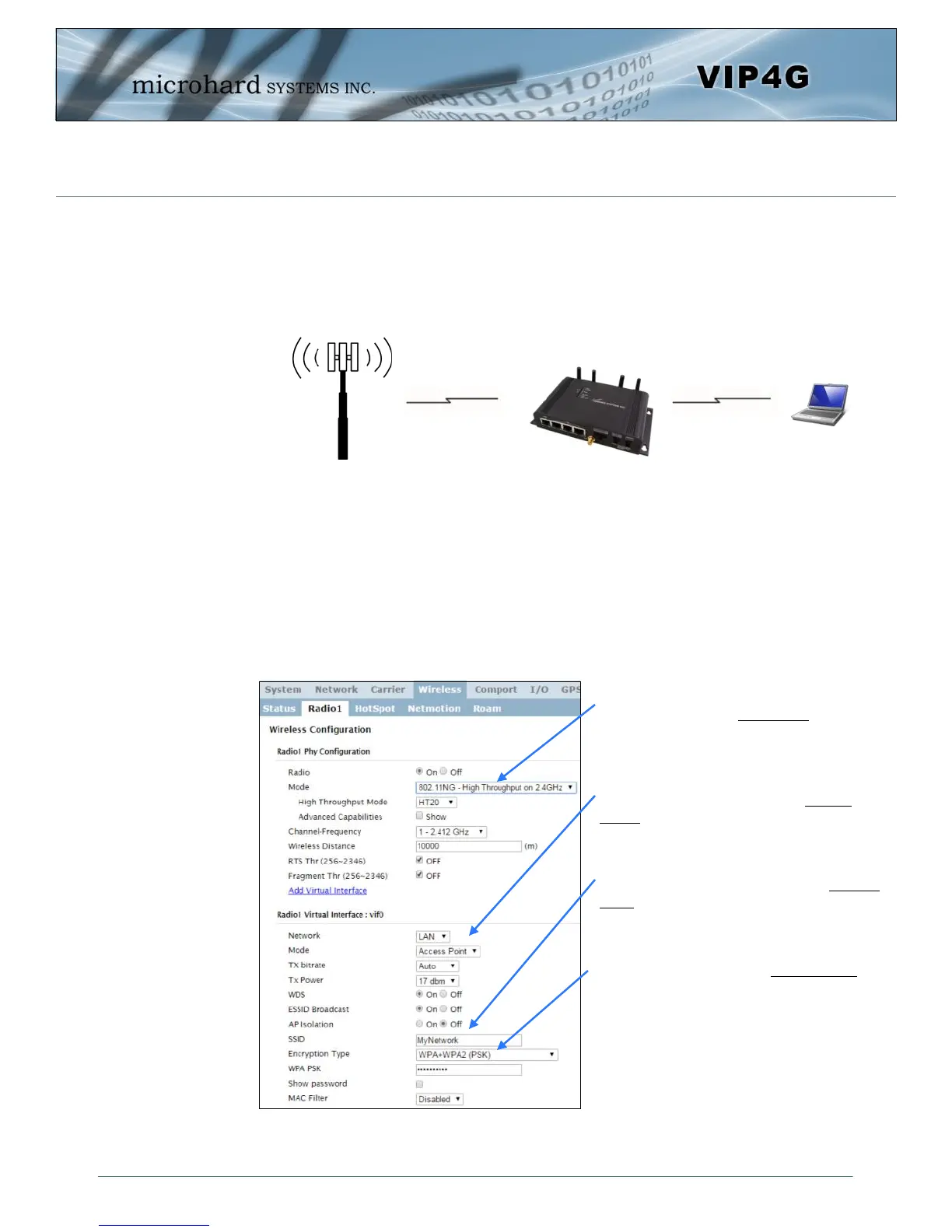
Click on the Wireless > Radio1 Tab to setup the WiFi portion of the VIP4G.
Cell Tower
2.0 Quick Start
4G LTE
802.11g/n
In Radio1 Phy Configuration, ensure
the mode is set for 802.11NG.
In the Radio1 Virtual Interface, en-
sure that the Mode is set for Access
Point.
Enter a name for the Wireless Network
under SSID. This example uses MyNet-
work
(Recommended) Set a password for the
WiFi, this example uses MyPassword
Click Submit.



 To Next Page