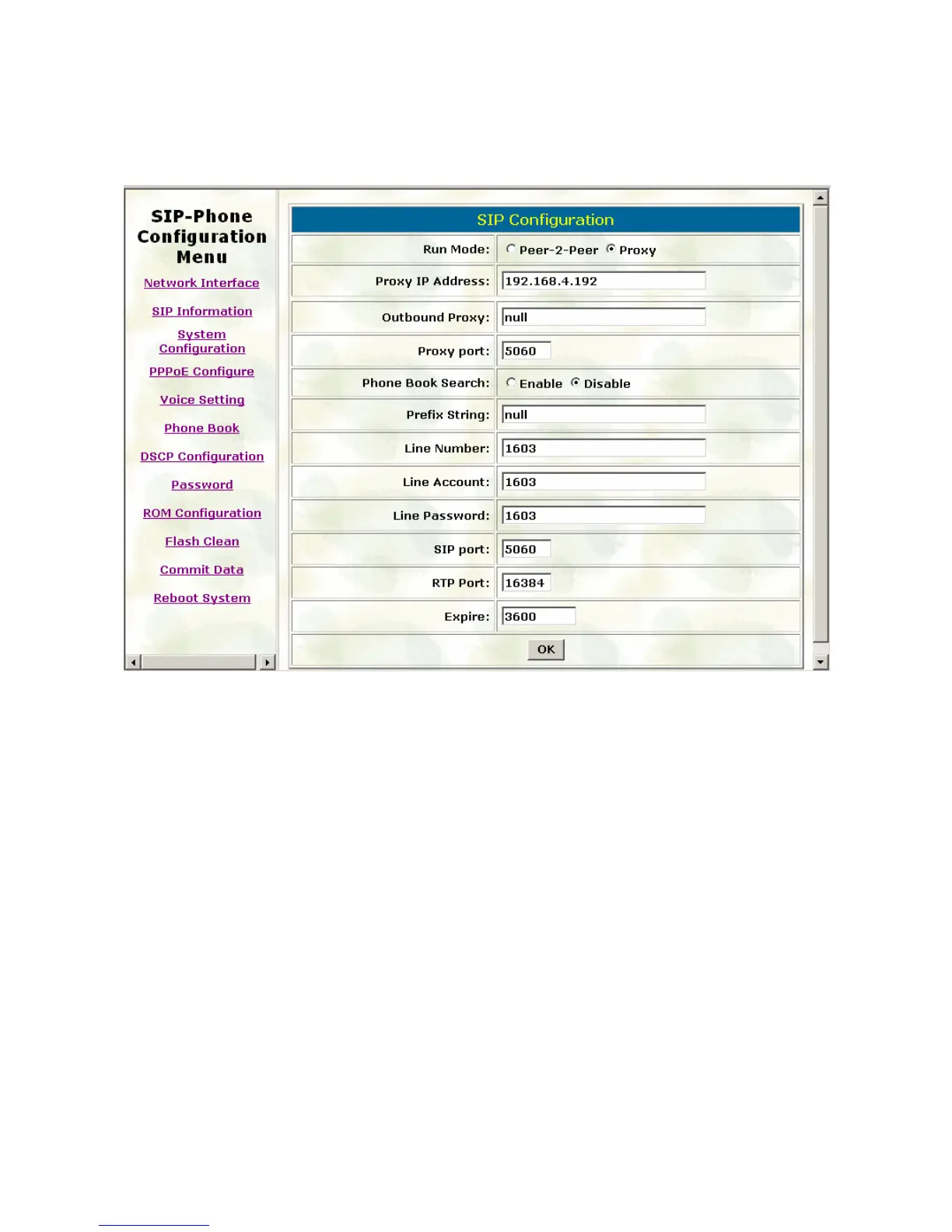
3.2. SIP Information
Please refer to chapter 4.13 [SIP] command
Run Mode: Select IP-Phone to work under Peer-to-Peer mode or Proxy mode.
Proxy IP Address: Set Proxy IP Address or URL address (Domain Name Server must be
configured. Please refer to Network Interface).
Outbound Proxy: Set IP Address or URL address (Domain Name Server must be
configured. Please refer to Network Configure) of outbound Proxy server.
Proxy port: Set Proxy port for IP-Phone to send message, default value is 5060, if there is
no special request of Proxy server, please don’t change this value.
Phone Book Search: enable/disable phone book search function. If user enabled this
function, IP-Phone will search dialed number in phone book to see if there is any matched
table before send to Proxy server, and if there is a matched data in phone book, IP-Phone
will make call to related IP address.
Prefix String: set prefix string. If user ID contains alphabets, user can set it as prefix string
here. For example, if Account Name is 123, IP-Phone will sent out messages as Account
Name @”IP address of Proxy”, if user set prefix as abc, IP-Phone will set out as
abc123@”IP address of Proxy”. This function is for special proxy server.
Line Number: identify one number for the IP-Phone to register to the Proxy.
26



 To Next Page