Selecting a Lens
Creating a Good
Image
A
v4.1.3, April 2012 Visionscape FrontRunner™ User’s Manual A-3
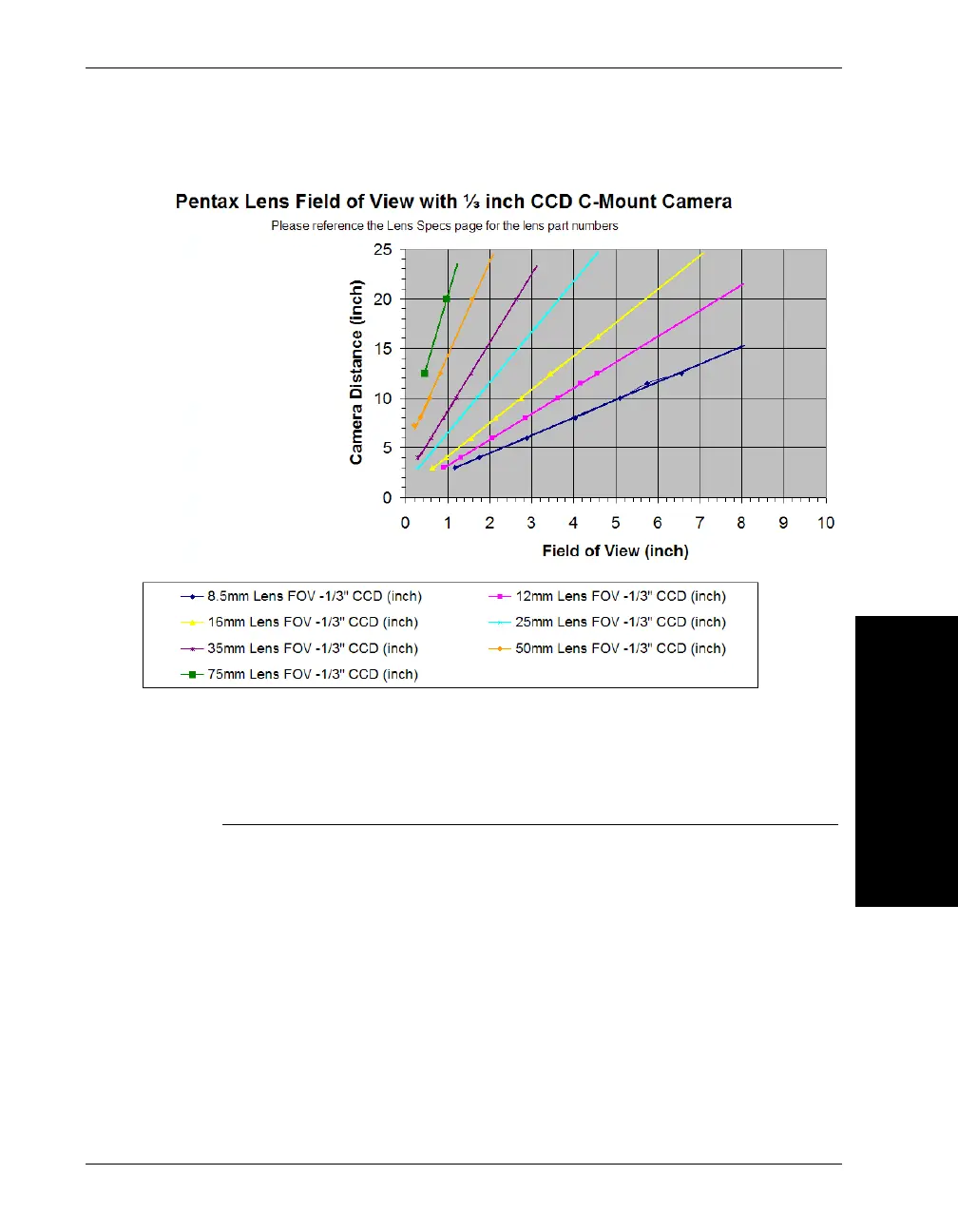
FIGURE A–2. Lens Selection Chart - Pentax Lens w/One Third Inch
CCD
For very precise measurements, you may need to use a precision, low-
distortion lens. Contact Microscan Application Engineering for a
recommendation that is specific to your measurement task (for more
information, see “Technical Support” on page xi).
First, determine the required horizontal field of view (FY). Use a
dimension of .75 inches from the front of the camera to the first mounting
hole, as shown in Figure A–3. Next, measure the distance from the part to
the first mounting hole on the camera (D).
12mm (98-92800572)
16mm (98-92800573)
25mm (98-92800574)
Lenses and Part Numbers:



 To Next Page