EasyManua.ls Logo

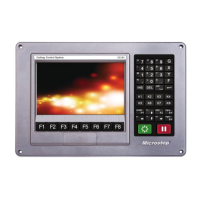
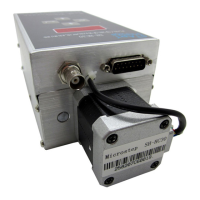
MicroStep SH-HC30 - User Manual

MicroStep SH-HC30
54 pages
Print Icon
To Next Page IconTo Next Page
Loading...
Contents
Micr ostep
1. Preface
Model SH-HC30
Height Controlle r for Flame /
2.
3.
Overview
Installation
Plasma Cutting Torch
User Manual
4. Quick operation guide
5. Commissioning
6. Operating guide
7. Control panel
8.
Troubleshooting
9Initial positioning
10
Commands b e tw e e n CNC
a n d height controller
11. Remote height controller
5
PDF 文件使用 "pdfFactory Pro" 试用版本创建 ww w.fine
p
rint.com.cn

Other manuals for MicroStep SH-HC30

Questions and Answers

  • N
    Nancy HintonAug 15, 2025
    Why is my MicroStep SH-HC30 motor not working?
    • D
      Dylan CoxAug 16, 2025
      The motor may not be working because it is not powered on. Ensure that the power is on. Another possible cause is an abnormal power supply voltage, so check the power supply. Also, the motor might be locked-rotor, in which case you should reduce the load.
  • A
    Andre OwensAug 18, 2025
    What to do if my MicroStep Controller has no display?
    • B
      brianortegaAug 19, 2025
      If your MicroStep Controller has no display, check the power supply and ensure that the power is on.
  • R
    ramirezaliciaAug 22, 2025
    How to fix inaccurate height on MicroStep Controller?
    • K
      Kayla CervantesAug 22, 2025
      If you are experiencing inaccurate height with your MicroStep Controller, it may be due to changes in the operating environment. Implement “a key height calibration”.
  • A
    allison49Aug 25, 2025
    What to do if MicroStep SH-HC30 shows upper limit alarm?
    • G
      Gabriela KelleyAug 25, 2025
      If your MicroStep Controller is showing an upper limit alarm, it indicates that the running exceeds the upper limit value of machinery. Check the limit switch in high position.
  • R
    Rebecca CarrilloAug 28, 2025
    What to do if MicroStep SH-HC30 Controller shows lower limit alarm?
    • J
      jordanramirezAug 28, 2025
      If your MicroStep Controller is showing a lower limit alarm, it means the running exceeds the lower limit value of machinery. Check the limit switch in low position.
  • L
    Lauren RodriguezAug 30, 2025
    How to fix instable signal on MicroStep Controller?
    • M
      Mary LynchAug 31, 2025
      If you are experiencing an unstable signal with your MicroStep Controller, the cutting board may not be grounded reliably. Ensure it is grounded firmly.
  • J
    Jared JacksonSep 2, 2025
    Why is the tracking too slow on my MicroStep SH-HC30 Controller?
    • A
      Anthony KellySep 2, 2025
      If the tracking on your MicroStep Controller is too slow, it may be because the speed reduction zone value is too big. Reduce the speed reduction zone value d.
  • M
    Mr. Tom Ward Jr.Sep 6, 2025
    How to stop MicroStep SH-HC30 from vibrating wildly?
    • R
      Roberto RussoSep 6, 2025
      If your MicroStep Controller is vibrating wildly, it may be due to the speed reduction zone value being too small. Increase the speed reduction zone value d.
  • H
    Heather ChoiSep 9, 2025
    How to improve low accuracy of MicroStep Controller?
    • E
      Eric SmithSep 9, 2025
      If the accuracy of your MicroStep Controller is too low, it may be because the dead zone value is too big. Reduce the dead zone value E.
  • H
    hannahgriffinSep 12, 2025
    How to fix slight vibration in MicroStep Controller?
    • K
      Kiara SmithSep 12, 2025
      If you are experiencing a slight vibration in your MicroStep Controller, it may be because the dead zone value is too small. Increase the dead zone value E.

Summary

Preface and Important Information

Purpose and Manufacturer Details

Defines the controller's purpose and provides manufacturer contact information.

Key Statements and Warnings

Covers important statements, safety warnings, and precautions for operation and installation.

Terminology Definitions

Defines key terms used in the manual like calibration zones and parameters.

Product Overview

Technical Features

Highlights key technological aspects such as stepper motor, linear calibration, and digital technology.

Main Technical Parameters

Lists specifications including power requirements, applicable motors, and dimensions.

Installation Guide

Mechanical Installation

Covers component placement and mounting procedures for the height controller.

Electrical Connection Modes

Details wiring for external switch control and CNC system interface (I/O, RS232).

Voltage Divider Board Details

Explains the voltage divider board's function, interfaces, and provides dimensional drawings.

Operation Guides

Quick Operation Guide

Guides on operating the panel using external switches for capacitance/arc voltage modes.

CNC System Interface Operation

Explains operation via CNC system I/O and RS232 communication interfaces.

Operation Flows

Outlines the general and routine operational workflows for the controller.

Operating Guide

Parameter Setting Procedures

Details how to set various operational parameters like limits, modes, and dead zones.

Manual and Automatic Operation

Explains manual control procedures and how automatic height control functions.

Commissioning and Debugging

Initial Commissioning for Capacitive Detection

Covers initial setup and debugging for capacitive height detection.

One-Keystroke Height Calibration

Outlines the procedure for debugging and performing one-keystroke height calibration.

Controller Panel and Display

Control Parameters Overview

Lists and defines the controller's adjustable parameters (H, L, A, E, d, C, b).

Operation Panel and Display Interpretation

Describes the operation panel layout, buttons, knobs, and display indicators.

Troubleshooting

Common Faults and Solutions

Provides a table of common faults, inspection methods, and corrective measures.

Initial Positioning Function

Positioning Mode and Process

Describes the impact position switch, its use, and the steps for positioning.

Positioning Height Setting and Arc Voltage Collection

Explains setting positioning height (B) and collecting initial arc voltage (A).

CNC System Commands (M Commands)

M Commands for Direct Control

Lists M commands for direct output port control of cutting torch and height controller.

M Commands for Routine Cycles

Details M commands for routine flame and plasma cutting cycles (M07, M08, M50).

Remote Height Controller

Function Introduction

Introduces the remote controller's purpose, design, and communication capabilities.

Operation Guide

Guides on operating the remote controller including buttons, knobs, and indicator lights.

Wiring Instructions

Provides wiring diagrams and terminal definitions for connecting the remote controller.

Installation Dimensions

Shows the physical installation dimensions for the remote controller.

MicroStep SH-HC30 Specifications

General IconGeneral
BrandMicroStep
ModelSH-HC30
CategoryController
LanguageEnglish

Related product manuals