
 Need help?
Do you have a question about the Microtek LS-3800 and is the answer not in the manual?
Legal statement on document reproduction rights and permissions.
Lists Microtek and third-party trademarks used in the manual.
States accuracy checks and Microtek's right to change content without prior warning.
Explains the meaning of caution and warning symbols for user safety.
Provides crucial safety instructions for connecting and using the power supply.
Details precautions for safely moving, storing, and preventing damage to the scanner.
Advises on safe operation, especially regarding the upper cover and potential hazards.
Outlines safe practices for cleaning and servicing, recommending professional help.
Highlights the scanner's main features like LED lighting and software integration.
Lists the necessary hardware and software specifications for scanner operation.
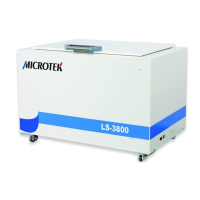
Identifies each physical component of the scanner and its function.
Guides users to verify all components are present after unpacking the scanner.
Provides step-by-step instructions for installing the scanner's software and drivers.
Explains how to use elevating knobs to secure the scanner on a flat surface.
Details the procedure for locking the scanner for transport and unlocking it for use.
Instructs on connecting the power cord and USB cable to the scanner and computer.
Describes the correct method for placing originals on the scanner bed.
Details how to launch and use the ScanWizard Graph software for scanning tasks.
Explains how to utilize the ScanWizard DTG software for textile and printing scans.
Provides instructions for using the ScanWizard Cubi software for stereogram capture.
Offers a procedure for safely cleaning the scanner's glass surface.
Advises on general maintenance and when to seek professional service.
Provides solutions for common scanner problems and error messages.
Lists detailed technical data, operating environment, and warranty for the scanner.
 Scanning
| resolution | 800 dpi |
|---|---|
| scanning area | 24" x 37" (610 mm x 940 mm) |
| scanning speed | 30 sec @ 200 dpi, A1 color |
 Power
Power| voltage | AC 100V to 240V |
|---|---|
| frequency | 50/60 Hz |
| current | 1.7A Max |
Operating Environment| operating temperature | 50° to 95°F (10° to 35°C) |
|---|---|
| relative humidity | 20% to 85% |
| light source | LED (Light Emitting Diode) |
 Weight and Dimensions
| dimensions | 52.4" x 34.3" x 34.7" |
|---|---|
| weight | 379 lbs. |
| dimensions in mm | 1330 mm x 870 mm x 880 mm |









 To Next Page