DIGITAL PROPORTIONAL R/CSYSTEM
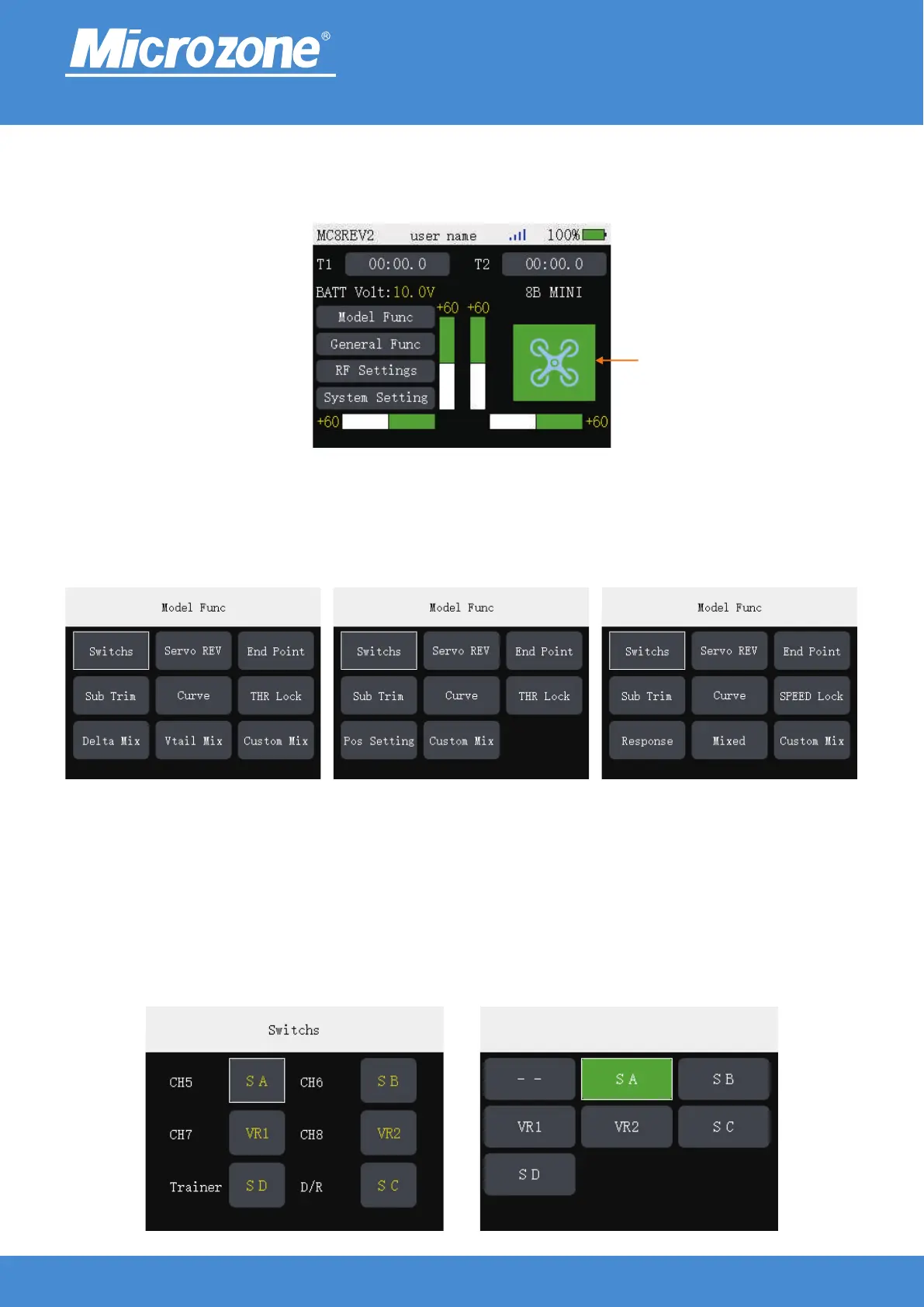
Model Func:
In the main page press <MENU> key to select <Model Func> button, then press <MENU> key to enter the
model function, you can press <UP> key or <DOWN> key to select the corresponding option, then press
<MENU> key to enter.
2.4GHz
FHSS
Switchs:
With the lever that allows you to customise each function, one switch can control multiple channels /
functions;
Press the <UP> key or <DOWN> key to select the corresponding option, press the <MENU> key to enter
the setting option, then press the <UP> key or <DOWN> key to select the corresponding option, and press
the <MENU> key to finish.
Model :Type Press <MENU> key in the main page, then press <UP> key or <DOWN> key to select the
<Model Icons> button, then press <MENU> key to enter the selection of models page.
Fixed-wing mode UAV mode
Vehicle / boat mode
www.microzone.cn
ModelType
-12-



 To Next Page