DIGITAL PROPORTIONAL R/CSYSTEM
2.4GHz
FHSS
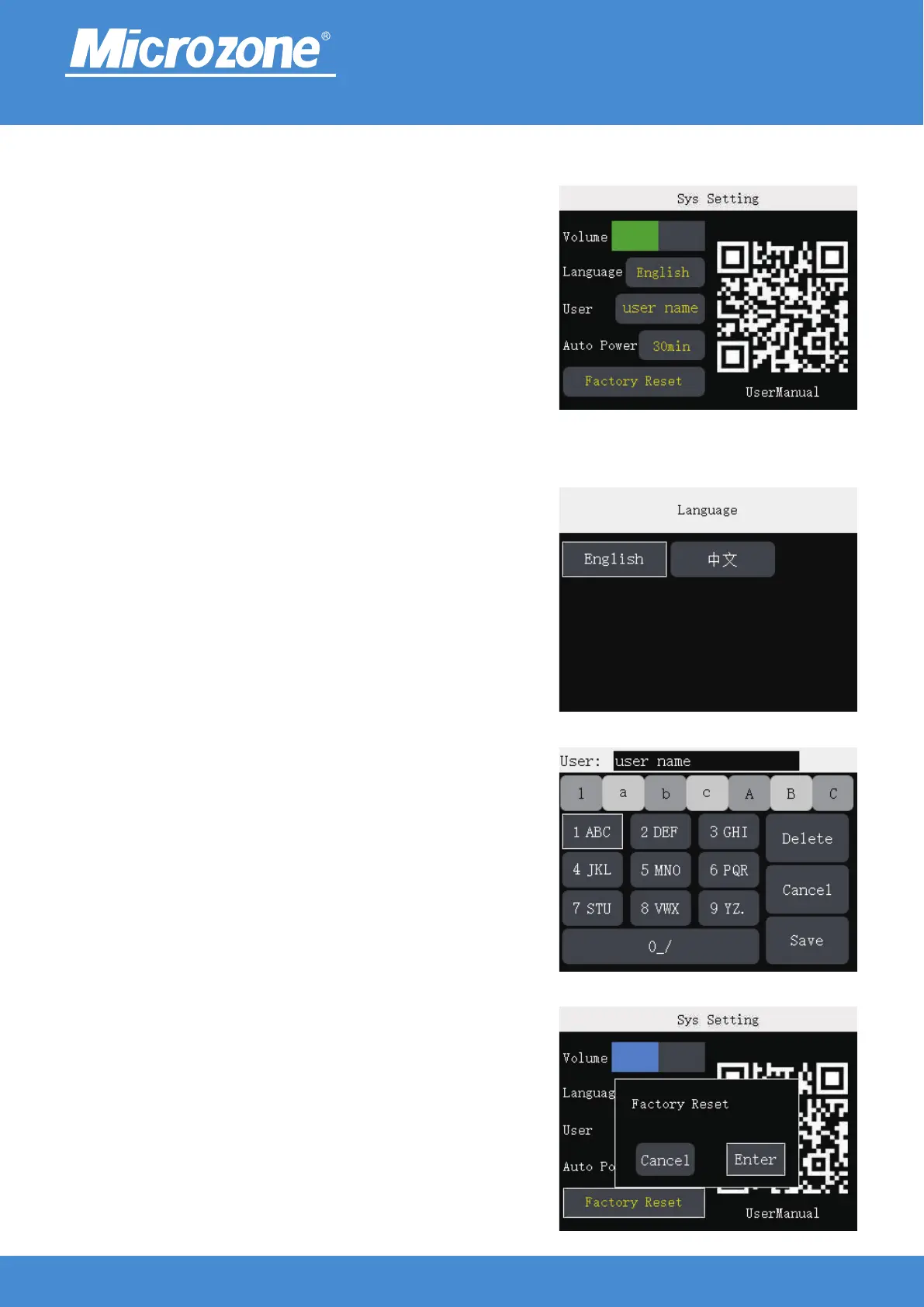
User:
You can modify the user name, after modifying, press <UP> key
or <DOWN> key to select <Save> button, then press <MENU>
key to finish.
Factory Reset:
All settings can be reset to return to the original settings;
Press the <DOWN> key to select the <Enter> button, then
press the <MENU> key to finish.
www.microzone.cn
Language:
Support Chinese and English;
Press<UP> key or <DOWN> key to select Chinese or English,
then press <MENU> key to finish.
Sys Setting:
In the main page press <MENU> key , press the <UP> key or
<DOWN> key to select the <System Setting> button, then press
<MENU> key to enter the sys setting.
Volume:
Press <MENU> key, then press <UP> key or <DOWN> key to
adjust the volume, then press <MENU> key to finish.
Auto Power:
Press the <MENU> key, then press the <UP> key or <DOWN>
key to select the time for auto power off, then press the
<MENU> key to finish.
UserManual:
Scan the QR code to download the manual.
-23-



 To Next Page