Mid-Continent Instruments and Avionics, Wichita, KS
REV. B, October 31, 2012 34 Manual Number 9017782
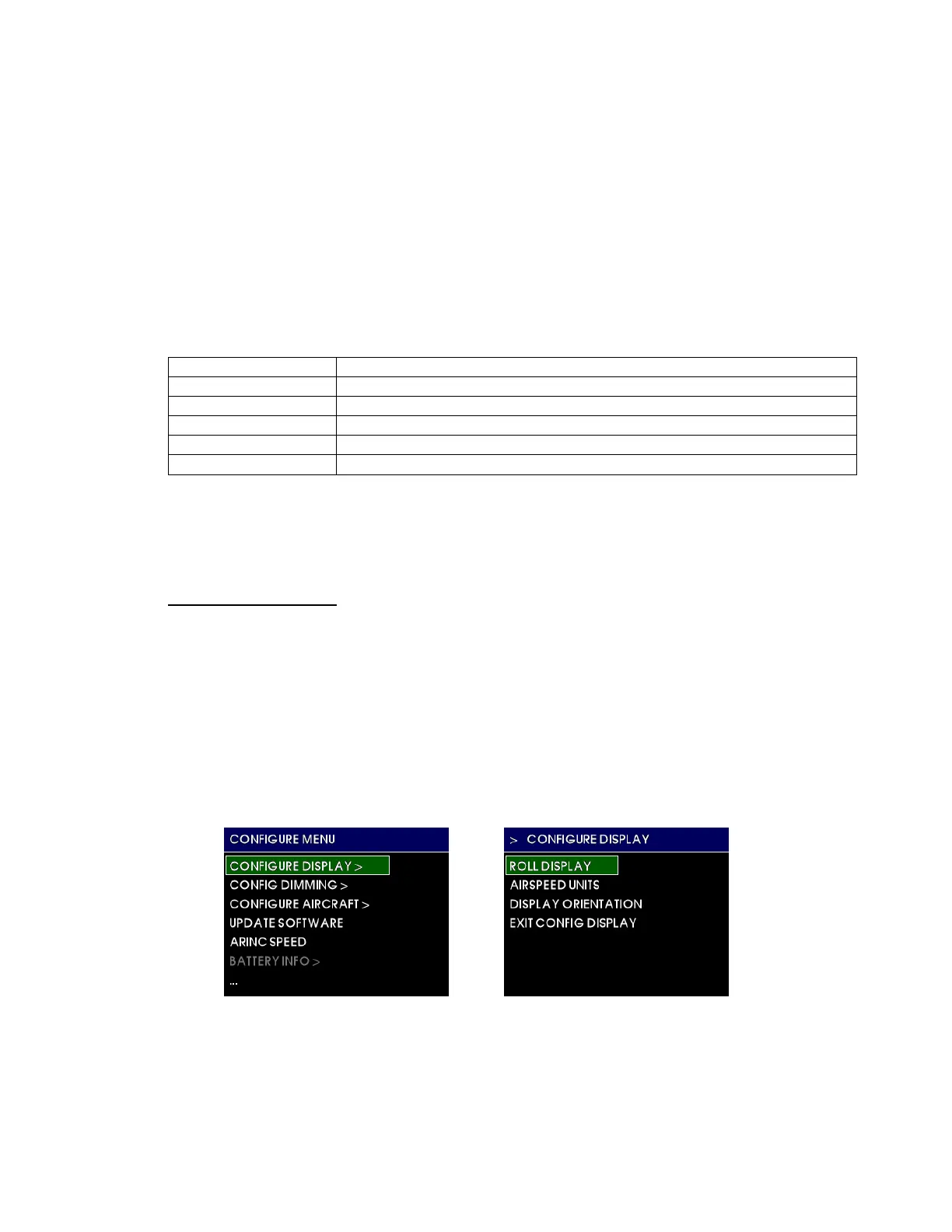
The CONFIGURE MENU root directory contains the following sub-menus and actions:
CONFIGURE DISPLAY
CONFIG DIMMING
CONFIGURE AIRCRAFT
UPDATE SOFTWARE
ARINC SPEED
BATTERY INFO
POWER OFF
ACCEPT CHANGES
CANCEL CHANGES
The parts of the menu structure are defined below:
Menu title white text on a blue background at the top of each menu and sub-menu
Current item cursor highlighted by a white box and green background
Selectable items any selectable item on the menu is indicated in white text
Unavailable items information only / unavailable options are indicated with gray text
> indicates an item has another menu page associated with it
… indicates there are more options available past the bottom of the screen
Menu operation throughout the MD302 is simple and intuitive. See Section 3.3.2.1 for details.
NOTE: In Configuration Mode, unlike in the Options Menu, any changes made to any settings will not
be saved unless you select ACCEPT CHANGES prior to exiting the Configuration Mode/Menu.
4.2 CONFIGURE DISPLAY
When the CONFIGURE DISPLAY menu option is selected, it opens the sub-menu shown below in
Figure 4.2. Note the sub-menu title at the top of the screen and indication (>) that there is a parent
menu associated with it. The EXIT CONFIG DISPLAY will return the user back to the CONFIGURE
MENU.
Within the CONFIGURE DISPLAY sub-menu are the following options:
ROLL DISPLAY
AIRSPEED UNITS
DISPLAY ORIENTATION
EXIT CONFIG DISPLAY
FIGURE 4.2


 To Next Page
 Loading...