Service manual, 2016-12
28 / 42
9. Function and operation
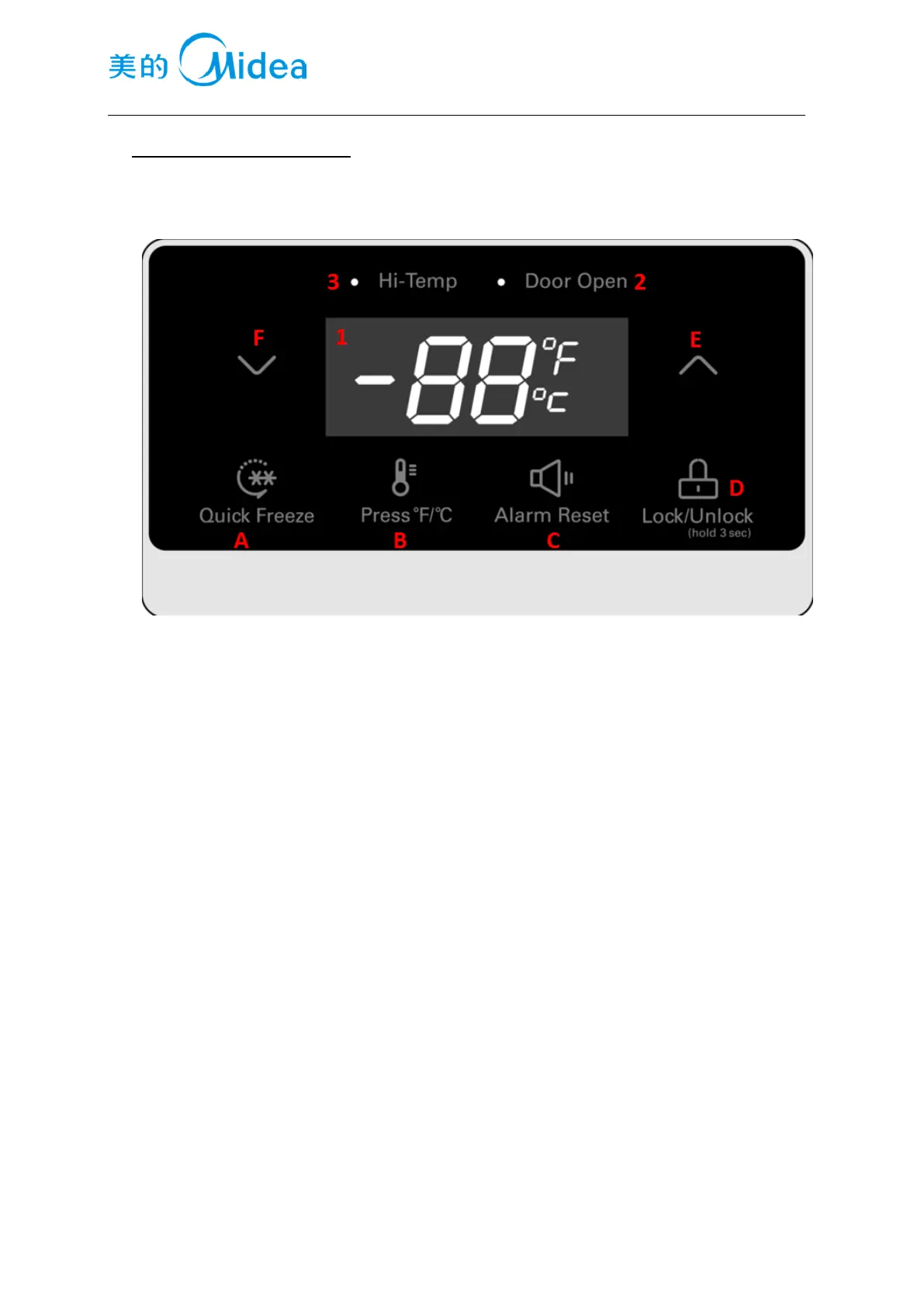
9.1 Operation panel
9.2 Button
A Quick Freeze button
B. Switch button of Fahrenheit display and Centigrade display
C. Cancellation button of alarm
D. Lock/Unlock button
E. Temperature adjustment button (warmer)
F. Temperature adjustment button(Colder)
9.3 Display screen
1. Freezer/Refrigerator temperature display zone
2. Indicated lamp of door open alarm
3. Indicated lamp of high temperature alarm
9.4 Display
·when power on the refrigerator, the display panel lighten for 3 seconds, and the start-up
tone rings at same time, if it is the 1
st
time to power on the refrigerator, the default temperature setting is
-18℃
·Normal display
Digital display zone: if there is any failure happen, it will display the error code, if no, it displays the
setting temperature,
·Display control(normal working mode, inspection mode)
If in locked status, the display panel will darken if there is no any operation on control panel for 30
seconds, any operation on control panel will wake up the display panel.
If there is failure happen, and there is corresponding error code related to this failure, the error code will




 To Next Page