47
Implement field settings
Using the Check function
6.1 Overview
6.2 Digital Display and Button
Settings
This chapter describes how the system configuration can
be implemented once the installation is complete and
other relevant information.
It contains the following information:
Only master unit has the full menu functions, slave units
only have error code checking and cleaning functions.
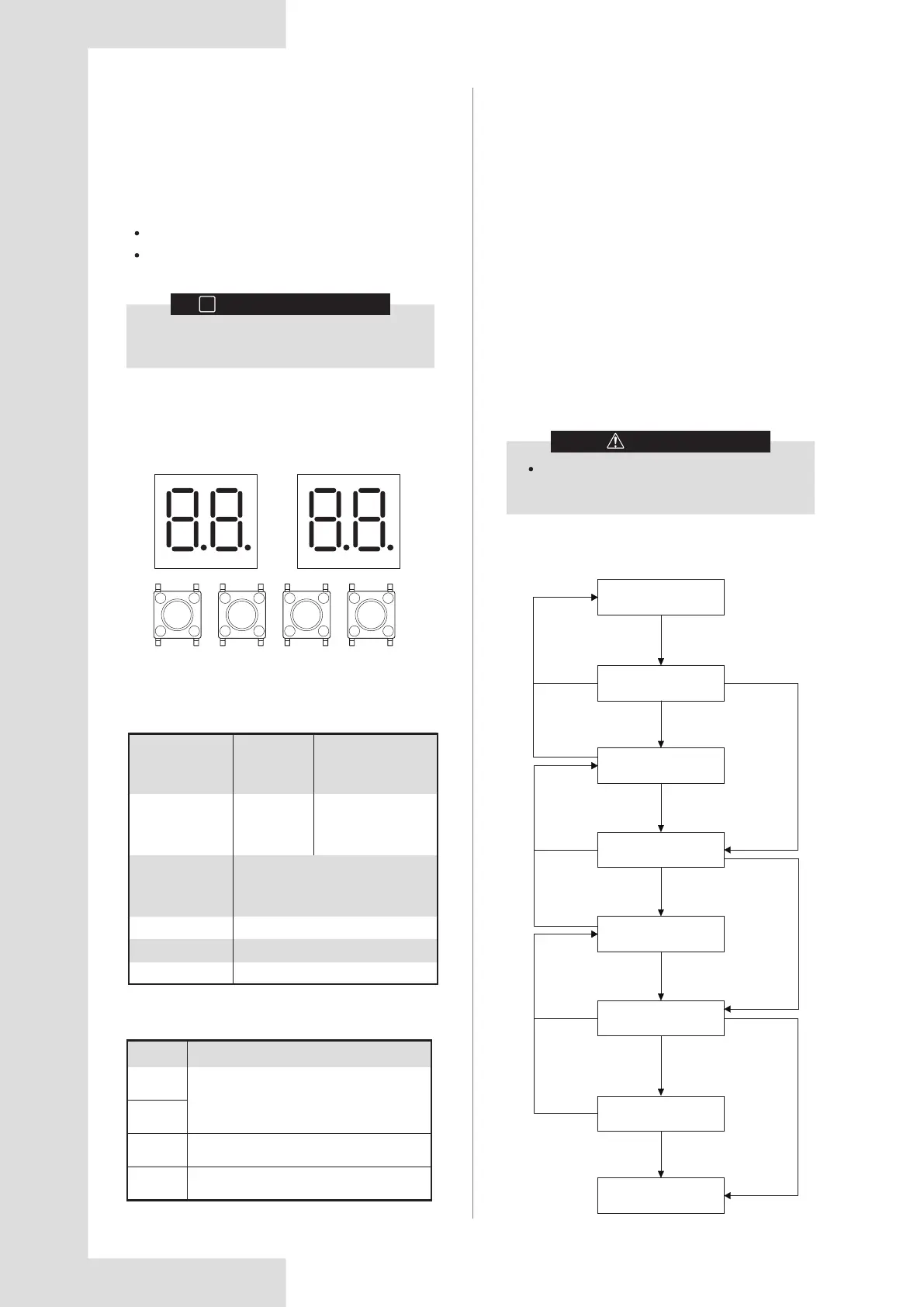
1. Press and hold the SW5 “MENU” button for 5 seconds
to enter menu mode, and the digital display displays “n1”.
2. Press the SW3 / SW4 “UP / DOWN” button to select
the first level menu “n1”, “n2”, “n3”, “n4” or “nb”.
3. Press the SW6 “OK” button to enter the specified first
level menu, for example, enter “n4” mode.
4. Press the SW3 / SW4 “UP / DOWN” button to select
the second level menu from “n41” to “n47”.
5. Press the SW6 “OK” button to enter the specified
second level menu, for example, enter “n43” mode.
6. Press the SW3 / SW4 “UP / DOWN” button to select
the specified menu mode code.
7. Press the SW6 “OK” button to enter the specified menu
mode.
6 CONFIGURATION
INFORMATION
i
The installation personnel should read this
chapter.
MENU DOWN
SW5 SW4
UP
SW3
OK
SW6
DSP1 DSP2
6.2.1 Digital display output
6.2.2 Function of buttons SW3 to SW6
6.2.3 Menu mode
SW3 (UP)
Button
Function
In menu mode: previous and next buttons
for menu modes.
Not in menu mode: previous and next
buttons for system check information.
SW4
(DOWN)
SW5
(MENU)
Enter / exit menu mode.
SW6
(OK)
Confirm to enter specified menu mode.
Operate the switches and push buttons with
an insulated stick (such as a closed ball-point
pen) to avoid touching live parts.
CAUTION
Menu mode selection flowchart:
Table 6.2
Figure 6.1
Start
Press and
hold “MENU”
5 seconds
Display "n0"
Press “MENU”
Press “MENU”
Press “MENU”
Press “MENU”
Press “MENU”
Press “MENU”
Display "nX"
Display "nXY"
Display "nXY"
Display "Z"
Display "Z"
Press "UP" or
"DOWN" to
choose "X"
Press "UP" or
"DOWN" to
choose "Y"
Press "UP" or
"DOWN" to
choose "Z"
Press “OK” to
confirm "X"
Press “OK” to
confirm "Y"
Press “OK” to
confirm "Z"
Press "OK" to confirm "X"Press "OK" to confirm "Y"Press "OK" to confirm "Z"
Confirm “Z”
Outdoor unit state
Parameters
displayed on
DSP1
Parameters
displayed on DSP2
Standby Unit's address
The number of indoor
units in communication
with the outdoor units
Normal operation
Running speed of the compressor
in rotations per second
Error or protection
Placeholder and error or protection code
In menu mode
System check
Display menu mode code
Display system check code
Table 6.1




 To Next Page