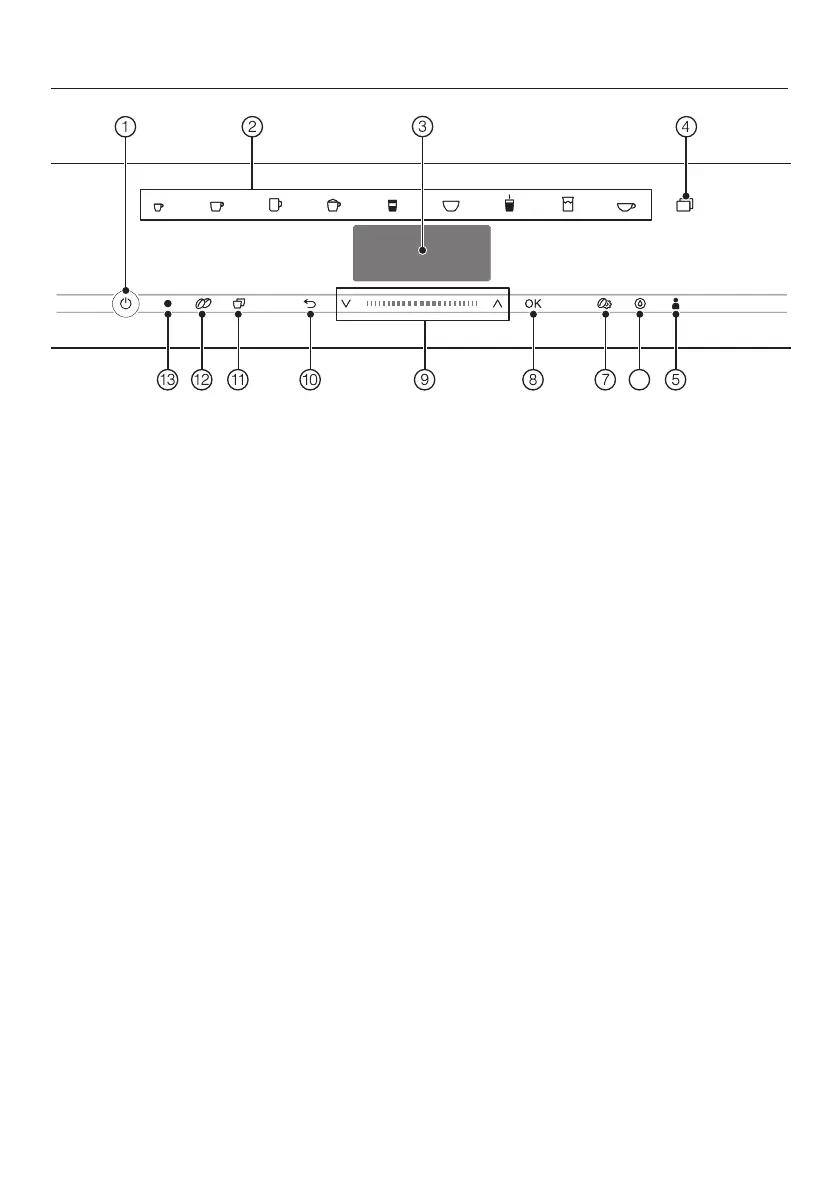
Controls and indicators
18
a
On/Off button
For switching coffee machine on and
off
b
Drink buttons
For making drinks
c
Display
For showing information about the
current action or status
d
sensor button
– For making other drinks, e.g.,
Ristretto, Capuccino italiano
– For making a pot of tea or coffee
– Settings menu
e
Profilessensor button
For creating and managing profiles
f
Maintenancesensor button
Maintenance programs, e.g.,Descale
g
Parameterssensor button
For displaying or changing drink
settings
h
OKsensor button
For confirming display messages and
saving settings
i
Navigation area with arrow
buttons
For scrolling through lists, selecting
entries, or changing values
j
“Back”sensor button
For returning to the previous menu
and canceling unwanted actions
k
“2portions”sensor button
For dispensing 2portions of a drink
at once
l
“DoubleShot”sensor buttons
For making a particularly strong and
aromatic coffee by using twice as
much ground coffee but the same
amount of water
m
Optical interface
(for Miele Technical Service only)



 To Next Page