Grinder setting
38
The grinder setting determines the
contact time between the ground coffee
and the water, known as the extraction
time. When the ideal grinder setting is
selected, the machine dispenses a
perfect cup of coffee with a fine,
hazelnut-brown crema.
The grinder setting you select will be
used for all coffee drinks.
There are various ways to tell whether
the coffee grinder is set correctly.
The grinder setting is too coarse if the
coffee or espresso is watery and tastes
acidic. The crema is very pale.
Set a finer grinder setting.
The grinder setting is too fine if the
coffee or espresso tastes too bitter and
the crema is dark brown.
Set a coarser grinder setting.
Only adjust the grinder one setting at
a time.
Start making a new drink to grind
beans again. Adjust the grinder
setting one setting at a time again.
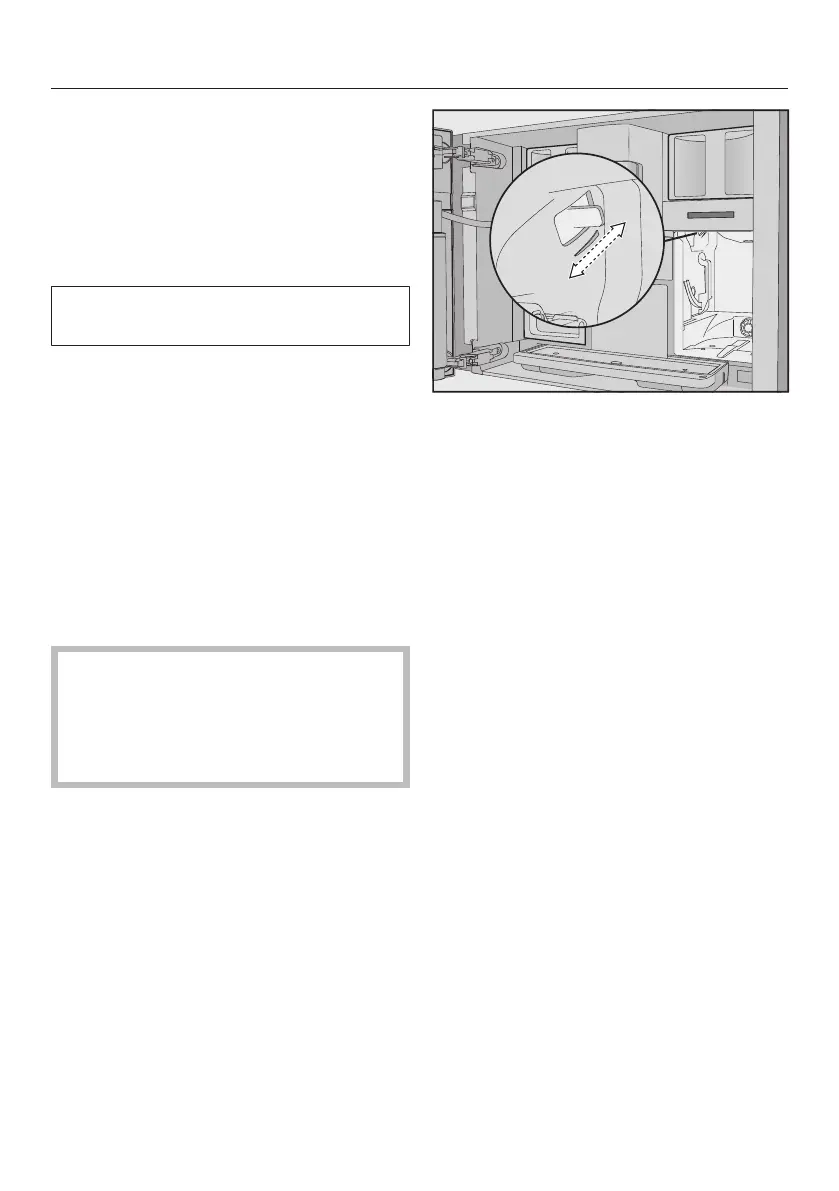
Adjusting the fineness of grind
The slide control for adjusting the
fineness is located on the top left
behind the water container.
Open the machine door.
Remove the water container.
Push the slide control a maximum of
one setting forward (for finer grinding)
or one setting backward (for coarser
grinding).
Replace the water container.
Close the machine door.
Make one cup of coffee.
After this, you can adjust the grinder
setting again.



 To Next Page