Problem solving guide
59
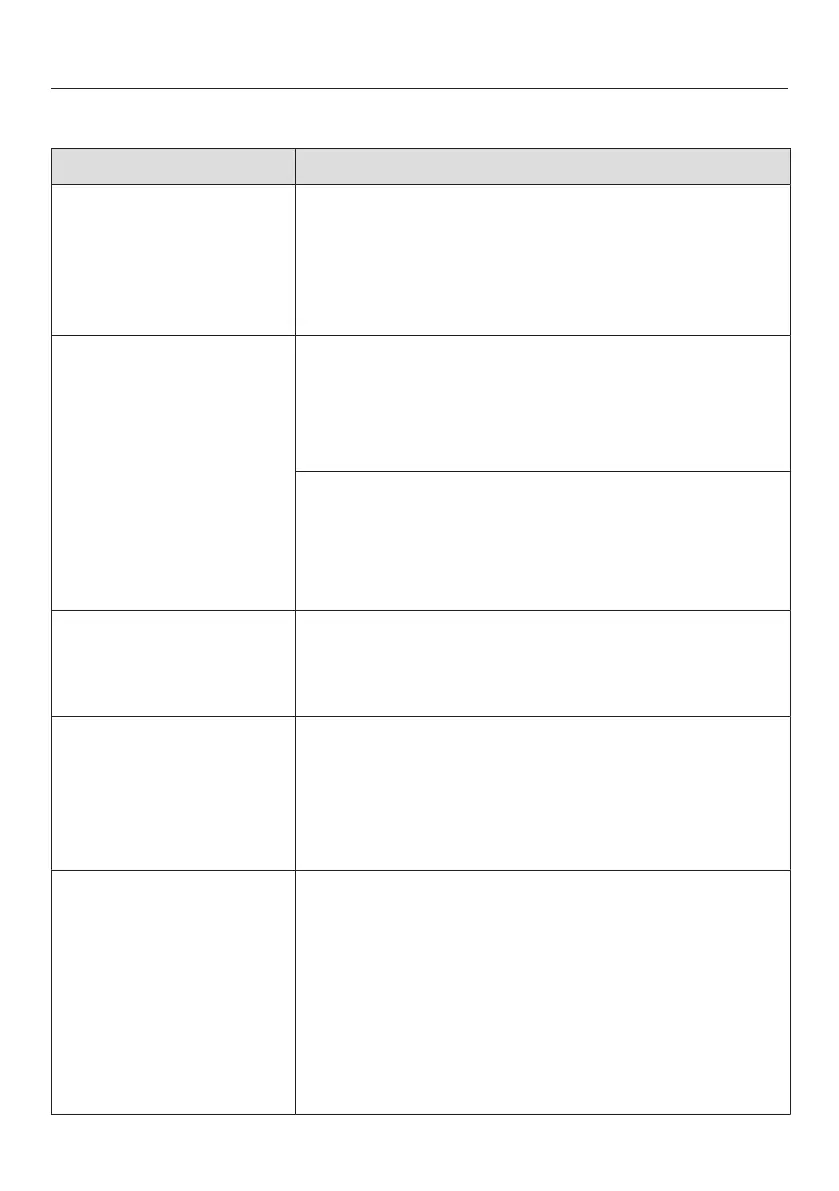
Display warnings
Message Cause and remedy
lights up on the
display, the appliance
does not get cold even
though the controls and
the interior lighting are
working.
Demo mode is switched on.
Switch Demo mode off (see “Selecting further
settings – Switching Demo mode off”).
Nothing is visible on the
display. The display is
completely blank.
Energy-saving mode is switched on. If the appliance
has not been operated for a while (approx.
10minutes), the display is switched off.
Touch the display.
The display shows the most recent indication.
Sabbath mode is switched on. The interior lighting is
switched off and the appliance is cooling down.
Touch the display.
will then light up white in the display (see “Selecting
further settings – Switching Sabbath mode on/off”).
is lit up in the display
and the appliance
cannot be used.
The safety lock has been activated.
Deactivate the safety lock temporarily or switch it
off completely (see “Selecting further settings -
Activating or deactivating the safety lock”).
lights up in the
display and an audible
tone also sounds.
The Clean ventilation grille reminder setting has
been activated. This is the prompt to clean the
ventilation grille.
Confirm the message by touching in the display
and clean the ventilation grille (see “Cleaning and
care - Cleaning the ventilation grille”).
lights up yellow in
the display and an
alarm also sounds.
The door alarm has been activated (see
“Temperature and door alarm”, section “Door alarm”).
Touch
in the display.
The alarm message is confirmed and the warning
tone stops.
The current temperature will appear in the display
again.
Close the appliance door.
The alarm will stop.





 To Next Page