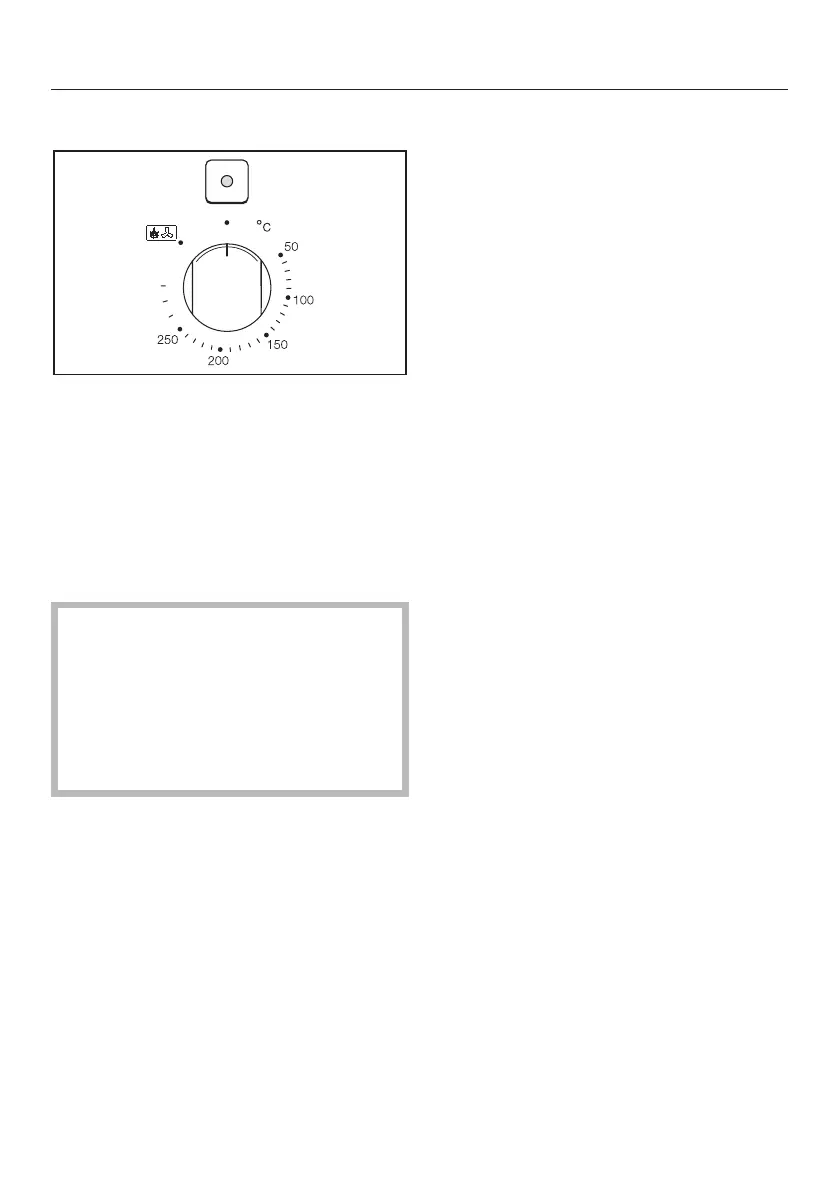
Temperature selector
The temperature can be freely selected
within the given range.
The temperature selector is also used
to start pyrolytic cleaning. First turn the
function selector to one of the pyrolytic
cleaning programmes then turn the
temperature selector to the "." posi-
tion.
Turn the temperature selector in a
clockwise direction to the required
setting. Then turn it back in an
anti-clockwise direction. Do not
force it right round in a clockwise di
-
rection as this would damage the se
-
lector.
Temperatures for a cooking process
can only be selected up to the
maximum on the dial. There is a
resistance at this point. Inadvertently
turning it to the "." symbol prevents
the heating coming on for a cooking
process. The indicator light above the
selector will flash.
When the temperature selector is
turned to a temperature setting, the in
-
dicator light above the selector comes
on.
When the temperature is reached, the
heating element switches itself off and
the indicator light goes out. When the
temperature falls below that selected,
the heating element switches on again
and the indicator light comes on again.
The indicator light comes on during
pyrolytic cleaning and remains on until
the temperaure has lowered sufficiently
for the door to be opened.
The indicator light flashes if a pyrolytic
programme has been selected but the
temperature selector is not at the "."
symbol.
It also flashes if the temperature selec-
tor is at the "." symbol and the func-
tion selector is not pointing to a
pyrolytic function.
It will also flash if the appliance has a
fault. (See "Correcting minor faults").
Oven - use
27



 To Next Page