The timer can:
–
display the time of day.
–
switch the oven off, or on and off au
-
tomatically.
Pyrolytic cleaning cannot be con-
trolled by the timer.
The timer must not be used during
pyrolytic cleaning. This would inter-
rupt the cleaning process and could
prevent the door from unlocking.
Controls
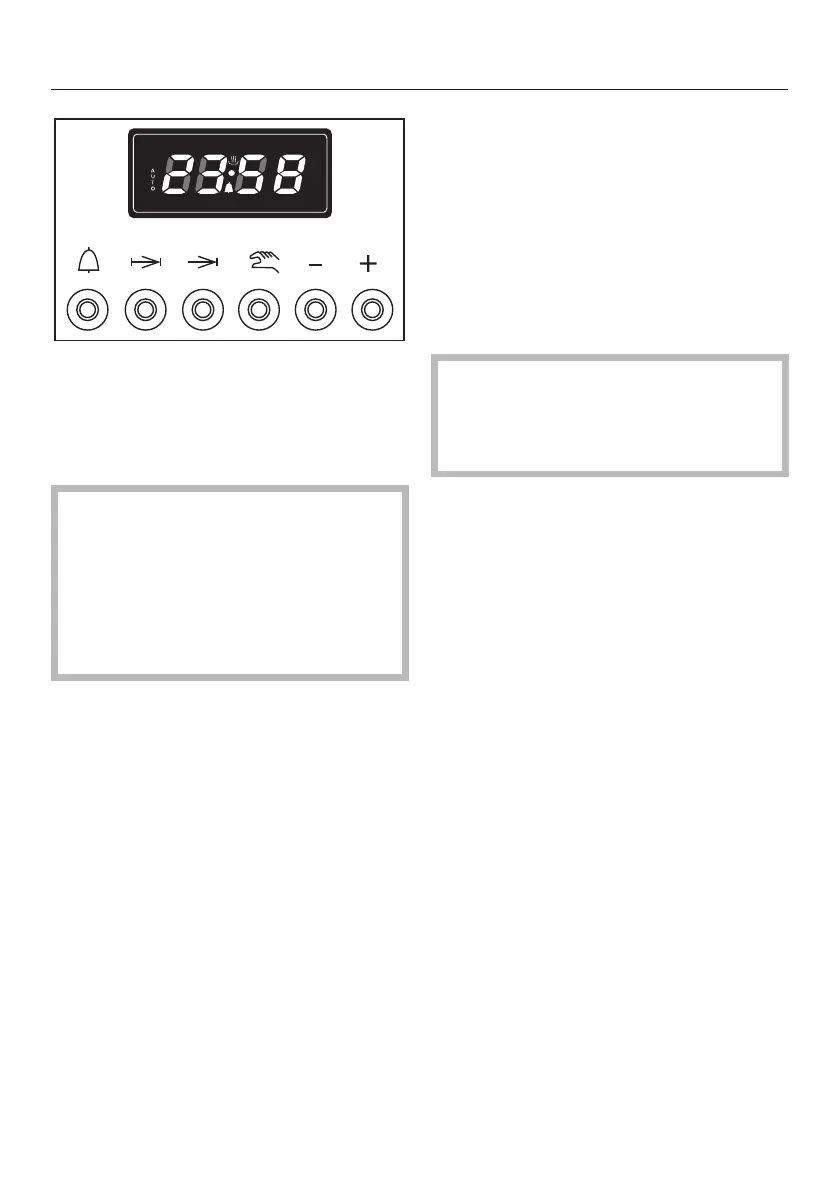
The push buttons are used:
l to set a time for the minute minder
g to set the cooking duration
) to set the end of cooking time
i – to set the time of day
– to delete cooking times
– – to reduce times
– to change the audible tone
+ to increase times
Entries made are shown in the display.
To use the timer
Proceed as follows:
^
Press the relevant button.
The symbol for that function will flash in
the display.
^
Whilst the symbol is flashing, use the
"+" or "–" buttons to set the time in
hourskminutes.
If you do not set the time within
approx. 5 seconds you will have to
press the relevant button and enter
the time again.
At the end of the cooking process the
buzzer will sound and the relevant sym-
bol will flash in the display.
If the "l" symbol is the only one dis-
played the oven can be used without
the timer.
Timer
30



 To Next Page