29 MM660 Installation Instructions
Control Box Settings
3
1 2 3 4
ON
STATUS
LEARN RMT
LEARN
MAST LIMIT
S3
S2
SOFT START OFF
WARNING OFF
OPEN PULL
SLV OPEN DLY.
MODE1 OFF
MODE2 OFF
ON
ON
PUSH
SIMULT.
ON
ON
120 MIN MAX
AUTO CLOSE TIME STALL FORCE
4
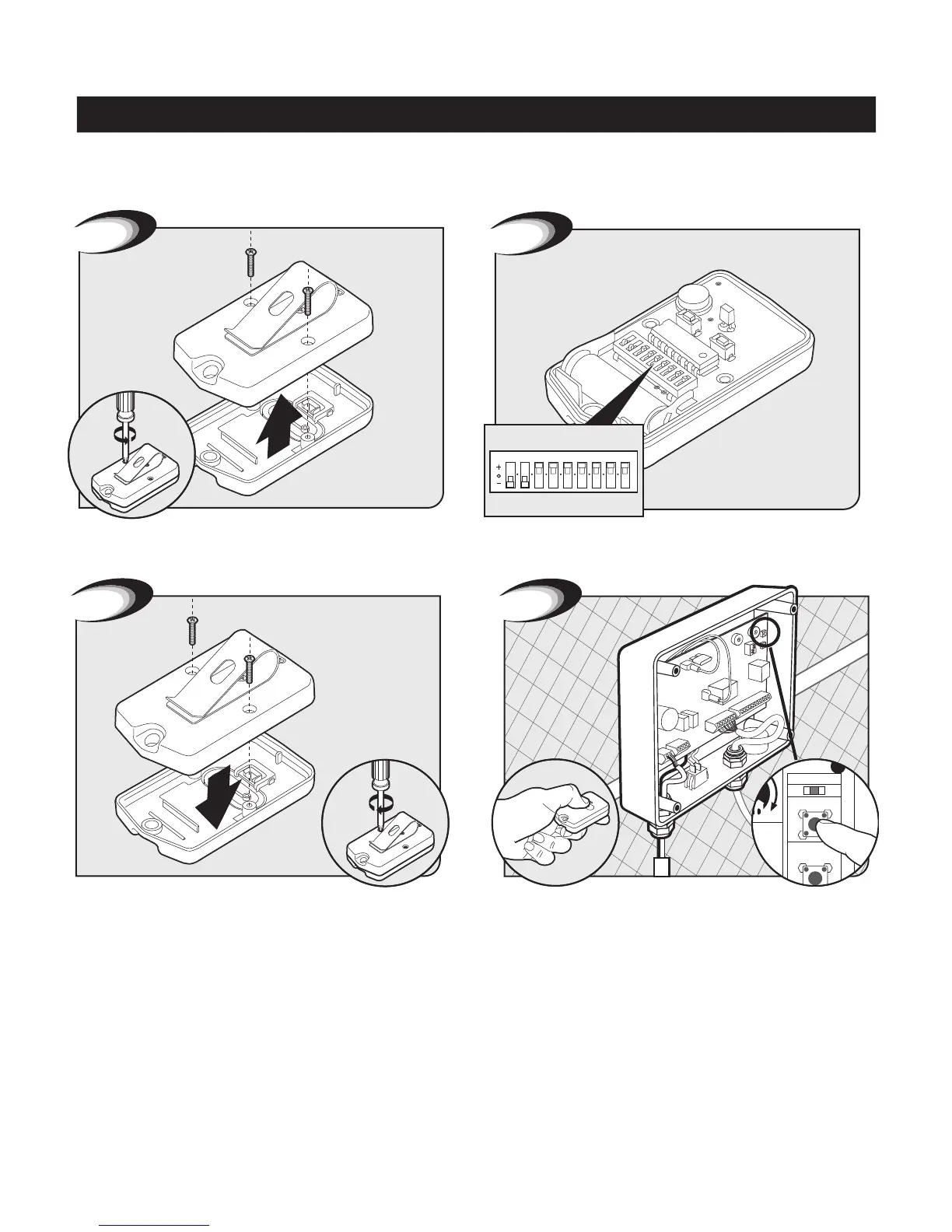
Replace and secure back cover of the opener remote.
Go to control box. Press and hold the remote and “LEARN RMT”
buttons simultaneously for 5 seconds or until the alarm sounds.
Setting Personal Transmitter Code
Remove back cover of the opener remote. Flip opener remote over. Use small screwdriver to move switch-
es to random positions. If you have more than one transmitter,
now is a good time to set them all with the same code.
1
1 2 3 4 5 6 7 8 9
2
All GTO transmitters are set to a standard code at the factory and are ready to operate your gate opener.
For your safety and security, however, we strongly recommend that you replace the factory setting with your own personal code.
Follow the directions below:










 To Next Page