4.2 Switch Group 2
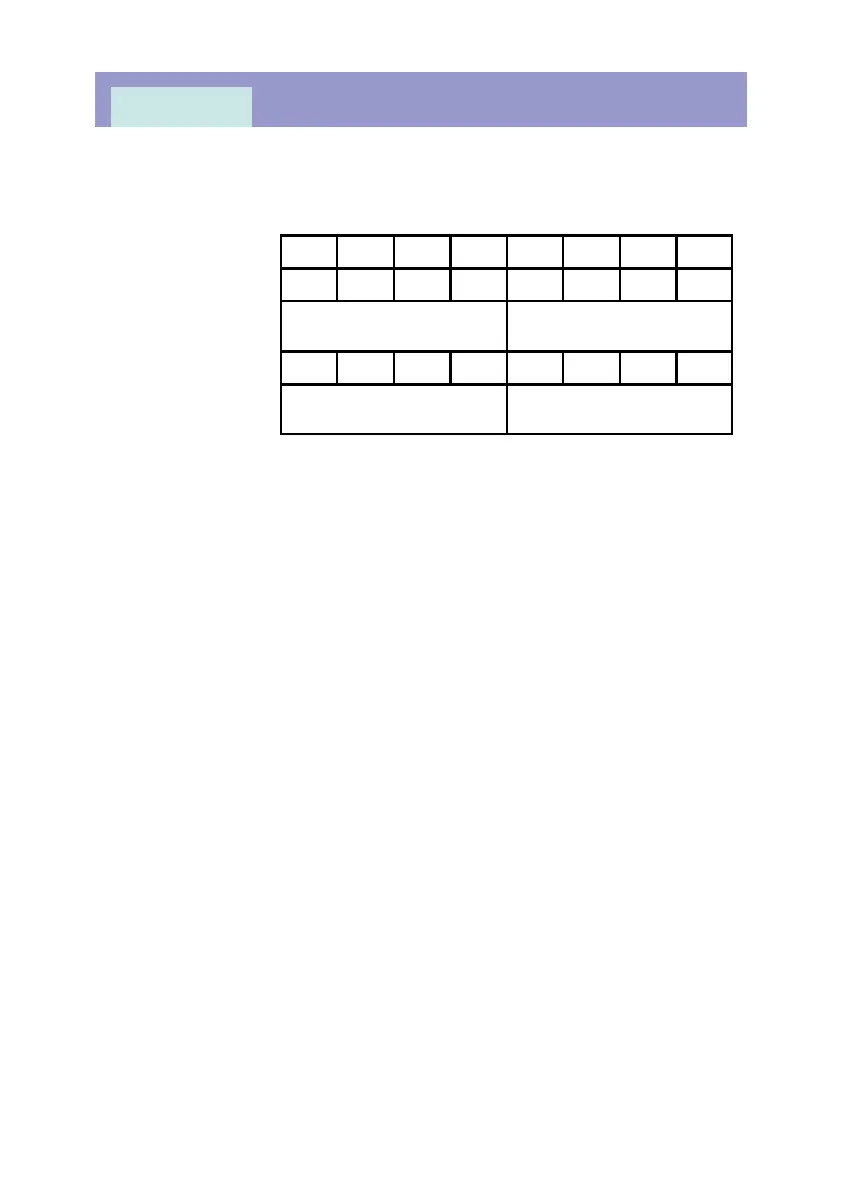
This switch configures the blocking signal and high-set elements selection.
BLOLBLOL - Block Low-set Overcurrent
This switch enables or disables the low-set overcurrent blocking function by the
digital input signal.
1 = I> stage blocking enabled.
0 = I> stage blocking disabled.
BLOH BLOH - Block High-set Overcurrent
This switch enables or disables the high-set overcurrent blocking function by
the digital input signal.
1 = I>> stage blocking enabled
0 = I>> stage blocking disabled.
BLELBLEL - Block Low-set Earth-Fault
This switch enables or disables the low-set earth-fault blocking function by the
digital input signal.
1 = I
O
> stage blocking enabled.
0 = I
O
> stage blocking disabled.
BLEH BLEH - Block High-set Earth-Fault
This switch enables or disables the high-set earth-fault blocking function by the
digital input signal.
1 = I
O
>> stage blocking enabled.
0 = I
O
>> stage blocking disabled.
MK2000
Page 19
RSVRSV RSVRSV HEESHEES HOESHOES BLEHBLEH BLELBLEL BLOHBLOH BLOLBLOL
Default value
0 0 0 0 0 0 0 0
Default hexadeci-
mal value
0 0
User setting
0 0
User hexadecimal
value*
* Refer to Appendix A for the corresponding hexadecimal value.



 To Next Page