OM-193472 Page 21
SECTION 6 − OPERATION
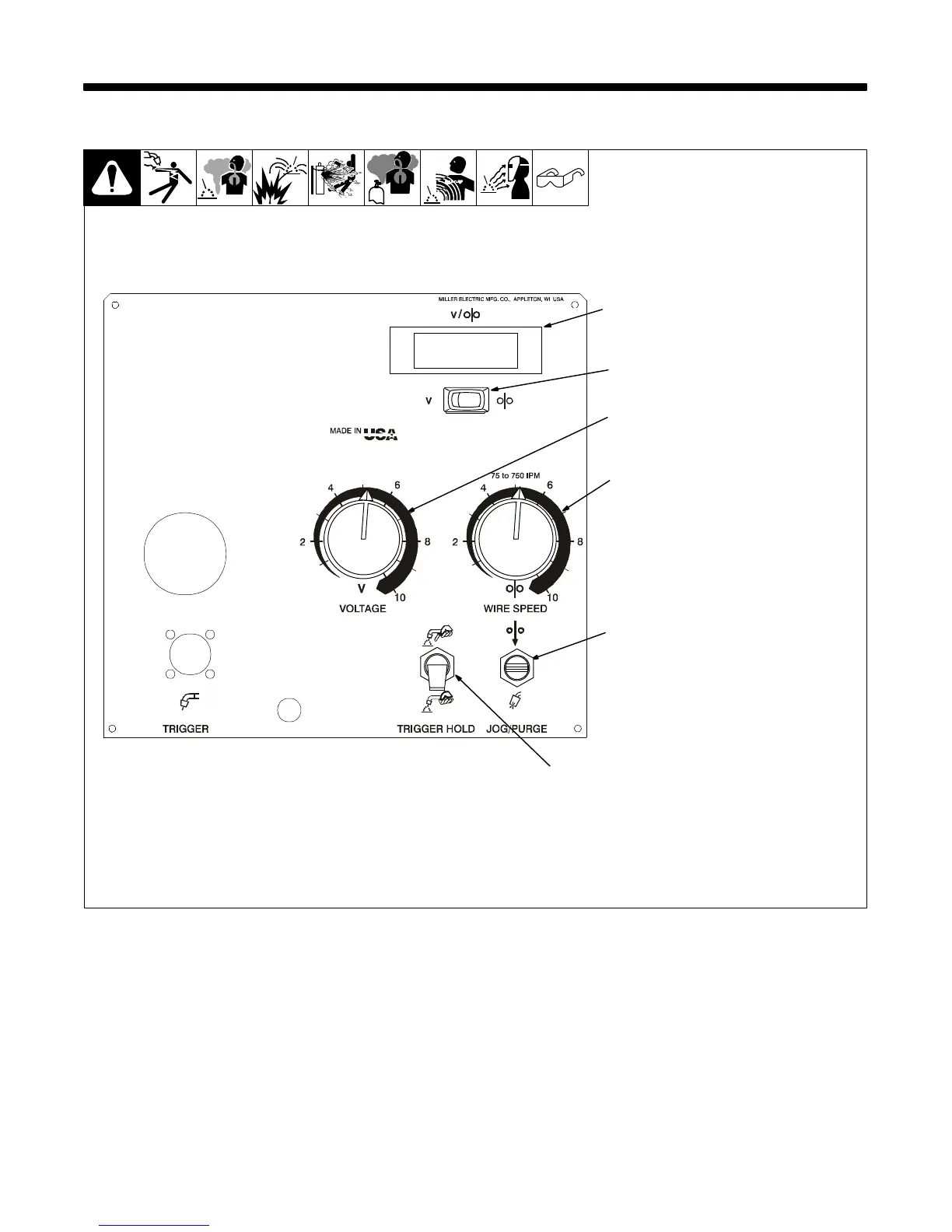
6-1. Front Panel Controls
1 Optional Voltage/Wire Speed
Meter
2 Optional Voltage/Wire Speed
Switch
Use to choose volts or wire feed
speed display.
3 Optional Remote Voltage
Control
Use to set welding power source
voltage at the wire feeder. Numbers
are for reference only.
4 Wire Speed Control
5 Jog/Purge Switch
Use Jog position to momentarily
feed welding wire at speed set on
Wire Speed control without ener-
gizing welding circuit or shielding
gas valve.
Use Purge position to momentarily
energize gas valve to purge air from
gun or adjust gas regulator.
6 Trigger Hold Switch
Push up to weld without holding gun
trigger throughout the weld cycle.
To start weld cycle, press and re-
lease gun trigger within three se-
conds after an arc has been struck.
To end weld, press and release gun
trigger.
Power switch is on rear panel (see
Section 5-3)
192 503-C
2
3
4
5
1
6








 To Next Page