Pellerin Milnor Corporation 53
MANUAL MENU
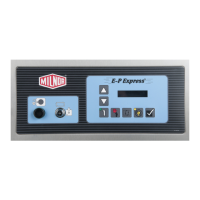
This is the Manual menu display.
1 SOFTWARE DATE CODE
Exits the Manual menu to the Run mode.
RUN FORMULA
This is the Run mode display. Select a formula to run, or turn off
machine power.
00 OK TO POWER OFF
4.2.2 Determining the Software Version
BNCJHT06.R01 0000209289 A.5 A.7 A.3 1/2/20 1:16 PM Released
Display or Action Explanation
Accesses the Manual menu.
MANUAL MENU
1 SOFTWARE DATE CODE
Manual menu accessed and Software date code mode selected.
Hold both buttons depressed to view the software date code and
machine configuration information, as shown below.
E-P EXPRESS/T 21001
HEALTHCARE LAUNDRY
Machine style (/T = T_X), software date code (21001), and con-
figuration (Healthcare Laundry).
RUN FORMULA
xx FORMULA NUMBER xx
Run mode display is restored when the button com-
bination is released.
4.2.3 Viewing Microprocessor Inputs
BNCJHT06.R02 0000209288 A.5 A.7 A.3 1/2/20 1:16 PM Released
The on/off state of each input to the microprocessor can be displayed by using the Test Inputs se-
lection of the Manual menu. The machine must be idle (not running a formula).
Display or Action Explanation
Accesses the Manual menu.
MANUAL MENU
2 TEST INPUTS
Manual menu accessed and Test Inputs mode selected.
Accesses the Test Inputs mode.
ABCDEFGHIJKLMNOP (-)
+--++----+----+- OFF
The input display code on the top row corresponds to a display
code in the table of inputs in this section. The status of the input is
displayed beneath each code. If the input is grounded, a “+” ap-
pears. Non-grounded inputs are represented by “–”.
Restores the controller to the Run mode.
RUN FORMULA
00 OK TO POWER OFF
This is the Run mode display. Select a formula to run, or shut
down the machine.
Testing and Troubleshooting


 To Next Page