66
Pellerin Milnor Corporation
4.1.5 Testing and Verifying the DIP Switch Settings
BNCJHT01.C04 0000191866 C.2 F.3 C.3 1/2/20 1:16 PM Released
For all E-P Plus models, the set of default formulas is determined by how the DIP switches on the
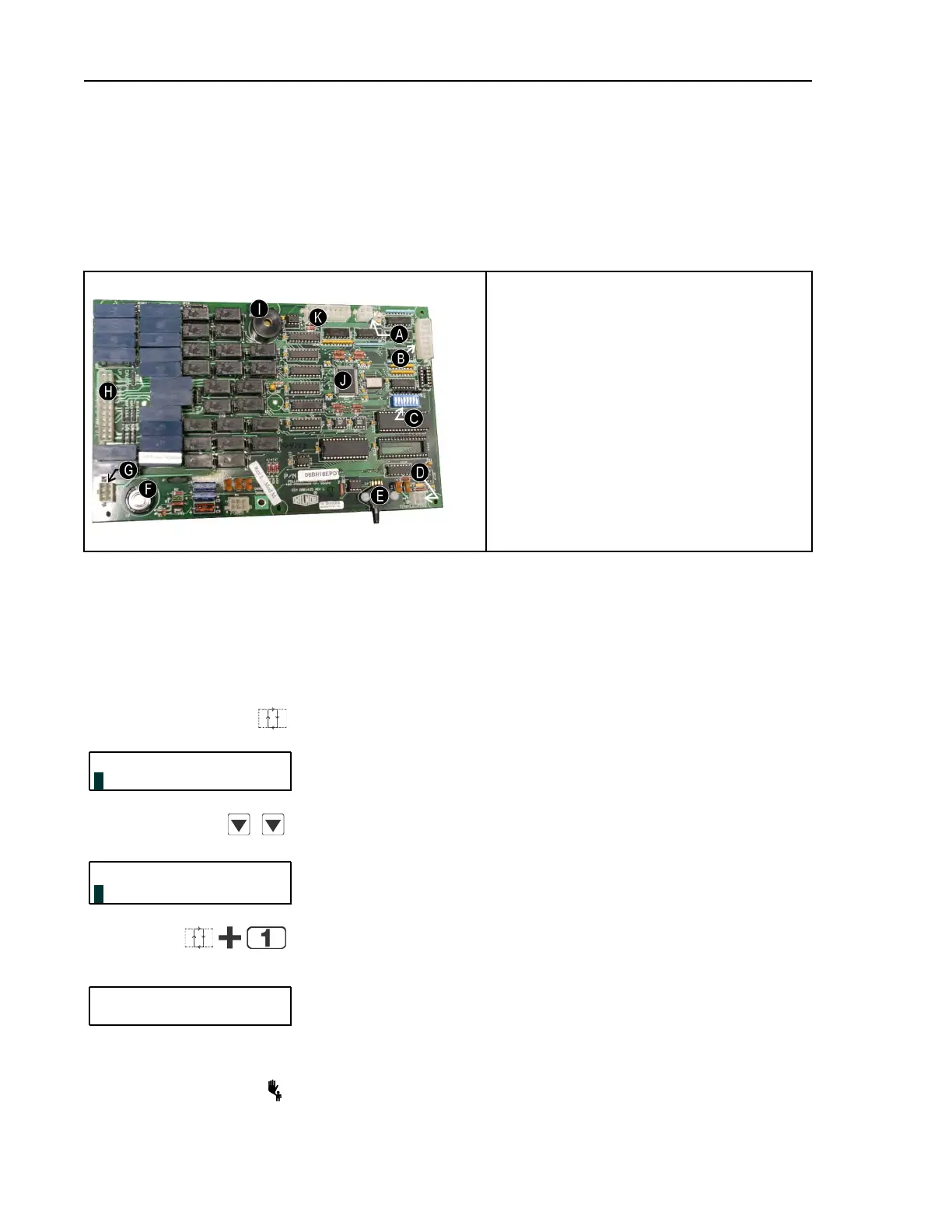
processor board are set. The bank of DIP switches is identified in Figure 9: Processor Board, page
66 .
Figure 9. Processor Board
Photograph of Typical Processor Board
Legend
A...Display connectors
B...Switch panel connector
C...DIP switches
D...Temperature probe connector (E-P Plus
models only)
E...Pressure transducer for level (E-P Plus mod-
els only)
F...Capacitor to retain memory
G... Outputs to chemical pumps
H...Standard outputs
I... Operator signal buzzer
J...CPU chip
K...Input connector
There is one unique number which identifies each possible combination of on/off settings at the
DIP switch. While the industry configuration (switch 1 through switch 4) is readily available
from the Software version mode (described in 4.1.2: Determining the Software Version, page 62
), the settings of other switch positions are only apparent from this display or by looking at the
processor board.
Display or Action Explanation
Enters the Manual menu from the Run mode.
MANUAL MENU
This is the first item of the Manual menu.
1 SOFTWARE DATE CODE
,
Scrolls down to the Test DIP Switch item.
MANUAL MENU
This is the Test DIP Switch item of the Manual menu.
4 TEST DIP SWITCH
Accesses the Test DIP Switch function and displays the DIP
switch setting.
This is an example of the DIP switch display. Referencing this
number in Table 14: Interpretation of Test DIP Switch Display,
page 67 shows that the sample machine is configured for Correc-
tional Laundries, and that switch position 5 is OFF and 6 is ON.
208
Terminates the Manual menu and returns controller to Run
mode.
Troubleshooting


 To Next Page