After pressurizing, manually remove the tray and press the icon.
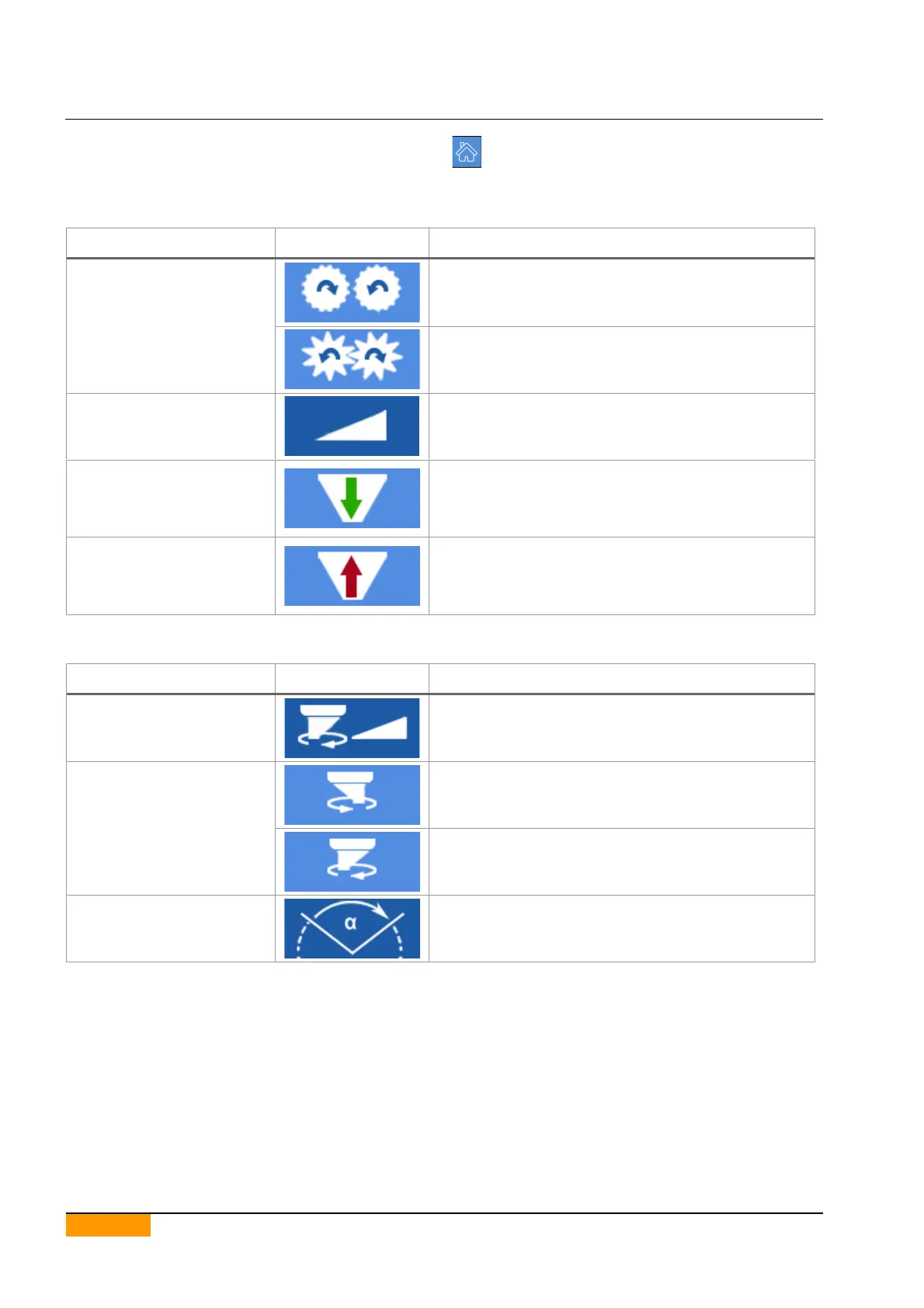
6.11. KEY TO MANUAL CONTROL ICONS
6.11.1. DOSING CONTROL ICONS
If selected, the type of dosing group is set to rollers.
If selected, the type of dosing group is set to pump.
Dosing rollers rotation speed.
As long as the button is pressed, the dosage takes
place.
The machine in start state is required.
Insertion of the pan under the dosing group is required.
As long as the button is pressed, the aspiration takes
place.
The machine in start state is required.
Insertion of the pan under the dosing group is required.
6.11.2. NOZZLES ROTATION CONTROL ICONS
Speed of the rotation of the nozzles.
As long as the button is pressed, the nozzles rotate
counter-clockwise.
The machine in start state is required.
As long as the button is pressed, the nozzles rotate
clockwise.
The machine in start state is required.
Indicates the position of the nozzles expressed in
degrees (°).


 To Next Page