USE AND MAINTENANCE MANUAL
7. SETUP AND DIAGNOSIS
7.1. MACHINE PARAMETERS
The machine parameters are inserted during the test phase by our qualified technicians.
Unauthorized people must NOT modify these parameters for any reason whatsoever. The
Producer is not liable for any faults, breakages or damage that are traceable to the
unauthorized modification of these parameters.
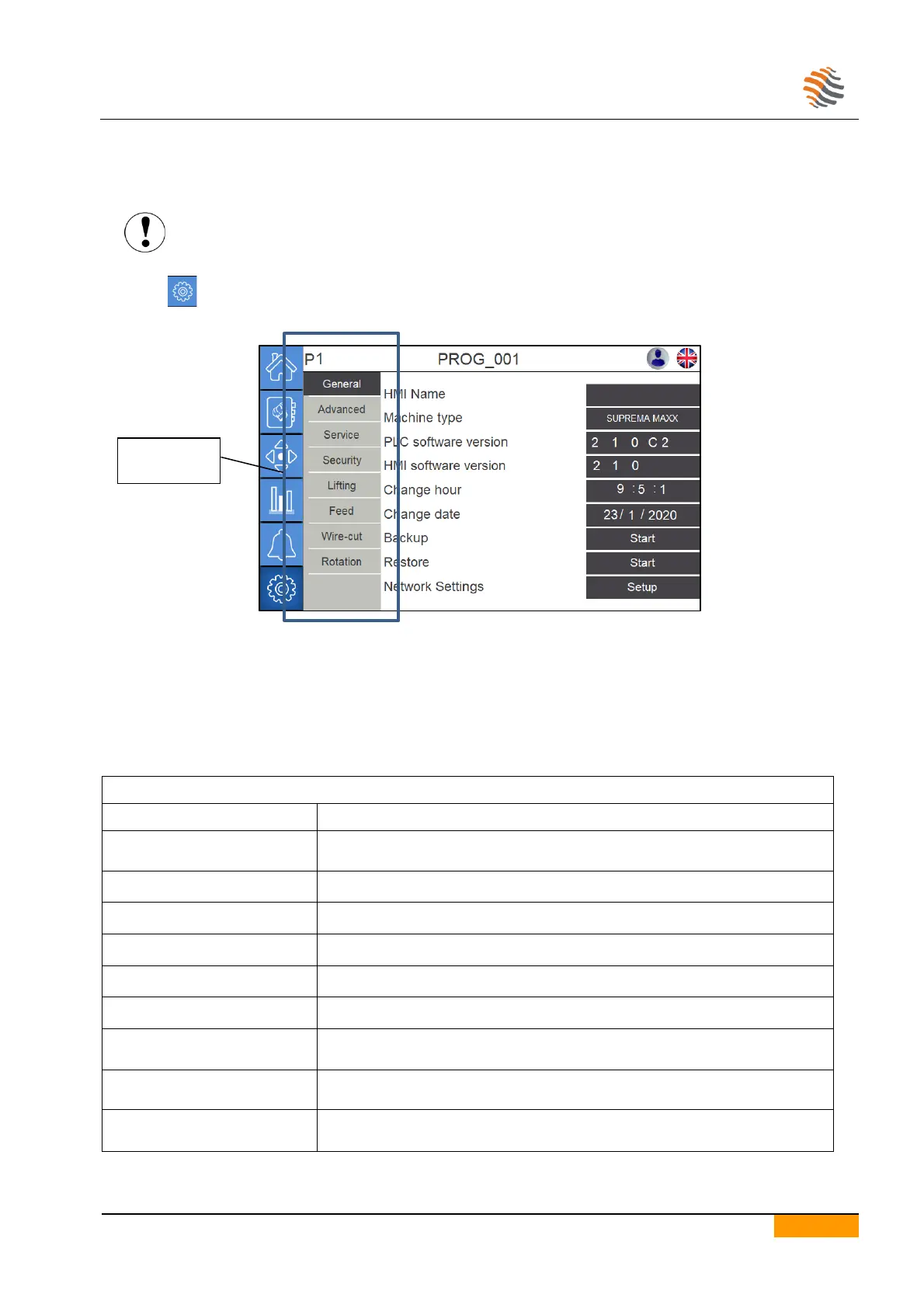
Press the icon to access the machine parameters.
7.1.1. LANGUAGE SETTING
To set the touchscreen language press any time the flag shaped icon located at the top right
A frame where to select the desired language will come up
7.1.2. DESCRIPTION OF THE MACHINE PARAMETERS
Identification name of the touchscreen device.
During the test-run it is initialized with the machine serial number.
Machine model set on the PLC.
Software version installed on the PLC.
Software version installed on the touchscreen panel.
To set the time on the touchscreen.
To set the date on the touchscreen.
Starts the procedure for saving the parameters on the USB flash drive.
For more information please refer to the paragraph “Back-up/Restore”.
Starts the procedure for restoring the previously saved parameters.
For more information please refer to the paragraph “Back-up/Restore”.
Allows to verify or modify the network connection addresses of the machine.


 To Next Page